You have a Microsoft 365 E5 subscription that contains a Microsoft Teams channel named Channel1. Channel1 contains research and development documents.
You plan to implement Microsoft 365 Copilot for the subscription.
You need to prevent the contents of files stored in Channel1 from being included in answers generated by Copilot and shown to unauthorized users.
What should you use?
A.data loss prevention (DLP)
B.Microsoft Purview insider risk management
C.Microsoft Purview Information Barriers (IBs)
D.sensitivity labelsCorrect
Explanation
Sensitivity labels that apply encryption control who can open the files and which usage rights they have, and Copilot honors those rights: a user who is not authorized cannot get the content, and Copilot returns text only to users who have the EXTRACT usage right. Labeling the Channel1 files therefore keeps their content out of Copilot answers for unauthorized users. A DLP policy for the Copilot location works by identifying files that already carry sensitivity labels, so labels are still the underlying control. Insider risk management detects risky user behavior, and information barriers restrict communication between segments rather than protecting specific files.
You have a Microsoft 365 E5 subscription that uses Microsoft Defender for Cloud Apps.
You plan to deploy a Defender for Cloud Apps file policy that will be triggered when the following conditions are met:
- A file is shared externally.
- A file is labeled as internal only.
Which filter should you use for each condition? To answer, drag the appropriate filters to the correct conditions. Each filter may be used once, more than once, or not at all.
NOTE: Each correct selection is worth one point.
Explanation
In a Defender for Cloud Apps file policy, the Access level filter describes how a file is shared (Public, Public with link, External, Internal, Private), so setting it to External catches files shared outside the organization. The Sensitivity label filter matches files by their applied Microsoft Purview label, so it identifies files labeled Internal only. Collaborators filters on specific users or groups that have access, and Matched policy filters on files already matched by other policies, so neither expresses these conditions.
You have a Microsoft 365 E5 subscription that contains three DOCX files named File1, File2, and File3.
You create the sensitivity labels shown in the following table.
| Name | Permission | Apply content marking |
| --- | --- | --- |
| Label1 | Any authenticated users: Viewer | Disabled |
| Label2 | None | Enabled |
You apply the labels to the files as shown in the following table.
| File | Label |
| --- | --- |
| File1 | None |
| File2 | Label1 |
| File3 | Label2 |
You ask Microsoft 365 Copilot to summarize the files, and you receive the results shown in the following table.
| Name | Based on content of |
| --- | --- |
| Summary1 | File1, File3 |
| Summary2 | File2 |
| Summary3 | File1, File2, File3 |
For each of the following statements, select Yes if the statement is true. Otherwise, select No.
NOTE: Each correct selection is worth one point.
Explanation
Statement 1 (Yes): Copilot output inherits the highest-priority sensitivity label of the items it was based on. Summary1 uses File1 (unlabeled) and File3 (Label2), so it inherits Label2; whether a label applies encryption or content marking does not matter for inheritance.
Statement 2 (Yes): Summary2 is based only on File2, which has Label1, so the summary inherits Label1. You applied the label yourself, and the person who applies encryption is the Rights Management owner with all usage rights, which is why Copilot could summarize it.
Statement 3 (Yes): Summary3 draws on File2 (Label1) and File3 (Label2), so it inherits whichever of those labels has the higher priority. An unlabeled source file such as File1 does not stop the label from being inherited.
You have a Microsoft 365 E5 subscription.
You need to create a sensitivity label named Label1. The solution must ensure that users can use Microsoft 365 Copilot to summarize files that have Label1 applied.
Which permission should you select for Label1?
A.Export content (EXPORT)
B.Copy and extract content (EXTRACT)Correct
C.Edit content (DOCEDIT)
D.View rights (VIEW)
Explanation
Copilot honors the EXTRACT usage right, shown in the Microsoft Purview portal as Copy and extract content (EXTRACT), when deciding whether it can return text from encrypted content. If a user has VIEW but not EXTRACT, Copilot does not summarize the content and only links to it. EXPORT controls saving in other formats or removing protection, and DOCEDIT controls editing; neither lets Copilot summarize the file.
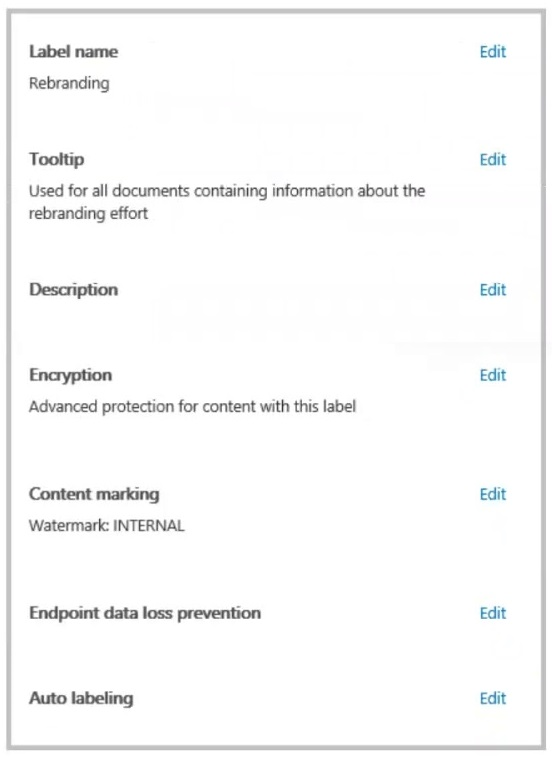
You have a Microsoft 365 sensitivity label that is published to all the users in your Microsoft Entra tenant as shown in the following exhibit.
For each of the following statements, select Yes if the statement is true. Otherwise, select No.
Explanation
Statement 1 (No): The watermark is applied only to documents that have the Rebranding label. Publishing a label makes it available to users; it does not apply it to every document, and no auto-labeling or default label is configured in the exhibit.
Statement 2 (No): The content marking is a watermark with the text INTERNAL, not a header. A header would need to be configured separately in the label's content marking settings.
Statement 3 (No): The word rebranding appears only in the tooltip, which is guidance shown to users. Auto labeling is not configured, so users can manually apply the label to any document.
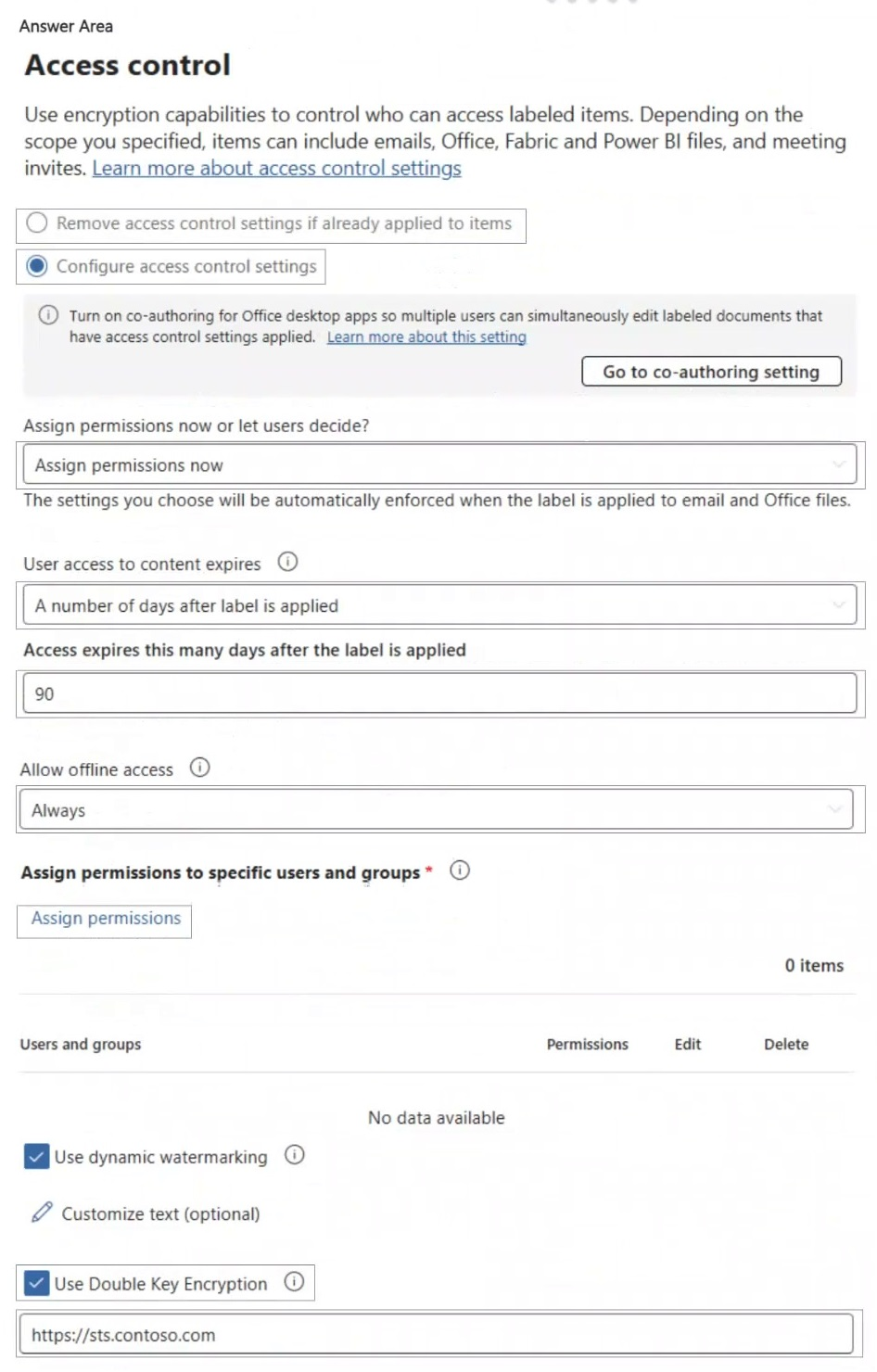
You have a Microsoft 365 E5 tenant that contains a sensitivity label named label1. The access control settings of label1 are shown in the exhibit.
You plan to enable co-authoring for encrypted files.
You need to ensure that files that have label1 applied support co-authoring.
Which two settings should you modify?
NOTE: Each correct selection is worth one point.
A.Remove access control settings if already applied to items / Configure access control settings
B.Assign permissions now or let users decide? (Assign permissions now)
C.User access to content expires (A number of days after label is applied)Correct
D.Access expires this many days after the label is applied (90)
E.Allow offline access (Always)
F.Assign permissions to specific users and groups
G.Use Double Key EncryptionCorrect
Explanation
Co-authoring and AutoSave are not supported for documents whose label sets User access to content expires to anything other than Never, or that use Double Key Encryption. To make label1 support co-authoring, set User access to content expires to Never and clear Use Double Key Encryption. The number of days field only applies while expiry is enabled, and Assign permissions now, offline access, and the assigned users and groups do not block co-authoring.
You have a new Microsoft 365 E5 tenant.
You need to create a custom trainable classifier that will detect product order forms. The solution must use the principle of least privilege.
What should you do first? To answer, select the appropriate options in the answer area.
NOTE: Each correct selection is worth one point.
Explanation
Action to perform: in a new tenant, trainable classifiers must first be turned on through the one-time opt-in, after which Microsoft 365 builds the baseline needed before you can create a custom classifier from seed content. An EDM schema is used for exact data match classifiers, and a DLP rule package is used to import custom sensitive information types, so neither is a step for a trainable classifier. To perform the action, assign the role of: Compliance Administrator is a role that can create and train custom trainable classifiers in the Microsoft Purview portal. Global Administrator would also work but grants far more than needed, which breaks least privilege.
You have a Microsoft 365 E5 subscription.
You have a file named Customer.csv that contains a list of 1,000 customer names.
You plan to use Customer.csv to classify documents stored in a Microsoft SharePoint Online library.
What should you create in the Microsoft Purview portal, and which type of element should you select? To answer, select the appropriate options in the answer area.
NOTE: Each correct selection is worth one point.
Explanation
Create: a custom sensitive info type is created in the Microsoft Purview portal and its pattern can use a list of terms as the primary element. A trainable classifier is trained from positive and negative sample documents in SharePoint folders, not from a CSV list of names and it has no element types, and an adaptive scope only defines which users, groups or sites a policy targets. Element: a keyword dictionary is the element that lets you upload a TXT or CSV file of terms (up to 1 MB compressed), which suits 1,000 customer names. A regular expression matches patterns rather than a fixed list, and functions are built-in validators such as date or checksum functions.
You have a Microsoft 365 E5 subscription.
You need to enable support for sensitivity labels in Microsoft SharePoint Online.
What should you use?
A.the Microsoft Purview portalCorrect
B.the Microsoft Entra admin center
C.the SharePoint admin center
D.the Microsoft 365 admin center
Explanation
Support for sensitivity labels in SharePoint and OneDrive is enabled in the Microsoft Purview portal under Information Protection > Sensitivity labels by selecting Turn on now, or alternatively with Set-SPOTenant -EnableAIPIntegration in SharePoint Online PowerShell. The SharePoint admin center has no setting for this opt-in. The Microsoft Entra admin center and the Microsoft 365 admin center are not where this capability is turned on.
You have a Microsoft 365 subscription.
You need to customize encrypted email for the subscription. The solution must meet the following requirements:
- Ensure that when an encrypted email is sent, the email includes the company logo.
- Minimize administrative effort.
Which PowerShell cmdlet should you run?
A.Set-IRMConfiguration
B.Set-OMEConfigurationCorrect
C.Set-RMSTemplate
D.New-OMEConfiguration
Explanation
Set-OMEConfiguration with the Image parameter adds the company logo to the existing default Message Encryption branding template, which is applied to all encrypted email without any further configuration. New-OMEConfiguration creates an additional custom template that would also need a mail flow rule to apply it, which adds administrative effort. Set-IRMConfiguration controls tenant IRM features such as licensing and decryption, and Set-RMSTemplate manages rights management templates, not email branding.
You have a Microsoft 365 E5 subscription.
You need to ensure that encrypted email messages sent to an external recipient can be revoked or will expire within seven days.
What should you configure first?
A.a custom branding templateCorrect
B.a mail flow rule
C.a sensitivity label
D.a Conditional Access policy
Explanation
With Microsoft Purview Advanced Message Encryption, expiration and revocation work for external recipients who read mail in the OME portal, and you force that portal experience with a custom branding template, for example New-OMEConfiguration -ExternalMailExpiryInDays 7. Expiration can only be used with custom branding, so the template comes first. A mail flow rule is the second step, used to apply the template to matching messages. A sensitivity label and a Conditional Access policy do not configure OME portal expiration.
You have a Microsoft 365 E5 subscription.
You need to identify documents that contain patent application numbers containing the letters PA followed by eight digits, for example, PA 12345678. The solution must minimize administrative effort.
What should you do? To answer, select the appropriate options in the answer area.
NOTE: Each correct selection is worth one point.
Explanation
To identify the documents, use a data classification of: a custom sensitive info type detects text that follows a predictable pattern, such as PA followed by eight digits, with little effort. EDM requires a schema and an uploaded table of the actual values, and a trainable classifier needs many sample documents and is meant for content categories, not fixed patterns. Configure data classifications by using a: a regular expression such as PA\s?\d{8} describes the pattern exactly. A keyword dictionary matches a fixed list of terms, and functions are built-in validators that cannot be defined for a new pattern.
You have a Microsoft SharePoint Online site named Site1 that contains a document library. The library contains more than 1,000 documents. Some of the documents are job applicant resumes. All the documents are in the English language.
You plan to apply a sensitivity label automatically to any document identified as a resume. Only documents that contain work experience, education, and accomplishments must be labeled automatically.
You need to identify and categorize the resumes. The solution must minimize administrative effort.
What should you include in the solution?
A.a trainable classifierCorrect
B.a keyword dictionary
C.a function
D.an exact data match (EDM) classifier
Explanation
Resumes are a category of content rather than a fixed pattern, which is what trainable classifiers detect, and Microsoft provides a built-in Resume classifier that identifies documents describing work experience, education and accomplishments, so nothing has to be built or trained. A keyword dictionary would match words that also appear in many non-resume documents. A function validates specific patterns such as dates or checksums, and EDM matches exact values from an uploaded data table.
You have a Microsoft 365 E5 subscription that contains the groups shown in the following table.
| Name | Type |
|---|---|
| Group1 | Microsoft 365 |
| Group2 | Security |
The subscription contains the resources shown in the following table.
| Name | Type |
|---|---|
| Site1 | Microsoft SharePoint Online site |
| Team1 | Microsoft Teams team |
You create a sensitivity label named Label1.
You need to publish Label1 and have the label apply automatically.
To what can you publish Label1, and to what can Label1 be auto-applied? To answer, select the appropriate options in the answer area.
NOTE: Each correct selection is worth one point.
Explanation
Publish to: a label publishing policy is assigned to users and groups, and the supported groups include Microsoft 365 groups and security groups, whether mail-enabled or not. Sites and teams are not targets of a publishing policy, so Label1 can be published to Group1 and Group2 only. Auto-apply to: an auto-labeling policy covers the Exchange, SharePoint and OneDrive locations; the OneDrive location is scoped by users or groups (Microsoft 365 groups and security groups are supported), and the SharePoint location is scoped by sites. Site1 is a SharePoint site, and the files of Team1 are stored in the team's SharePoint site, so all four can be covered by auto-labeling.
You have a Microsoft 365 E5 subscription that uses Microsoft Exchange Online and Teams.
You need to ensure that when a user sends a message containing a cloud attachment, a retention label is applied to the cloud attachment by using an auto-labeling policy.
How should you configure the retention label to start the retention period, and to which locations should you apply the auto-labeling policy? To answer, select the appropriate options in the answer area.
NOTE: Each correct selection is worth one point.
Explanation
For the retention start setting, Microsoft requires that a label auto-applied to cloud attachments starts its retention period when items were labeled. The label is applied to a copy of the file taken at the moment it is shared, so Created or Last modified would refer to the original file and could make the retained copy expire too early.
For Locations, cloud attachments are copies of files stored in SharePoint or OneDrive, and the policy must cover every place those files can live. Files shared in Teams chats and Outlook usually come from users' OneDrive accounts, files in Teams channels live in team sites connected to Microsoft 365 groups (Microsoft 365 Group mailboxes & sites), and files can also come from SharePoint communication and classic sites. Selecting Microsoft 365 Group mailboxes & sites only would miss every attachment shared from OneDrive, so all three locations are needed.
You create a data loss prevention (DLP) policy that meets the following requirements:
- Prevents guest users from accessing a sensitive document shared during a Microsoft Teams chat
- Prevents guest users from accessing a sensitive document stored in a Microsoft Teams channel
Which location should you select for each requirement? To answer, select the appropriate options in the answer area.
NOTE: Each correct selection is worth one point.
Explanation
For a document shared during a Teams chat, the file is uploaded to the sender's OneDrive, so the DLP policy must include the OneDrive accounts location to block guest access to it. The Teams chat and channel messages location checks the text of messages, not the files they link to.
For a document stored in a Teams channel, the file lives in the SharePoint team site behind the team, so the policy must include SharePoint sites. Exchange email is unrelated to files shared in Teams.
You have a Microsoft 365 E5 subscription that uses Microsoft Purview.
You need to create a sensitive information type (SIT) to detect project code content that starts with the letters pjt followed by six digits and ends with the letters sct. The following is an example of the project code.
pjt123456sct
How should you complete the regular expression? To answer, select the appropriate options in the answer area.
```
pjt[Dropdown 1][Dropdown 2]sct
```
NOTE: Each correct selection is worth one point.
Explanation
Dropdown 1 must be the character class [0-9], which matches any single digit. Parentheses create a group that would match the literal text 0-9, and # or ^ do not define a character range.
Dropdown 2 must be the quantifier {6}, which repeats the previous token exactly six times, so the full pattern pjt[0-9]{6}sct matches pjt123456sct. (6) would match the literal digit 6, and %6%, #6# and :6: are not regex quantifiers.
You have a Microsoft 365 E5 subscription that contains a Windows 11 device named Device1 and three users named User1, User2, and User3.
You plan to deploy Azure Information Protection (AIP) and the Microsoft Purview Information Protection client to Device1.
You need to ensure that the users can perform the following actions on Device1 as part of the planned deployment:
- User1 will test the functionality of the client.
- User2 will install and configure the Microsoft Rights Management connector.
- User3 will be configured as the service account for the information protection scanner.
The solution must maximize the security of the sign-in process for the users.
What should you do?
A.Exclude User1 and User2 from multifactor authentication (MFA).
B.Enable User2 and User3 for passwordless authentication.
C.Exclude User2 and User3 from multifactor authentication (MFA).Correct
D.Enable User1, User2, and User3 for passkey (FIDO2) authentication.
Explanation
The Rights Management connector does not support MFA, so the account that installs and configures it (User2) must not require MFA. The service account that runs the information protection scanner (User3) runs non-interactively and must not require MFA either. User1 only tests the client interactively and can keep MFA, which keeps sign-in as secure as possible. Passwordless or passkey (FIDO2) sign-in still needs an interactive user, so it does not work for these accounts.
You use project codes that have a format of three alphabetical characters that represent the project type, followed by three digits, for example Abc123.
You need to create a new sensitive info type for the project codes.
How should you configure the regular expression to detect the content? To answer, select the appropriate options in the answer area.
```
(\s)([Dropdown 1]\[Dropdown 2])(\s)
```
NOTE: Each correct selection is worth one point.
Explanation
Dropdown 1 must be [a-zA-Z]{3}, which matches any three letters in upper or lower case, such as Abc. [aA]{3} only matches the letter a, [abc]{3} only the letters a, b and c in lower case, and [alpha]{3} only the letters a, l, p and h.
Dropdown 2 completes \d{3}, which matches exactly three digits. d{123} would mean 123 repetitions, and d{000-999} is not valid quantifier syntax.
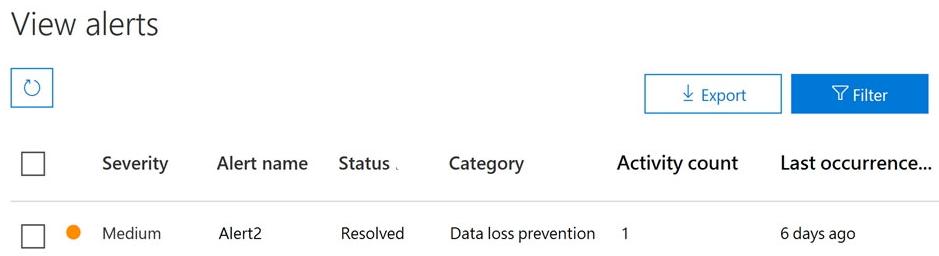
You have a Microsoft 365 alert named Alert2 as shown in the following exhibit.
You need to manage the status of Alert2.
To which status can you change Alert2?
A.The status cannot be changed.
B.Dismissed only
C.Investigating only
D.Active or Investigating only
E.Investigating, Active, or DismissedCorrect
Explanation
Alert2 is currently Resolved. On the View alerts page, an alert's status can be set to Active, Investigating, Resolved or Dismissed at any time, and resolving an alert does not lock it. So a resolved alert can be moved back to Active or Investigating, or set to Dismissed. The options that limit the change to one or two statuses, or say it cannot be changed, are wrong.
Verifying access...
Access Required
You need to purchase this exam to access practice mode
Unlock a few more questions every day for 300 points you earn free on
Godlike Academy. Everything you unlock with the Daily Climb stays open for 7 days after your last unlock.