Question
You have a Microsoft 365 E5 tenant that contains a sensitivity label named label1. The access control settings of label1 are shown in the exhibit.
You plan to enable co-authoring for encrypted files.
You need to ensure that files that have label1 applied support co-authoring.
Which two settings should you modify?
NOTE: Each correct selection is worth one point.
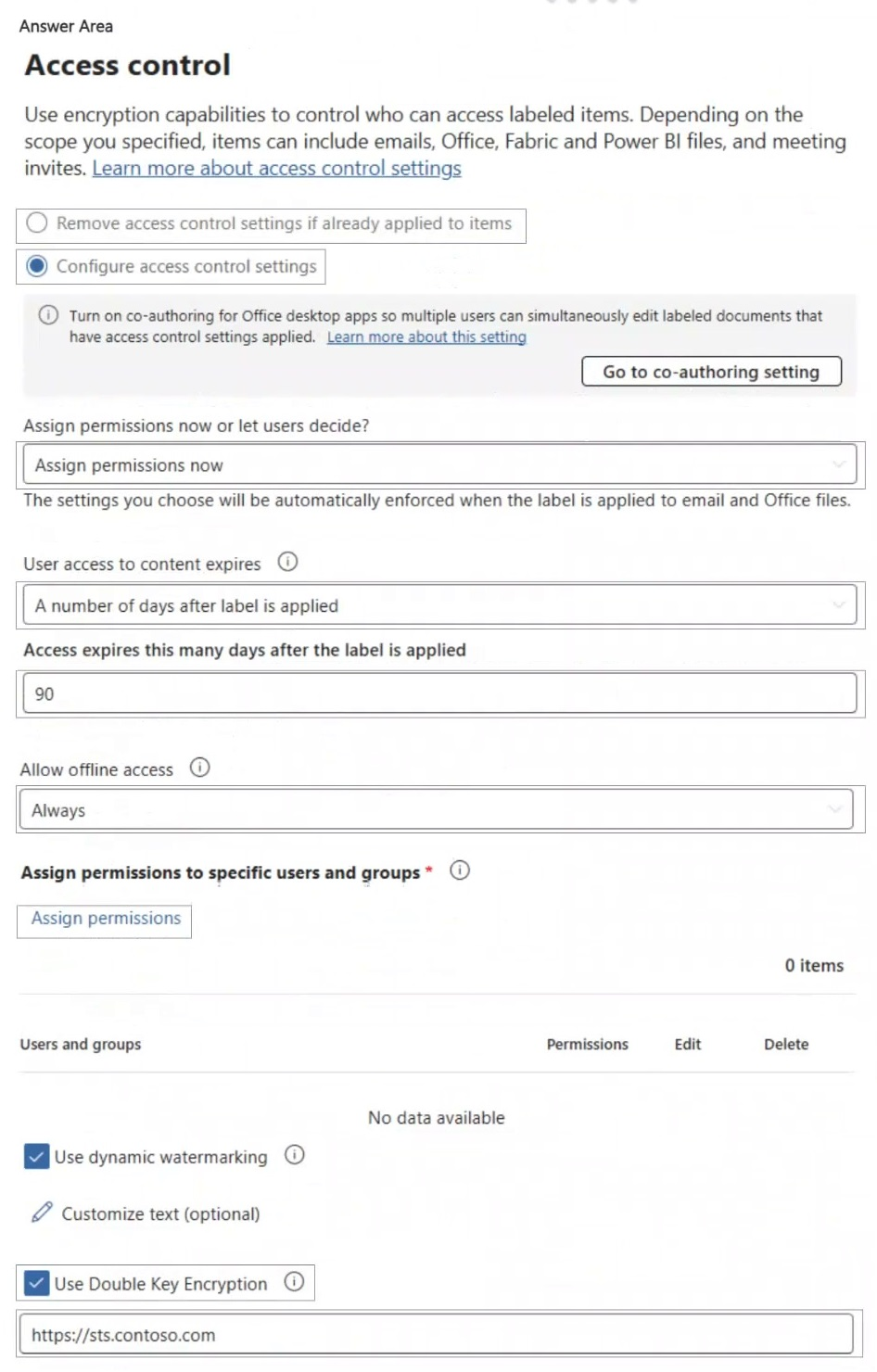
- A. Remove access control settings if already applied to items / Configure access control settings
- B. Assign permissions now or let users decide? (Assign permissions now)
- C. User access to content expires (A number of days after label is applied) Correct
- D. Access expires this many days after the label is applied (90)
- E. Allow offline access (Always)
- F. Assign permissions to specific users and groups
- G. Use Double Key Encryption Correct
Explanation
Co-authoring and AutoSave are not supported for documents whose label sets User access to content expires to anything other than Never, or that use Double Key Encryption. To make label1 support co-authoring, set User access to content expires to Never and clear Use Double Key Encryption. The number of days field only applies while expiry is enabled, and Assign permissions now, offline access, and the assigned users and groups do not block co-authoring.
