You have a Microsoft Teams Phone deployment that contains a Session Border Controller (SBC) named SBC1.contoso.com.
Direct Routing integrates with a PBX phone system that uses only four-digit dialing and is configured to use the SBC.
Teams is configured to use dial plans that normalize any four-digit calls to E.164.
You have the following translation rule.
```
Identity: rule1
Name: rule1
Pattern: ^\+1(\d{10});ext=(\d{4})$
Translation: $2
```
You need to ensure that calls to the legacy PBX pass only a four-digit extension.
How should you complete the PowerShell command? To answer, select the appropriate options in the answer area.
```PowerShell
[Dropdown 1] -Identity SBC1.contoso.com [Dropdown 2] "rule1"
```
Explanation
Dropdown 1: Number translation rules are assigned to the SBC's configuration in Teams, which is the online PSTN gateway object, so you use Set-CsOnlinePSTNGateway. The hybrid PSTN site and appliance cmdlets belong to Skype for Business hybrid scenarios, and Set-CsOnlinePSTNUsage only manages PSTN usage records for voice routing. Dropdown 2: Calls from Teams users to the PBX are outbound calls, and the called number that the SBC receives is changed by OutboundPstnNumberTranslationRules, which turns the dial-plan normalized E.164 number into the four-digit extension captured by $2. The Inbound parameters apply to calls coming from the SBC into Teams, and OutboundTeamsNumberTranslationRules changes the calling (From) number of the Teams user rather than the called number.
You have a Teams Phone deployment that uses Direct Routing on a single Session Border Controller (SBC).
Users report that outbound PSTN calls are failing, but inbound PSTN calls are successful.
When you review the SBC logs, you discover that Microsoft is responding to SIP option requests, but is NOT sending SIP option requests.
What is the cause of the issue?
A.The online PSTN gateway is disabled.
B.An SBC certificate is expired.
C.An external DNS entry is missing from the FQDN of the SBC.Correct
D.The phone numbers of the users are defined by running the New-CsTeamsUnassignedNumberTreatment cmdlet.
Explanation
When the SBC receives the SIP 200 OK from the Microsoft SIP proxy but never receives the SIP OPTIONS that the proxy sends, Microsoft documents that the FQDN in the Record-Route or Contact header must resolve to the correct public IP address; without a public DNS record the proxy cannot reach the SBC to send OPTIONS or new outbound INVITEs. Inbound calls still work because the SBC initiates those connections. An expired certificate would break the TLS connection in both directions, so Microsoft would not respond to OPTIONS either. A disabled gateway or an unassigned number treatment does not explain Microsoft answering OPTIONS while never sending its own.
The sales department at your company needs to route a call to multiple users and have calls route differently after business hours.
Which two features should you implement? Each correct answer presents part of the solution.
NOTE: Each correct selection is worth one point.
A.call queuesCorrect
B.calling policies
C.voice routing policies
D.auto attendantsCorrect
E.caller ID policies
Explanation
An auto attendant provides business hours and after-hours call flows, so calls can be routed differently outside working hours. A call queue distributes a call to a group of agents, which meets the need to route a call to multiple users. Calling policies control user calling features, voice routing policies select PSTN routes for Direct Routing, and caller ID policies change the outbound number displayed, so none of them provide hours-based routing or group distribution.
You have a Microsoft Teams Phone deployment.
You need to create two call queues named CQ1 and CQ2. The solution must meet the following requirements:
- CQ1 must balance incoming calls so that each call agent receives the same number of calls.
- Calls received by CQ2 must ring all call agents simultaneously.
What should you configure for each requirement? To answer, drag the appropriate routing methods to the correct requirements. Each routing method may be used once, more than once, or not at all.
NOTE: Each correct selection is worth one point.
Explanation
Round robin balances incoming calls so that each agent receives the same number of calls from the queue, which meets the CQ1 requirement. Attendant routing rings all agents in the queue at the same time and the first to answer gets the call, which meets the CQ2 requirement. Serial routing rings agents one by one in list order, and longest idle sends each call to the agent who has been available the longest, so neither guarantees an equal count or simultaneous ringing.
You have a Microsoft Teams Phone deployment.
You are deploying Direct Routing by using a certified Session Border Controller (SBC). The FQDN of the SBC is sbc1.contoso.com. You use signaling port 5067.
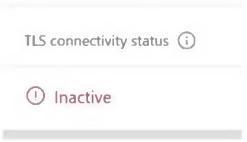
You cannot place calls and receive an error message in the Microsoft Teams admin center as shown in the following exhibit.
What is a possible cause of the issue?
A.Calling Plan licenses are not assigned to users.
B.The failover timer is set to 0 seconds.
C.The Forward P-Asserted Identity (PAI) header is disabled.
D.The Baltimore or the DigiCert root certificates are missing on the SBC.Correct
Explanation
The exhibit shows the SBC's TLS connectivity status as Inactive, which means the TLS connection between the SBC and the Microsoft SIP proxy cannot be established. A common cause is that the SBC does not trust the SIP proxy certificate because the Microsoft trusted root certificates (the Baltimore CyberTrust or DigiCert Global Root G2 chain) are not installed on the SBC. Calling Plan licenses are not used with Direct Routing, and the failover timer and the PAI header setting affect call handling after a connection exists, not TLS connectivity.
You have a Microsoft Teams Phone deployment that contains two users named User1 and User2.
User1 will be on leave for two weeks.
You need to redirect all calls to the phone number of User1 to the phone number of User2. The solution must minimize administrative effort.
What should you modify for User1?
A.the voicemail transfer target settings
B.the call delay and order settings
C.the call delegation settingsCorrect
D.the phone number type
Explanation
In the Teams admin center, the user's Voice tab exposes the call forwarding and delegation settings, where you can add User2 as a delegate and set User1's call answering rules so that calls go to the delegate (or are forwarded to User2) while User1 is away. Voicemail transfer targets only apply after a call reaches voicemail, call delay and order settings control how call group members are rung, and changing the phone number type does not redirect calls.
You have a Microsoft Teams Phone deployment.
You have a call queue named Customer Service.
You need to ensure that when the agents of Customer Service make calls, the outbound calling name appears as Contoso, and the caller ID shows the phone number of Customer Service. Other users must NOT be affected.
Which three actions should you perform? Each correct answer presents a part of the solution.
NOTE: Each correct selection is worth one point.
A.From the Microsoft Teams admin center, configure a new caller ID policy.Correct
B.Set Calling Party Name to the organization name.Correct
C.From the Microsoft Teams admin center, modify the global (Org-wide default) caller ID policy.
D.Set Replace the caller ID with to Resource account.Correct
E.Set Override the caller ID policy to On.
Explanation
Because other users must not be affected, create a new custom caller ID policy and assign it only to the Customer Service agents instead of changing the global (Org-wide default) policy. In that policy, set Calling Party Name to Contoso so the name is sent as CNAM, and set Replace the caller ID with to Resource account, choosing the call queue's resource account so its number is displayed. Override the caller ID policy lets users hide or expose their own number, which works against a fixed caller ID rather than providing it.
From the Microsoft Teams admin center, you add an operator to Operator Connect.
You need to enable users for Microsoft Teams Phone.
Which three actions should you perform in sequence? To answer, move the appropriate actions from the list of actions to the answer area and arrange them in the correct order.
Explanation
After the operator is enabled, you acquire phone numbers by ordering them from the operator, which uploads them to your tenant. You then create valid emergency addresses in the Teams admin center so they can be associated with the numbers, as each user number needs a static emergency location. Finally, you assign the phone numbers to users from Voice > Phone numbers or with PowerShell. Set-CsUser is an on-premises Skype for Business cmdlet, New-CsHybridTelephoneNumber is for Direct Routing hybrid numbers, and New-CsOnlineNumberPortInOrder ports numbers into Microsoft Calling Plans, so none of them apply to Operator Connect.
Your company has offices in London and Vancouver.
The company has a Teams Phone deployment that uses Calling Plans.
The London office contains a user named User1.
User1 moves from the London office to the Vancouver office.
You need to update the phone number and emergency location of User1 to match the new office.
What should you do first?
With Calling Plans, a phone number can be assigned to a user only when the number and the user's usage location are in the same country or region. User1 is moving from the UK to Canada, so the usage location must be changed to Canada first; only then can a Vancouver number be assigned together with its emergency location. An emergency calling policy controls notifications and dial masks, not the user's number or address, and adding an emergency location does not let you assign a Canadian number while the usage location is still the UK.
Your company has offices throughout the United States.
The company is opening a new office in Scranton. The office will occupy two floors in the same building.
You need to ensure that if an emergency call is placed, the local emergency dispatchers know from which floor the call came.
How should you complete the PowerShell script? To answer, drag the appropriate values to the correct targets. Each value may be used once, more than once, or not at all.
```powershell
[Target 1] -Location "Scranton Office, 1st Floor" -CompanyName "Contoso" -HouseNumber 1155 -StreetName 22nd -StreetSuffix St -City Scranton -StateOrProvince PA -CountryOrRegion US -PostalCode 18501 -Description "Scranton"
$Scranton = Get-CsOnlineLisCivicAddress -Description "Scranton"
[Target 2] -CivicAddressId $Scranton.CivicAddressId -Location "Scranton Office, 2nd Floor"
```
Explanation
Target 1: New-CsOnlineLisLocation creates the emergency location "Scranton Office, 1st Floor"; in this script the address parameters (CompanyName, HouseNumber, StreetName and so on) also create the Scranton civic address in the same call, which the next line retrieves with Get-CsOnlineLisCivicAddress. Target 2: the 2nd floor is a new location inside that existing civic address, and New-CsOnlineLisLocation with -CivicAddressId and -Location is the cmdlet that creates a new emergency dispatch location within an existing civic address. Set-CsOnlineLisLocation only modifies an existing location; its -Location parameter is available only together with -LocationId, so it cannot add the 2nd floor. Network site and emergency number cmdlets do not define dispatchable floor locations.
You have a Microsoft Teams Phone deployment.
You need to ensure that a user named user1@contoso.com can call international phone numbers by using Direct Routing.
Which type of policy should you use?
A.a teams policy
B.a voice routing policyCorrect
C.a calling policy
D.a caller ID policy
Explanation
With Direct Routing, what a user may dial and through which SBC is controlled by an online voice routing policy, which links PSTN usages to voice routes whose number patterns can include international numbers. Calling policies control features such as call forwarding and delegation, caller ID policies control the number displayed to the callee, and Teams policies govern teams and channels, so none of them grants international dialing over Direct Routing.
You have a Microsoft Teams Phone deployment that uses Direct Routing.
You plan to use Microsoft Power BI to analyze Call Quality Dashboard (CQD) data for the deployment.
You download the Power BI query templates for CQD from the Microsoft Download Center.
You need to use Power BI Desktop to review reports about PSTN calls that go through Direct Routing.
What should you do first?
A.From Microsoft Call Quality Dashboard, download the current Tenant Data Upload file.
B.Publish the template to the Power BI service.
C.Install the Power BI Connector for CQD.Correct
D.Install the Microsoft Power Platform connector.
Explanation
Before the CQD Power BI template (PBIT) files can be used, the Power BI Connector for Microsoft CQD must be installed from the MicrosoftCallQuality.pqx file included in the same download; the templates query CQD through it. Publishing to the Power BI service is not needed to work in Power BI Desktop, the tenant data upload file only adds building data, and the Power Platform connector is unrelated to CQD.
You have a Microsoft Teams Phone deployment that has 10 offices. Each office has a Session Border Controller (SBC).
A user reports that she can make internal calls by using the dial pad, but cannot use the dial pad to make external calls.
What is a possible cause of the issue?
A.The user is missing a validated emergency address
B.The user has the incorrect voice routing policy appliedCorrect
C.Enterprise Voice is disabled for the user
D.The user has the incorrect Teams app setup policy applied
Explanation
The dial pad works and internal calls succeed, so the user is voice-enabled; external PSTN calls fail because the online voice routing policy assigned to her has no PSTN usage and route that sends the dialed numbers to an SBC. If Enterprise Voice were disabled, the user would not have PSTN dial pad calling at all, and a missing emergency address or the app setup policy does not block outbound PSTN calls.
Your company has an office in Seattle.
The default dial-in number for the company's Microsoft Teams meetings has an area code of 425.
The company does NOT have an office in New York. However, most of the company's customers are in New York.
You need to get a new default dial-in number that has a local 718 area code. You will NOT define additional location information in Teams.
Which two actions should you perform before you assign the bridge? Each correct answer presents part of the solution.
A.Get an auto attendant toll free number
B.Search for new numbers by using a 718 area codeCorrect
C.Get a Dedicated conference bridge (Toll Free) number
D.Search for new numbers by using New York
E.Get a Dedicated conference bridge (Toll) numberCorrect
Explanation
In the Teams admin center Add phone numbers wizard, an audio conferencing number with a local area code is ordered with the number type Dedicated conference bridge (Toll); toll-free numbers have no local area code and auto attendant numbers are for voice apps, not meeting dial-in. Because no New York location will be defined, you search for new numbers by area code (718) rather than by location.
You have a Microsoft Teams Phone deployment.
You are designing a room that will be used for collaboration.
You need to select a device for the room. The device must meet the following requirements:
- Support video
- Support one-touch join for meetings
- Can start new meetings from within the room
- Support HDMI ingestion of content into Teams
Which two types of devices should you select? Each correct answer presents a complete solution.
A.Microsoft Teams Rooms on WindowsCorrect
B.Microsoft Teams panels
C.Microsoft Teams Rooms on AndroidCorrect
D.Microsoft Teams displays
Explanation
Microsoft Teams Rooms on Windows and on Android are full meeting room systems: they provide room video, one-touch join from the console, ad hoc Meet now meetings, and HDMI content ingest into the meeting. Teams panels are scheduling displays mounted outside the room and cannot join meetings, and Teams displays are personal desk devices rather than room systems with HDMI ingest.
You have a Microsoft Teams deployment.
You have two teams that have meeting requirements as shown in the following table.
| Name | Requirement |
|---|---|
| Human Resources | 5,000 attendees must be supported.<br>All attendees must be able to ask questions.<br>Streaming by using a Stream Encoder must be supported. |
| Sales | 100 attendees must be supported.<br>The meeting must allow attendee registration.<br>Attendee registrations must be approved by meeting organizers. |
You need to recommend which type of meeting to use for each team.
What should you recommend for each team? To answer, drag the meeting types to the correct teams. Each meeting type may be used once, more than once, or not at all.
Explanation
Human Resources: 5,000 attendees, Q&A for everyone and production from an external streaming encoder point to a broadcast-style large-audience event, which among the options is a live event; Microsoft has since replaced Teams live events with town halls (events optimized for large audience), which keep Q&A and encoder (RTMP-In) support. A regular Teams meeting is limited in interactive size and has no encoder input. Sales: 100 attendees with a registration form and organizer approval of registrations is a webinar, which supports registration with manual approval; meetings and virtual appointments have no registration process.
Your company has offices in Paris and London.
You are migrating from an on-premises PBX telephony solution to a Microsoft Teams Phone deployment that uses Direct Routing. You plan to use the existing telephony carrier. The new solution will provide telephony services to users in both offices.
You need to recommend a solution that is the most resistant to possible failures. The solution must ensure that calls are routed through each user's respective office.
Which two actions should you include in the recommendation? Each correct answer presents part of the solution.
A.Configure voice routing policies for each office.Correct
B.Configure a single voice routing policy for all users.
C.Deploy a highly available Session Border Controller (SBC) pair to each office.Correct
D.Deploy one Session Border Controller (SBC) to each office. Configure the SBCs as a high-availability pair.
Explanation
A separate voice routing policy per office lets each office's users use PSTN usages and voice routes that point to their own office's SBCs, so calls break out locally. Deploying a highly available SBC pair in each office means the loss of one SBC does not take down calling for that office. A single routing policy cannot send Paris and London users through different SBCs, and pairing one Paris SBC with one London SBC leaves each office with a single local SBC and sends failover calls through the other office.
Normalization rules are configured as shown in the following table. Rules are matched from top to bottom.
| Rank | Name | Pattern | Translation |
|---|---|---|---|
| 1 | AU-NewSouthWales-Local | ^([2-9]\d{7})$ | +612$1 |
| 2 | AU-TollFree | ^(1[38]\d{4,8})\d*$ | +61$1 |
| 3 | AU-Premium | ^(19\d{4,8})$ | +61$1 |
| 4 | AU-Mobile | ^0(([45]\d{8}))$ | +61$1 |
| 5 | AU-National | ^0([23578]\d{8})\d*(\D+\d+)?$ | +61$1 |
Use the drop-down menus to select the answer choice that completes each statement based on the information presented.
Explanation
Dialing 70105000: the eight digits start with 7 and match rule 1, ^([2-9]\d{7})$, which is checked first, so the number is translated to +612 followed by the digits, giving +61270105000. The other choices would need a different rule or no translation, and none of the lower rules is reached once rule 1 matches.
Numbers beginning with 1900: rule 1 needs exactly eight digits starting 2-9 and rule 2 needs 13 or 18 as the first two digits, so neither matches; rule 3, ^(19\d{4,8})$, matches, so the AU-Premium rule normalizes the number. AU-Mobile and AU-National both require a leading 0.
You have a Teams Phone deployment. The deployment has a single Session Border Controller (SBC) that uses Direct Routing.
Users report that outbound PSTN calls fail.
You need to identify the quantity of specific SBC SIP errors.
What should you review?
A.Quality of Experience Reports in Microsoft Call Quality Dashboard
B.the Jitter tab in Network parameters in the Microsoft Teams admin center
C.the network effectiveness ratio on the Usage tab for the SBC in the Microsoft Teams admin centerCorrect
D.Endpoint Reports in Microsoft Call Quality Dashboard
Explanation
The Direct Routing health dashboard in the Teams admin center shows the network effectiveness ratio for each SBC, which is lowered by SIP failure responses from the SBC (for example 504 Server Time-out), and lets you see the calls and failures behind it. Jitter measures media quality, not call setup failures. Call Quality Dashboard Quality of Experience and endpoint reports focus on media quality and devices rather than SBC SIP error counts.
You have a Microsoft Teams Phone deployment.
You need to implement PSTN connectivity by using Direct Routing.
What are three requirements for the implementation? Each correct answer presents part of the solution.
A.a public DNS entry that maps the FQDN of the Session Border Controller (SBC) to a public IP addressCorrect
B.a Session Border Controller (SBC) that uses a hostname in the onmicrosoft.com domain
D.a firewall rule that opens a TCP signaling port to Microsoft TeamsCorrect
E.a firewall rule that opens a UDP signaling port to Microsoft Teams
Explanation
Direct Routing requires a Microsoft-certified SBC, a public IP address with a public DNS entry for the SBC FQDN, and firewall rules for SIP signaling, which runs as SIP over TLS on TCP (port 5061 to the Microsoft SIP proxy). The SBC FQDN must be in a verified tenant domain; the default onmicrosoft.com domain is not supported. UDP is used for media, not for SIP signaling.
Verifying access...
Access Required
You need to purchase this exam to access practice mode
Unlock a few more questions every day for 300 points you earn free on
Godlike Academy. Everything you unlock with the Daily Climb stays open for 7 days after your last unlock.