Question
You have a Microsoft Teams Phone deployment.
You are deploying Direct Routing by using a certified Session Border Controller (SBC). The FQDN of the SBC is sbc1.contoso.com. You use signaling port 5067.
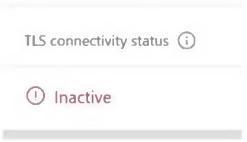
You cannot place calls and receive an error message in the Microsoft Teams admin center as shown in the following exhibit.
What is a possible cause of the issue?
- A. Calling Plan licenses are not assigned to users.
- B. The failover timer is set to 0 seconds.
- C. The Forward P-Asserted Identity (PAI) header is disabled.
- D. The Baltimore or the DigiCert root certificates are missing on the SBC. Correct
Explanation
The exhibit shows the SBC's TLS connectivity status as Inactive, which means the TLS connection between the SBC and the Microsoft SIP proxy cannot be established. A common cause is that the SBC does not trust the SIP proxy certificate because the Microsoft trusted root certificates (the Baltimore CyberTrust or DigiCert Global Root G2 chain) are not installed on the SBC. Calling Plan licenses are not used with Direct Routing, and the failover timer and the PAI header setting affect call handling after a connection exists, not TLS connectivity.
