You have an Azure Active Directory (Azure AD) tenant that contains the following objects:
- A device named Device1
- Users named User1, User2, User3, User4, and User5
- Groups named Group1, Group2, Group3, Group4, and Group5
The groups are configured as shown in the following table.
| Name | Type | Membership type | Members |
|---|---|---|---|
| Group1 | Security | Assigned | User1, User3, Group2, Group3 |
| Group2 | Security | Dynamic User | User2 |
| Group3 | Security | Dynamic Device | Device1 |
| Group4 | Microsoft 365 | Assigned | User4 |
| Group5 | Microsoft 365 | Dynamic User | User5 |
To which groups can you assign a Microsoft Office 365 Enterprise E5 license directly?
A.Group1 and Group4 only
B.Group1, Group2, Group3, Group4, and Group5Correct
C.Group1 and Group2 only
D.Group1 only
E.Group1, Group2, Group4, and Group5 only
Explanation
Group-based licensing accepts security groups and Microsoft 365 groups, whether their membership is assigned or dynamic, so a license can be assigned directly to all five groups. The membership type does not restrict the assignment; it only determines who receives the license. Assigning a license to Group3 (a dynamic device group) is allowed, but only user members consume licenses, so no device receives one. Answers that exclude Microsoft 365 groups or dynamic groups are wrong because both group types are supported targets.
You have a Microsoft Exchange organization that uses an SMTP address space of contoso.com.
Several users use their contoso.com email address for self-service sign-up to Azure Active Directory (Azure AD).
You gain global administrator privileges to the Azure AD tenant that contains the self-signed users.
You need to prevent the users from creating user accounts in the contoso.com Azure AD tenant for self-service sign-up to Microsoft 365 services.
Which PowerShell cmdlet should you run?
A.Set-MsolCompanySettingsCorrect
B.Set-MsolDomainFederationSettings
C.Update-MsolFederatedDomain
D.Set-MsolDomain
Explanation
Self-service sign-up is a tenant-wide setting. In the MSOnline module it is controlled by Set-MsolCompanySettings -AllowEmailVerifiedUsers $false (and -AllowAdHocSubscriptions), which stops email-verified users from joining the tenant; today the same settings are allowEmailVerifiedUsersToJoinOrganization and allowedToSignUpEmailBasedSubscriptions in Update-MgPolicyAuthorizationPolicy. Set-MsolDomainFederationSettings and Update-MsolFederatedDomain manage federation for a domain, and Set-MsolDomain changes domain properties such as authentication type, so none of them controls self-service sign-up.
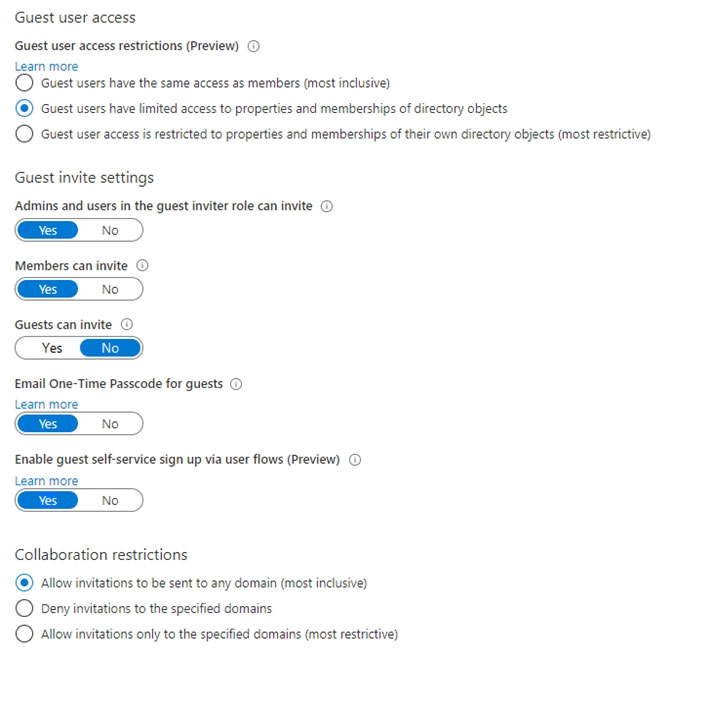
You have a Microsoft 365 tenant that uses the domain named fabrikam.com. The Guest invite settings for Azure Active Directory (Azure AD) are configured as shown in the exhibit.
A user named Admin1@fabrikam.com shares a Microsoft SharePoint Online document library to the users shown in the following table.
| Name | Email | Description |
|---|---|---|
| User1 | User1@contoso.com | A guest user in fabrikam.com |
| User2 | User2@outlook.com | A user who has never accessed resources in fabrikam.com |
| User3 | User3@fabrkam.com | A user in fabrikam.com |
Which users will be emailed a passcode?
A.User2 onlyCorrect
B.User1 only
C.User1 and User2 only
D.User1, User2, and User3
Explanation
With Email One-Time Passcode for guests set to Yes and invitations allowed to any domain, a passcode is the fallback sign-in method for a new external recipient who redeems a share and has no other way to authenticate. User2 has never accessed resources in fabrikam.com, so User2 is the only recipient who goes through first-time redemption, and the one emailed a passcode. User1 is already a guest in fabrikam.com. Existing guests are past redemption and keep the sign-in method they used when they first redeemed, so User1 is not sent a passcode. User3 is an internal fabrikam.com user who signs in with an organizational account, so User3 doesn't need one either. In practice a passcode is sent only when the recipient has no Microsoft Entra account, Microsoft account or federated account, so an address that already has a Microsoft account signs in with that account instead.
You have 2,500 users who are assigned Microsoft Office 365 Enterprise E3 licenses. The licenses are assigned to individual users.
From the Groups blade in the Azure Active Directory admin center, you assign Microsoft 365 Enterprise E5 licenses to the users.
You need to remove the Office 365 Enterprise E3 licenses from the users by using the least amount of administrative effort.
What should you use?
A.the Identity Governance blade in the Azure Active Directory admin center
B.the Set-AzureAdUser cmdlet
C.the Licenses blade in the Azure Active Directory admin centerCorrect
D.the Set-WindowsProductKey cmdlet
Explanation
On the Licenses blade you can open the Office 365 Enterprise E3 product, list its licensed users, select all of the directly assigned users and remove the license in one operation. Set-AzureADUser does not change license assignments (that needs Set-AzureADUserLicense) and would need scripting per user anyway. Identity Governance handles access reviews and entitlement management, not license removal, and Set-WindowsProductKey sets a Windows product key on a computer.
You have a Microsoft 365 tenant named contoso.com.
Guest user access is enabled.
Users are invited to collaborate with contoso.com as shown in the following table.
| User email | User type | Invitation accepted | Shared resource |
|---|---|---|---|
| User1@outlook.com | Guest | No | Enterprise application |
| User2@fabrikam.com | Guest | Yes | Enterprise application |
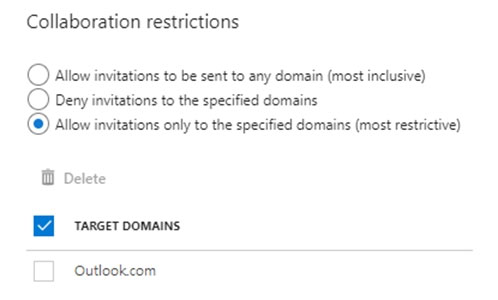
From the External collaboration settings in the Azure Active Directory admin center, you configure the Collaboration restrictions settings as shown in the exhibit.
From a Microsoft SharePoint Online site, a user invites User3@fabrikam.com to the site.
For each of the following statements, select Yes if the statement is true. Otherwise, select No.
Explanation
Statement 1 (Yes): Invitations are allowed only to the specified domains, and Outlook.com is on the allow list. User1's address is in outlook.com, so the pending invitation can still be redeemed and User1 gains access to the enterprise application.
Statement 2 (Yes): Collaboration restrictions are checked when an invitation is sent, not against guests who already exist. User2 accepted the invitation before the restriction applied, so User2 keeps access to the enterprise application even though fabrikam.com is not on the allow list.
Statement 3 (No): The new invitation to User3 is sent to fabrikam.com, which is not in the list of allowed target domains. The invitation is blocked, so User3 cannot accept it or reach the SharePoint site.
You have an Azure Active Directory (Azure AD) tenant named contoso.com.
You plan to bulk invite Azure AD business-to-business (B2B) collaboration users.
Which two parameters must you include when you create the bulk invite? Each correct answer presents part of the solution.
NOTE: Each correct selection is worth one point.
A.email addressCorrect
B.redirection URLCorrect
C.username
D.shared key
E.password
Explanation
The bulk invite CSV template has two required columns: the email address to invite and the redirection URL the guest is sent to after redeeming the invitation. The display name and the custom message are optional. Guests authenticate with their own identity, so you never supply a username, password or shared key for them.
You have an Azure Active Directory (Azure AD) tenant that contains the objects shown in the following table.
| Name | Type | Directly assigned license |
|---|---|---|
| User1 | User | None |
| User2 | User | Microsoft Office 365 Enterprise E5 |
| Group1 | Security group | Microsoft Office 365 Enterprise E5 |
| Group2 | Microsoft 365 group | None |
| Group3 | Mail-enabled security group | None |
Which objects can you add as members to Group3?
A.User2 and Group2 only
B.User2, Group1, and Group2 only
C.User1, User2, Group1 and Group2
D.User1 and User2 onlyCorrect
E.User2 only
Explanation
Security groups cannot be added as members of mail-enabled security groups, and Microsoft 365 groups cannot be added to security groups, so neither Group1 nor Group2 can join Group3. Any user can be a member of a group whether or not it holds a license, so both User1 and User2 can be added. Group3 has no license assigned, so licensing gives no reason to exclude User1, which is why User2 only is wrong.
You have an on-premises Microsoft Exchange organization that uses an SMTP address space of contoso.com.
You discover that users use their email address for self-service sign-up to Microsoft 365 services.
You need to gain global administrator privileges to the Azure Active Directory (Azure AD) tenant that contains the self-signed users.
Which four actions should you perform in sequence? To answer, move the appropriate actions from the list of actions to the answer area and arrange them in the correct order.
Explanation
This is an internal admin takeover of an unmanaged tenant. First create a user context in the unmanaged tenant by signing up for a self-service offer (such as Power BI) with a contoso.com address, then sign in to the Microsoft 365 admin center with that account. Respond to the Become the admin message, which gives you a TXT value, and create that TXT record in the contoso.com DNS zone to prove you own the domain; after verification you become Global Administrator. Adding or removing the domain name in the admin center belongs to an external takeover into a different, managed tenant, not to this sequence.
You have an Azure Active Directory (Azure AD) tenant that contains a user named User1 and the groups shown in the following table.
| Name | Type | Membership type |
|---|---|---|
| Group1 | Security | Assigned |
| Group2 | Security | Dynamic User |
| Group3 | Security | Dynamic Device |
| Group4 | Microsoft 365 | Assigned |
In the tenant, you create the groups shown in the following table.
| Name | Type | Membership type |
|---|---|---|
| GroupA | Security | Assigned |
| GroupB | Microsoft 365 | Assigned |
Which members can you add to GroupA and GroupB? To answer, select the appropriate options in the answer area.
NOTE: Each correct selection is worth one point.
Explanation
GroupA: GroupA is an assigned security group, so it can contain users and other security groups regardless of their membership type, which allows User1, Group1, Group2 (dynamic user) and Group3 (dynamic device). Group4 cannot be added because Microsoft 365 groups cannot be nested in security groups.
GroupB: Microsoft 365 groups do not support nesting at all, so neither security groups nor other Microsoft 365 groups can be added. Only User1 can be a member of GroupB.
Note: This question is part of a series of questions that present the same scenario. Each question in the series contains a unique solution that might meet the stated goals. Some question sets might have more than one correct solution, while others might not have a correct solution.
After you answer a question in this section, you will NOT be able to return to it. As a result, these questions will not appear in the review screen.
You have an Active Directory forest that syncs to an Azure Active Directory (Azure AD) tenant.
You discover that when a user account is disabled in Active Directory, the disabled user can still authenticate to Azure AD for up to 30 minutes.
You need to ensure that when a user account is disabled in Active Directory, the user account is immediately prevented from authenticating to Azure AD.
Solution: You configure password writeback.
Does this meet the goal?
A.Yes
B.NoCorrect
Explanation
Password writeback writes password changes and resets made in Azure AD back to on-premises Active Directory. It does not change how sign-ins are validated, so a disabled account is still only blocked once the change syncs. Pass-through authentication, which validates every sign-in against on-premises Active Directory, is what enforces the disabled state immediately.
Note: This question is part of a series of questions that present the same scenario. Each question in the series contains a unique solution that might meet the stated goals. Some question sets might have more than one correct solution, while others might not have a correct solution.
After you answer a question in this section, you will NOT be able to return to it. As a result, these questions will not appear in the review screen.
You have an Active Directory forest that syncs to an Azure Active Directory (Azure AD) tenant.
You discover that when a user account is disabled in Active Directory, the disabled user can still authenticate to Azure AD for up to 30 minutes.
You need to ensure that when a user account is disabled in Active Directory, the user account is immediately prevented from authenticating to Azure AD.
Solution: You configure pass-through authentication.
Does this meet the goal?
A.YesCorrect
B.No
Explanation
With pass-through authentication, Azure AD hands each password sign-in to an on-premises agent that validates it directly against Active Directory. On-premises account states such as disabled, locked out or expired are therefore enforced at the moment of sign-in, without waiting for the next synchronization cycle. Password hash sync alone is what causes the delay described in the scenario.
Note: This question is part of a series of questions that present the same scenario. Each question in the series contains a unique solution that might meet the stated goals. Some question sets might have more than one correct solution, while others might not have a correct solution.
After you answer a question in this section, you will NOT be able to return to it. As a result, these questions will not appear in the review screen.
You have an Azure Active Directory (Azure AD) tenant that syncs to an Active Directory forest.
You discover that when a user account is disabled in Active Directory, the disabled user can still authenticate to Azure AD for up to 30 minutes.
You need to ensure that when a user account is disabled in Active Directory, the user account is immediately prevented from authenticating to Azure AD.
Solution: You configure conditional access policies.
Does this meet the goal?
A.Yes
B.NoCorrect
Explanation
Conditional Access evaluates the cloud identity and sign-in conditions, but Azure AD only learns that the account was disabled on-premises after the next synchronization, so the policy cannot act on it any sooner. Validating sign-ins against on-premises Active Directory with pass-through authentication (or federation) is what blocks the disabled account immediately.
You have an Azure Active Directory (Azure AD) tenant that contains the following objects:
- A device named Device1
- Users named User1, User2, User3, User4, and User5
- Five groups named Group1, Group2, Group3, Group4, and Group5
The groups are configured as shown in the following table.
| Name | Type | Membership type | Members |
|---|---|---|---|
| Group1 | Security | Assigned | User1, User3, Group2, Group4 |
| Group2 | Security | Dynamic User | User2 |
| Group3 | Security | Dynamic Device | Device1 |
| Group4 | Microsoft 365 | Assigned | User4 |
| Group5 | Microsoft 365 | Assigned | User5 |
How many licenses are used if you assign the Microsoft 365 Enterprise E5 license to Group1?
A.0
B.2Correct
C.3
D.4
Explanation
Group-based licensing does not support nested groups: a license assigned to a group reaches only the users who are direct members of it. Group1's direct user members are User1 and User3, so two licenses are used. User2 and User4 belong to Group1 only through the nested Group2 and Group4, so they receive no license, which rules out 3 and 4.
You have an Azure Active Directory (Azure AD) tenant named contoso.com that contains an Azure AD enterprise application named App1.
A contractor uses the credentials of user1@fabrikam.com.
You need to ensure that you can provide the contractor with access to App1. The contractor must be able to authenticate as user1@fabrikam.com.
What should you do?
A.Run the New-AzADUser cmdlet.
B.Configure the External collaboration settings.
C.Add a WS-Fed identity provider.
D.Create a guest user account in contoso.com.Correct
Explanation
Inviting the contractor as a B2B guest user in contoso.com creates a guest object that authenticates with the contractor's existing external identity, and you can then assign that guest to App1. New-AzADUser creates a new member account with contoso.com credentials, which does not let the contractor sign in with their own account. External collaboration settings only control who may invite and which domains are allowed, and a WS-Fed identity provider is only needed when the partner's own federation service must be trusted; neither grants access by itself.
Your network contains an Active Directory forest named contoso.com that is linked to an Azure Active Directory (Azure AD) tenant named contoso.com by using Azure AD Connect.
You need to prevent the synchronization of users who have the extensionAttribute15 attribute set to NoSync.
What should you do in Azure AD Connect?
A.Create an inbound synchronization rule for the Windows Azure Active Directory connector.
B.Configure a Full Import run profile.
C.Create an inbound synchronization rule for the Active Directory Domain Services connector.Correct
D.Configure an Export run profile.
Explanation
Attribute-based filtering is done with an inbound synchronization rule on the Active Directory connector: the rule has a scoping filter of extensionAttribute15 EQUAL NoSync and a transformation that sets cloudFiltered to True, so those users never reach the metaverse export to Azure AD. A rule on the Azure AD connector handles objects coming from the cloud, not from Active Directory. Run profiles only control when import, synchronization and export run; they cannot filter objects.
Your network contains an on-premises Active Directory domain that syncs to an Azure Active Directory (Azure AD) tenant. The tenant contains the users shown in the following table.
| Name | Type | Directory synced |
|---|---|---|
| User1 | User | No |
| User2 | User | Yes |
| User3 | Guest | No |
All the users work remotely.
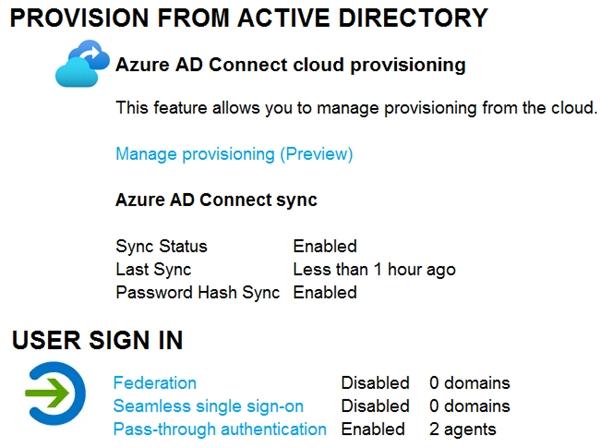
Azure AD Connect is configured in Azure AD as shown in the following exhibit.
Connectivity from the on-premises domain to the internet is lost.
Which users can sign in to Azure AD?
A.User1 and User3 onlyCorrect
B.User1 only
C.User1, User2, and User3
D.User1 and User2 only
Explanation
User sign-in uses pass-through authentication, so synced users such as User2 are validated by the on-premises agents, which cannot be reached once the domain loses internet connectivity. Password hash sync is enabled, but it is not an automatic fallback for pass-through authentication; an administrator would have to switch the sign-in method manually. User1 is a cloud-only account and User3 is a guest authenticated by their own home identity provider, so neither depends on the on-premises domain and both can still sign in.
Note: This question is part of a series of questions that present the same scenario. Each question in the series contains a unique solution that might meet the stated goals. Some question sets might have more than one correct solution, while others might not have a correct solution.
After you answer a question in this section, you will NOT be able to return to it. As a result, these questions will not appear in the review screen.
You have an Active Directory forest that syncs to an Azure Active Directory (Azure AD) tenant.
You discover that when a user account is disabled in Active Directory, the disabled user can still authenticate to Azure AD for up to 30 minutes.
You need to ensure that when a user account is disabled in Active Directory, the user account is immediately prevented from authenticating to Azure AD.
Solution: You configure Azure AD Password Protection.
Does this meet the goal?
A.Yes
B.NoCorrect
Explanation
Azure AD Password Protection only blocks weak and banned passwords when passwords are set or changed; it has no effect on whether a disabled account can authenticate. The delay comes from password hash synchronization, where the disabled state reaches Azure AD only on the next sync cycle. To enforce the on-premises account state immediately, you would use pass-through authentication or federation so that sign-ins are validated against Active Directory in real time.
Your network contains an on-premises Active Directory domain named contoso.com. The domain contains the objects shown in the following table.
| Name | Type | In organizational unit (OU) | Description |
|---|---|---|---|
| User1 | User | OU1 | User1 is a member of Group1. |
| User2 | User | OU1 | User2 is not a member of any groups. |
| Group1 | Security group | OU2 | User1 and Group2 are members of Group1. |
| Group2 | Security group | OU1 | Group2 is a member of Group1. |
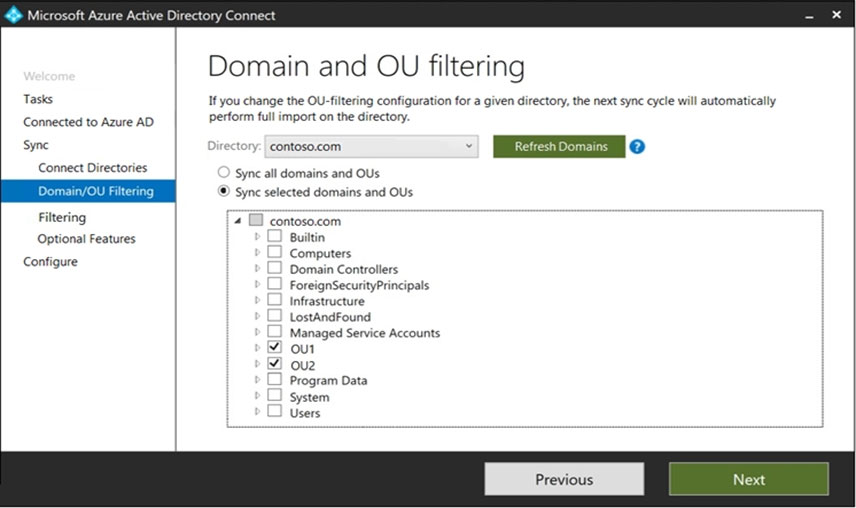
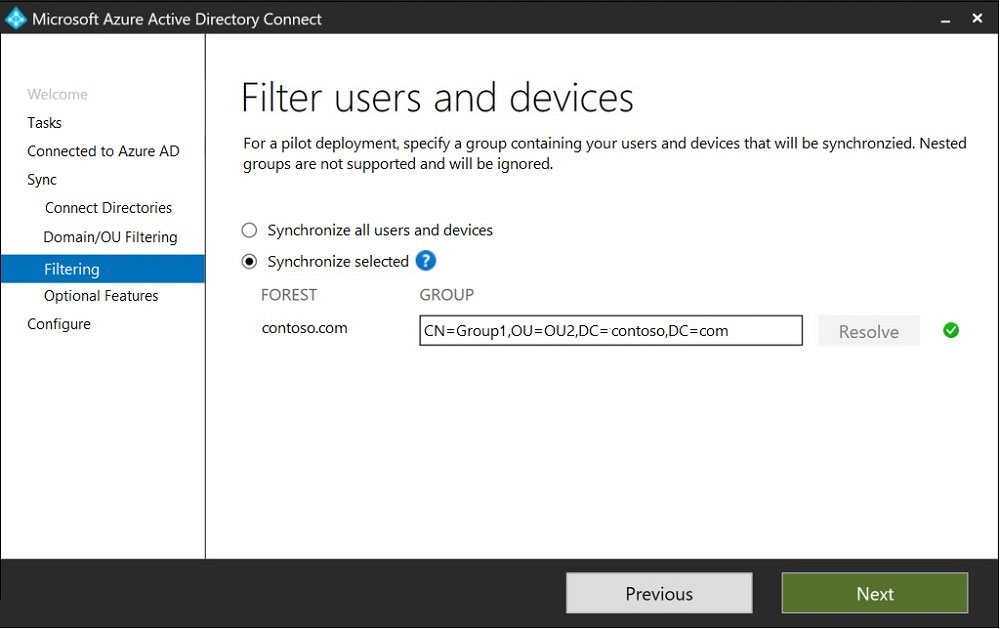
You install Azure AD Connect. You configure the Domain and OU filtering settings as shown in the Domain and OU Filtering exhibit.
You configure the Filter users and devices settings as shown in the Filter Users and Devices exhibit.
For each of the following statements, select Yes if the statement is true. Otherwise, select No.
Explanation
Statement 1 (Yes): User1 is in OU1, which is selected in OU filtering, and is a direct member of Group1, the pilot group used for group-based filtering. An object must pass both filters, and User1 does.
Statement 2 (No): User2 is in an in-scope OU, but group-based filtering only synchronizes direct members of Group1. User2 is not a member of any group, so it is filtered out.
Statement 3 (Yes): Group2 is in OU1 and is itself a direct member of Group1, so the group object syncs. Nested groups are not expanded, so any members of Group2 would not be synchronized through it, but Group2 itself is in scope.
You have an Azure Active Directory (Azure AD) tenant named contoso.com.
You need to ensure that Azure AD External Identities pricing is based on monthly active users (MAU).
What should you configure?
A.a user flow
B.the terms of use
C.a linked subscriptionCorrect
D.an access review
Explanation
MAU-based billing for External Identities is enabled by linking the tenant to an Azure subscription; usage is then billed to that subscription. User flows define sign-up and sign-in experiences, terms of use present policies for acceptance, and access reviews recertify access, none of which affect the billing model.
You have a new Microsoft 365 tenant that uses a domain name of contoso.onmicrosoft.com.
You register the name contoso.com with a domain registrar.
You need to use contoso.com as the default domain name for new Microsoft 365 users.
Which four actions should you perform in sequence? To answer, move the appropriate actions from the list of actions to the answer area and arrange them in the correct order.
Explanation
You first add contoso.com as a custom domain name, which gives you the TXT record value needed to prove ownership. You then create that TXT record at the DNS host and verify the domain. Only a verified domain can be set as primary, which makes it the default for new users. The initial onmicrosoft.com domain cannot be deleted, so that action is never used.
Verifying access...
Access Required
You need to purchase this exam to access practice mode
Unlock a few more questions every day for 300 points you earn free on
Godlike Academy. Everything you unlock with the Daily Climb stays open for 7 days after your last unlock.