Question
Your network contains an on-premises Active Directory domain named contoso.com. The domain contains the objects shown in the following table.
| Name | Type | In organizational unit (OU) | Description |
|---|---|---|---|
| User1 | User | OU1 | User1 is a member of Group1. |
| User2 | User | OU1 | User2 is not a member of any groups. |
| Group1 | Security group | OU2 | User1 and Group2 are members of Group1. |
| Group2 | Security group | OU1 | Group2 is a member of Group1. |
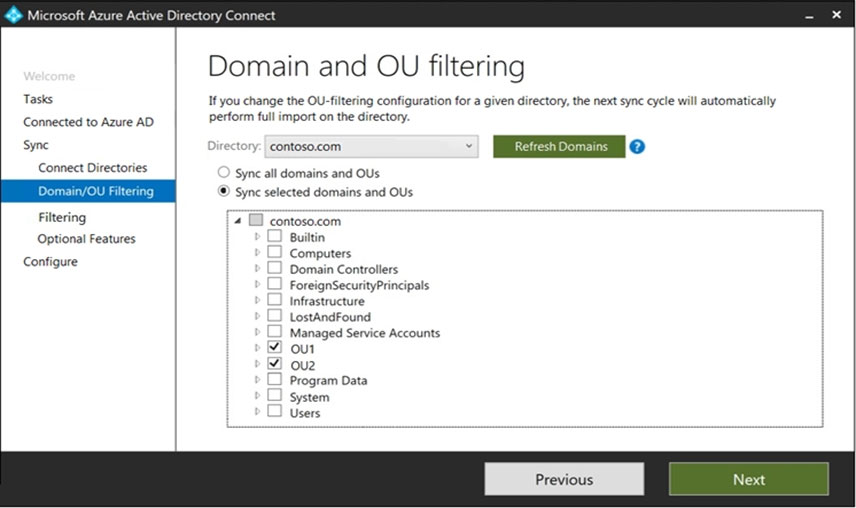
You install Azure AD Connect. You configure the Domain and OU filtering settings as shown in the Domain and OU Filtering exhibit.
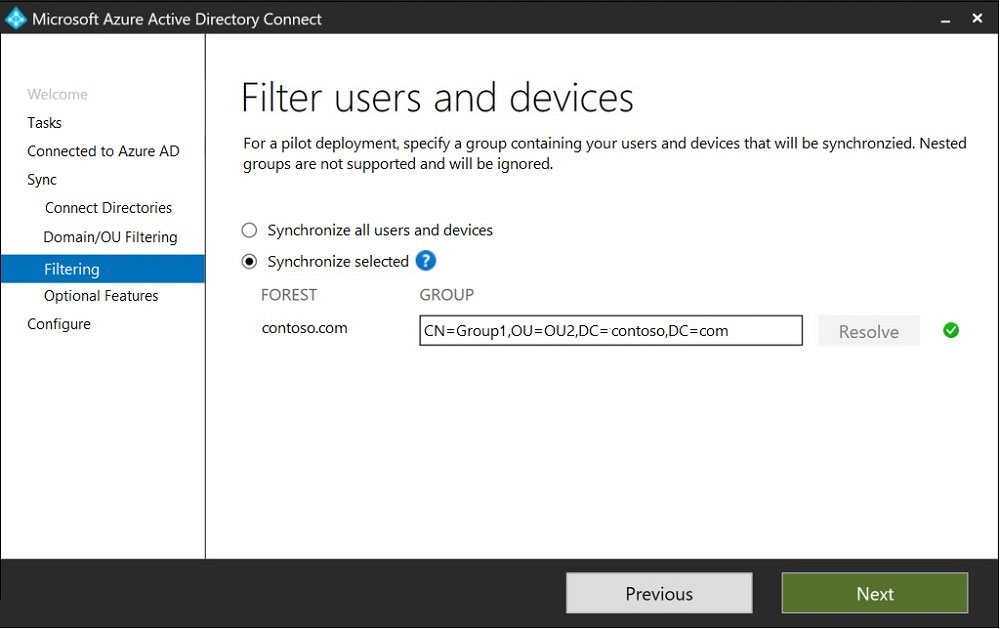
You configure the Filter users and devices settings as shown in the Filter Users and Devices exhibit.
For each of the following statements, select Yes if the statement is true. Otherwise, select No.
Explanation
Statement 1 (Yes): User1 is in OU1, which is selected in OU filtering, and is a direct member of Group1, the pilot group used for group-based filtering. An object must pass both filters, and User1 does.
Statement 2 (No): User2 is in an in-scope OU, but group-based filtering only synchronizes direct members of Group1. User2 is not a member of any group, so it is filtered out.
Statement 3 (Yes): Group2 is in OU1 and is itself a direct member of Group1, so the group object syncs. Nested groups are not expanded, so any members of Group2 would not be synchronized through it, but Group2 itself is in scope.
