Your company has a single on-premises datacenter in Washington DC. The East US Azure region has a peering location in Washington DC.
The company only has Azure resources in the East US region.
You need to implement ExpressRoute to support up to 1 Gbps. You must use only ExpressRoute Unlimited data plans. The solution must minimize costs.
Which type of ExpressRoute circuits should you create?
A.ExpressRoute LocalCorrect
B.ExpressRoute Direct
C.ExpressRoute Premium
D.ExpressRoute Standard
Explanation
ExpressRoute Local gives access only to the Azure region or regions in the same metro as the peering location, which is all this company needs because its resources are only in East US and the peering location is in Washington DC. Its price already includes data transfer, so it is the cheapest way to get an unlimited data plan. Standard and Premium unlimited circuits cost more because they reach a whole geopolitical area or every region. ExpressRoute Direct gives you dedicated 10 Gbps or 100 Gbps ports, far more than the 1 Gbps needed.
You are planning an Azure Point-to-Site (P2S) VPN that will use OpenVPN.
Users will authenticate by an on-premises Active Directory domain.
Which additional service should you deploy to support the VPN authentication?
A.an Azure key vault
B.a RADIUS serverCorrect
C.a certification authority
D.Microsoft Entra application proxy
Explanation
P2S authentication with Active Directory domain credentials requires a RADIUS server that integrates with the AD domain controllers. The VPN gateway passes authentication messages between the client and the RADIUS server, which can run on-premises or in Azure. OpenVPN supports RADIUS authentication. A certification authority is for certificate authentication, not domain credentials, and Key Vault and Microsoft Entra application proxy play no part in P2S VPN authentication.
You plan to configure BGP for a Site-to-Site VPN connection between a datacenter and Azure.
Which two Azure resources should you configure? Each correct answer presents a part of the solution.
NOTE: Each correct selection is worth one point.
A.a virtual network gatewayCorrect
B.Azure Application Gateway
C.Azure Firewall
D.a local network gatewayCorrect
E.Azure Front Door
Explanation
BGP for a Site-to-Site VPN is configured on both sides of the connection in Azure. On the virtual network gateway you enable BGP and set the Azure ASN. On the local network gateway, which represents the on-premises VPN device, you set the on-premises BGP peer IP address and ASN. Application Gateway, Azure Firewall and Azure Front Door do not take part in Site-to-Site VPN routing.
You fail to establish a Site-to-Site VPN connection between your company's main office and an Azure virtual network.
You need to troubleshoot what prevents you from establishing the IPsec tunnel.
Which diagnostic log should you review?
A.IKEDiagnosticLogCorrect
B.RouteDiagnosticLog
C.GatewayDiagnosticLog
D.TunnelDiagnosticLog
Explanation
IKEDiagnosticLog has verbose IKE/IPsec debug logging, which shows the negotiation messages and why a tunnel fails to establish. TunnelDiagnosticLog only records when a tunnel connects or disconnects. GatewayDiagnosticLog records configuration changes and maintenance events, and RouteDiagnosticLog records static route and BGP activity.
You have an Azure virtual network and an on-premises datacenter.
You are planning a Site-to-Site VPN connection between the datacenter and the virtual network.
Which two resources should you include in your plan? Each correct answer presents part of the solution.
NOTE: Each correct selection is worth one point.
A.a user-defined route
B.a virtual network gatewayCorrect
C.Azure Firewall
D.Azure Web Application Firewall (WAF)
E.an on-premises data gateway
F.an Azure application gateway
G.a local network gatewayCorrect
Explanation
A Site-to-Site VPN needs a VPN-type virtual network gateway in the virtual network's GatewaySubnet, and a local network gateway that holds the on-premises VPN device's public IP address and address prefixes. You then create a connection between the two. A user-defined route, firewalls and an application gateway are not required. An on-premises data gateway is used by Power BI, Power Platform and Logic Apps to reach on-premises data, not to build a VPN.
You need to connect an on-premises network and an Azure environment. The solution must use ExpressRoute and support failing over to a Site-to-Site VPN connection if there is an ExpressRoute failure.
What should you configure? To answer, select the appropriate options in the answer area.
NOTE: Each correct selection is worth one point.
Explanation
Routing type: Route-based. When ExpressRoute and a Site-to-Site VPN coexist, only a route-based VPN gateway is supported, so neither a policy-based gateway nor static routing will work. Number of virtual network gateways: 2. The virtual network needs one gateway of type ExpressRoute and a separate gateway of type VPN, both in the same GatewaySubnet (/27 or larger). The VPN path carries traffic only when the ExpressRoute circuit fails.
Your company has an on-premises network and three Azure subscriptions named Subscription1, Subscription2, and Subscription3.
The departments at the company use the Azure subscriptions as shown in the following table.
| Department | Subscription |
|---|---|
| IT | Subscription1 |
| Research | Subscription1 |
| Development | Subscription2 |
| Testing | Subscription2 |
| Distribution | Subscription3 |
All the resources in the subscriptions are in either the West US Azure region or the West US 2 Azure region.
You plan to connect all the subscriptions to the on-premises network by using ExpressRoute.
What is the minimum number of ExpressRoute circuits required?
A.1Correct
B.2
C.3
D.4
E.5
Explanation
A single ExpressRoute circuit can link virtual networks in the same subscription as the circuit or in other subscriptions, using authorizations. A Standard circuit reaches every Azure region in its geopolitical area, so West US and West US 2 are both covered. One circuit is therefore enough for all three subscriptions, as long as the number of linked virtual networks stays within the circuit's limit (10 on Standard).
Your company has offices in New York and Amsterdam. The company has an Azure subscription. Both offices connect to Azure by using a Site-to-Site VPN connection.
The office in Amsterdam uses resources in the North Europe Azure region. The office in New York uses resources in the East US Azure region.
You need to implement ExpressRoute circuits to connect each office to the nearest Azure region. Once the ExpressRoute circuits are connected, the on-premises computers in the Amsterdam office must be able to connect to the on-premises servers in the New York office by using the ExpressRoute circuits.
Which ExpressRoute option should you use?
A.ExpressRoute FastPath
B.ExpressRoute Global ReachCorrect
C.ExpressRoute Direct
D.ExpressRoute Local
Explanation
ExpressRoute Global Reach connects ExpressRoute circuits together so that on-premises sites can reach each other over the Microsoft backbone. Because these circuits are in different geopolitical regions, both need the Premium add-on. FastPath only bypasses the gateway for traffic into virtual networks, Direct only provides dedicated ports, and Local circuits do not support Global Reach.
You have an Azure subscription that contains a single virtual network and a virtual network gateway.
You need to ensure that administrators can use Point-to-Site (P2S) VPN connections to access resources in the virtual network. The connections must be authenticated by Microsoft Entra ID (formerly Azure Active Directory).
What should you configure? To answer, select the appropriate options in the answer area.
NOTE: Each correct selection is worth one point.
Explanation
For the Microsoft Entra ID configuration, the gateway authenticates users through the Azure VPN Client application, which exists in the tenant as an enterprise application (for the manually registered client you grant admin consent to it; the newer Microsoft-registered client app ID needs no manual registration). An access package or a Conditional Access policy can govern access but do not enable Entra authentication, and a VPN certificate is used for certificate authentication, not Entra ID. For the P2S VPN tunnel type, Microsoft Entra ID authentication is supported only with the OpenVPN (SSL) protocol, so IKEv2, SSTP or the IKEv2 and SSTP combination cannot be used.
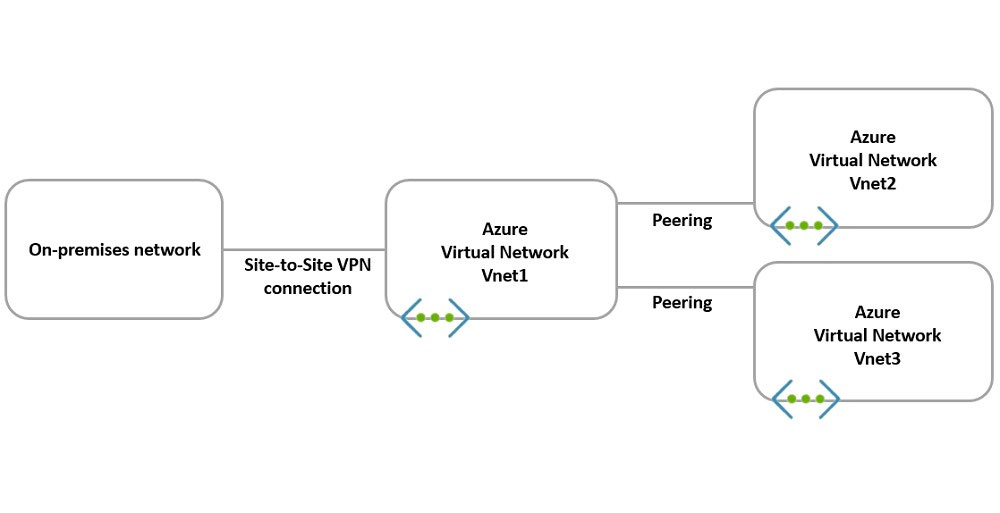
You have the hybrid network shown in the Network Diagram exhibit.
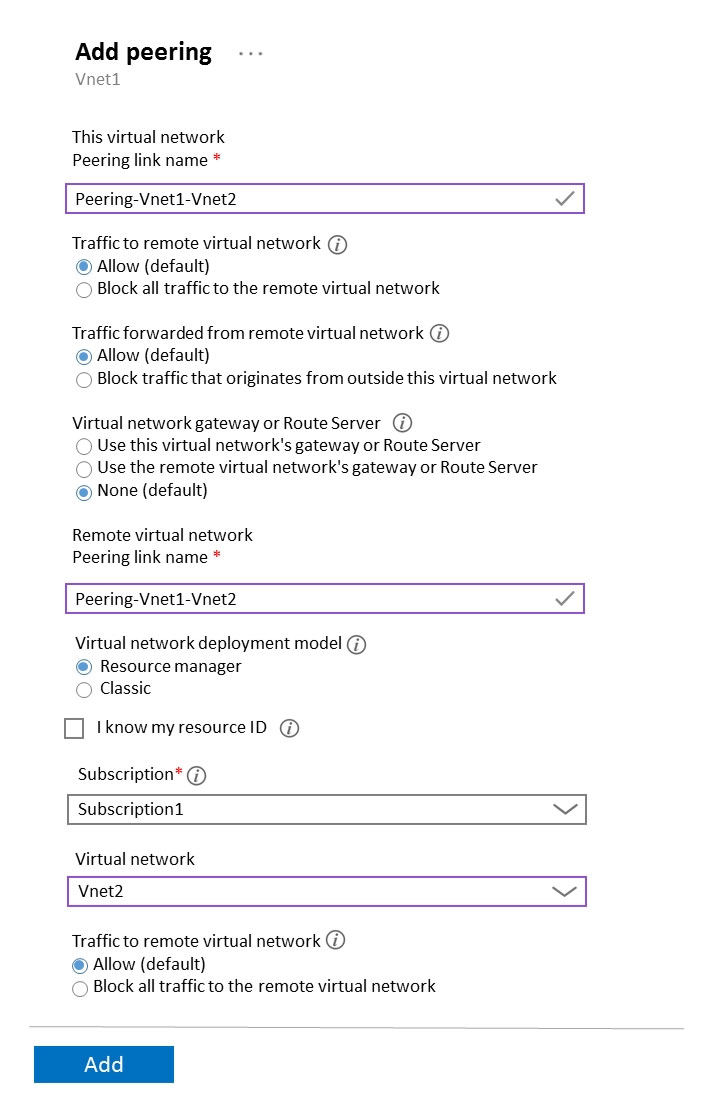
You have a peering connection between Vnet1 and Vnet2 as shown in the Peering-Vnet1-Vnet2 exhibit.
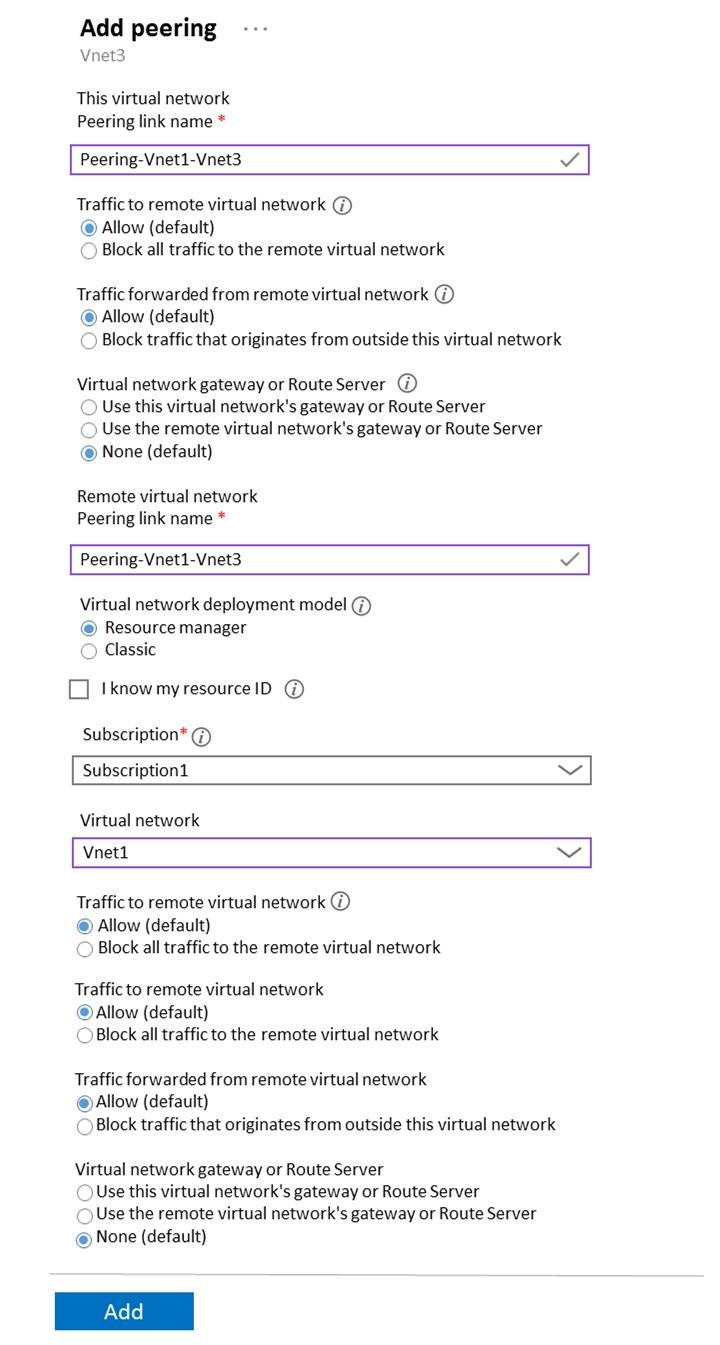
You have a peering connection between Vnet1 and Vnet3 as shown in the Peering-Vnet1-Vnet3 exhibit.
For each of the following statements, select Yes if the statement is true. Otherwise, select No.
NOTE: Each correct selection is worth one point.
Explanation
Statement 1 (Yes): Vnet1 and Vnet2 are directly peered and traffic to the remote virtual network is set to Allow on both sides, so their resources can communicate. Statement 2 (No): Vnet2 and Vnet3 are each peered only to Vnet1, and peering is not transitive, so without a direct peering or an NVA/route in the hub there is no path between them. Statement 3 (No): the Vnet1-Vnet2 peering has the gateway setting at None, so Vnet1 does not offer gateway transit and Vnet2 does not use the remote gateway; Vnet2 therefore learns no routes to the on-premises network over the Site-to-Site VPN.
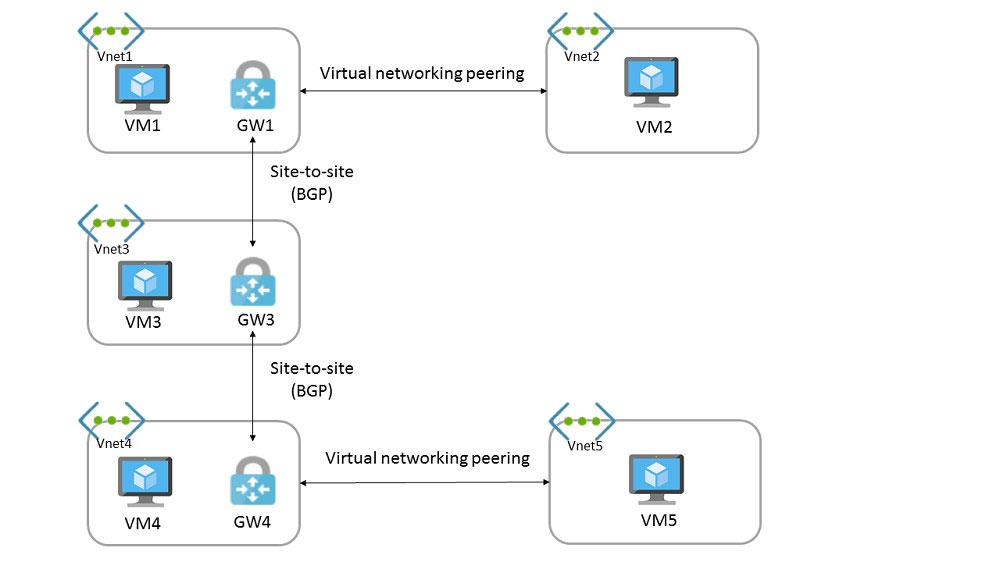
You have the Azure environment shown in the exhibit.
You have virtual network peering between Vnet1 and Vnet2. You have virtual network peering between Vnet4 and Vnet5. The virtual network peering is configured as shown in the following table.
| Virtual network | Traffic to remote virtual network | Use remote gateway | Allow gateway transit |
|---|---|---|---|
| Vnet1 | Allow | None | Enabled |
| Vnet2 | Allow | Enabled | None |
| Vnet4 | Allow | None | Enabled |
| Vnet5 | Block | Enabled | None |
For each of the following statements, select Yes if the statement is true. Otherwise, select No.
Explanation
Statement 1 (Yes): GW1-GW3 and GW3-GW4 are Site-to-Site connections with BGP, and BGP propagates the routes each gateway learns to its other peers, so GW3 provides transit routing between Vnet1 and Vnet4. Statement 2 (Yes): Vnet1 allows gateway transit and Vnet2 uses the remote gateway, so Vnet2's prefix is advertised by GW1 over BGP and reaches Vnet4 through GW3, and VM2 can reach VM4 the same way. Statement 3 (No): although Vnet5 uses GW4 as its remote gateway, its peering is set to Block all traffic to the remote virtual network, which stops traffic flowing from Vnet5 over the peering, so VM5 cannot exchange traffic with Vnet4 or anything reached through GW4, including VM1.
You have on-premises datacenters in New York and Seattle.
You have an Azure subscription that contains the ExpressRoute circuits shown in the following table.
| Name | Azure region | Datacenter |
|---|---|---|
| ERC1 | East US | New York |
| ERC2 | West US2 | Seattle |
You need to ensure that all the data sent between the datacenters is routed via the ExpressRoute circuits. The solution must minimize costs.
How should you configure the network? To answer, select the appropriate options in the answer area.
NOTE: Each correct selection is worth one point.
Explanation
For the ExpressRoute configuration, ExpressRoute Global Reach links two ExpressRoute circuits so the on-premises networks behind them can exchange traffic directly over the Microsoft backbone. Premium is only needed when linking circuits in different geopolitical regions, and both circuits here are in the United States, so it would add cost without benefit; ExpressRoute Direct provides dedicated ports and FastPath bypasses the gateway for VNet traffic, and neither connects the datacenters. For the Peering, Global Reach is configured on the circuits' Azure private peering; Microsoft peering carries traffic to Microsoft public services and public peering is deprecated.
You have an Azure virtual network named Vnet1 and an on-premises network. The on-premises network has policy-based VPN devices.
In Vnet1, you deploy a virtual network gateway named GW1 that uses a SKU of VpnGw1 and is route-based.
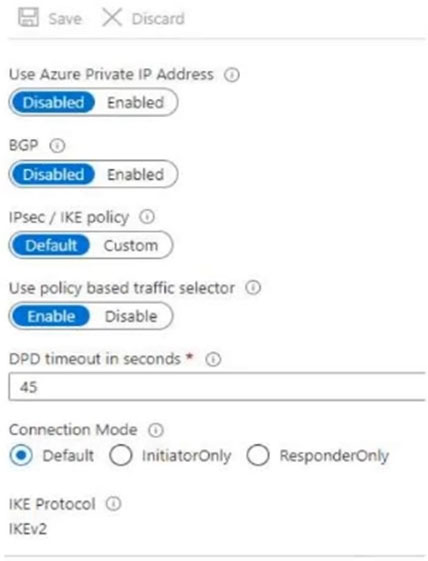
You have a Site-to-Site VPN connection for GW1 as shown in the following exhibit.
You need to ensure that the on-premises network can connect to the route-based GW1.
What should you do before you create the connection?
A.Set Connection Mode to ResponderOnly.
B.Set BGP to Enabled.
C.Set Use Azure Private IP Address to Enabled.
D.Set IPsec / IKE policy to Custom.Correct
Explanation
A route-based gateway connects to policy-based on-premises devices by enabling policy-based traffic selectors on the connection, and that option is part of a custom IPsec/IKE policy: you must specify the complete policy (algorithms, key strengths and SA lifetimes). The exhibit already enables Use policy based traffic selector but leaves IPsec / IKE policy at Default, so it must be set to Custom. Enabling BGP, changing the connection mode or using the Azure private IP address does nothing to match the policy-based device's traffic selectors.
Your on-premises network contains a VPN device.
You have an Azure subscription that contains a virtual network and a virtual network gateway.
You need to create a Site-to-Site VPN connection that has a custom cryptographic policy.
How should you complete the PowerShell script? To answer, select the appropriate options in the answer area.
```powershell
...
$policy = [Cmdlet 1] -IkeEncryption AES256 -IkeIntegrity SHA384 -DhGroup DHGroup24 -IpsecEncryption AES256 -IpsecIntegrity SHA256 -PfsGroup None -SALifeTimeSeconds 14400 -SADataSizeKilobytes 102400000
...
[Cmdlet 2] -Name $Connection16 -ResourceGroupName $RG1 -VirtualNetworkGateway1 $vnet1gw -LocalNetworkGateway2 $lng6 -Location $Location1 -ConnectionType IPsec -IpsecPolicies $policy -SharedKey 'AzureA1b2C3'
```
NOTE: Each correct selection is worth one point.
Explanation
Cmdlet 1 is New-AzIpsecPolicy, which builds the custom IKE and IPsec algorithms, DH and PFS groups and SA lifetimes for a Site-to-Site or VNet-to-VNet connection. New-AzIpsecTrafficSelectorPolicy defines traffic selector prefixes, New-AzServiceEndpointPolicy is for service endpoints, and New-AzVpnClientIpsecPolicy applies to Point-to-Site clients. Cmdlet 2 is New-AzVirtualNetworkGatewayConnection, which creates the IPsec connection between the virtual network gateway and the local network gateway and accepts -IpsecPolicies. The other cmdlets create a Virtual WAN hub, a gateway or a NAT rule, not a connection.
You have an Azure virtual network and an on-premises datacenter that connect by using a Site-to-Site VPN tunnel.
You need to ensure that all traffic from the virtual network to the internet is routed through the datacenter.
How should you complete the PowerShell script to configure forced tunneling? To answer, select the appropriate options in the answer area.
```powershell
$force1 = [Cmdlet 1] -Name "HQ" -ResourceGroupName "ForcedTunneling"
$force2 = Get-AzVirtualNetworkGateway -Name "Gateway1" -ResourceGroupName "ForcedTunneling"
[Cmdlet 2] -GatewayDefaultSite $force1 -VirtualNetworkGateway $force2
```
NOTE: Each correct selection is worth one point.
Explanation
Cmdlet 1 is Get-AzLocalNetworkGateway: the default site for forced tunneling is the local network gateway that represents the on-premises datacenter (HQ), not a NAT gateway, an NVA or the Azure gateway itself. Cmdlet 2 is Set-AzVirtualNetworkGatewayDefaultSite, which assigns that local network gateway as the default site of the route-based VPN gateway so internet-bound traffic is sent over the S2S tunnel. Changing the connection, a peering or a subnet configuration does not set the default site.
You are planning an Azure deployment that will contain three virtual networks in the East US Azure region as shown in the following table.
| Name | Description |
|---|---|
| Vnet1 | Hub virtual network for shared services |
| Vnet2 | Virtual machines for the IT department |
| Vnet3 | Virtual machines for the research department |
A Site-to-Site VPN will connect Vnet1 to your company's on-premises network.
You need to recommend a solution that ensures that the virtual machines on all the virtual networks can communicate with the on-premises network. The solution must minimize costs.
What should you recommend for Vnet2 and Vnet3?
A.VNet-to-VNet VPN connections
B.peeringCorrect
C.service endpoints
D.route tables
Explanation
Peer Vnet2 and Vnet3 with the hub Vnet1, allow gateway transit on the hub side and enable use of the remote gateway on the spokes; the spokes then reach on-premises through Vnet1's VPN gateway without needing their own gateways. VNet-to-VNet VPN connections would require a VPN gateway in each spoke, which costs more. Service endpoints only secure access to Azure PaaS services, and route tables alone cannot connect separate virtual networks.
Your company has an office in New York.
The company has an Azure subscription that contains the virtual networks shown in the following table.
| Name | Location |
|---|---|
| Vnet1 | East US |
| Vnet2 | North Europe |
| Vnet3 | West US |
| Vnet4 | West Europe |
You need to connect the virtual networks to the office by using ExpressRoute. The solution must meet the following requirements:
- The connection must have up to 1 Gbps of bandwidth.
- The office must have access to all the virtual networks.
- Costs must be minimized.
How many ExpressRoute circuits should be provisioned, and which ExpressRoute SKU should you enable?
A.one ExpressRoute Premium circuitCorrect
B.two ExpressRoute Premium circuits
C.four ExpressRoute Standard circuits
D.one ExpressRoute Standard circuit
Explanation
A Standard ExpressRoute circuit only reaches Azure regions in the same geopolitical area as its peering location, so a circuit in North America cannot link to the virtual networks in North Europe and West Europe. ExpressRoute Premium adds global connectivity, letting a single circuit link virtual networks in any region, which meets the requirement with the fewest circuits. A single Standard circuit cannot reach the European virtual networks, and two or four circuits cost more than one Premium circuit.
You have an Azure subscription that contains a virtual network.
You plan to deploy an Azure VPN gateway and 90 Site-to-Site VPN connections. The solution must meet the following requirements:
- Ensure that the Site-to-Site VPN connections remain available if an Azure datacenter fails.
- Minimize costs.
Which gateway SKU should you specify?
A.VpnGw1AZ
B.VpnGw2AZ
C.VpnGw4AZCorrect
D.VpnGw5AZ
Explanation
The AZ SKUs are zone-redundant, so the gateway keeps working if one datacenter (availability zone) fails. VpnGw1AZ, VpnGw2AZ and VpnGw3AZ support at most 30 Site-to-Site tunnels, which is not enough for 90 connections. VpnGw4AZ and VpnGw5AZ support up to 100 tunnels, and VpnGw4AZ is the cheaper of the two.
Your on-premises network contains an Active Directory Domain Services (AD DS) domain named contoso.com that has an internal certification authority (CA).
You have an Azure subscription.
You deploy an Azure application gateway named AppGwy1 and perform the following actions:
- Configure an HTTP listener
- Associate a routing rule with the listener
You need to configure AppGwy1 to perform mutual authentication for requests from domain-joined computers to contoso.com.
Which four actions should you perform in sequence? To answer, move the appropriate actions from the list of actions to the answer area and arrange them in the correct order.
Explanation
Mutual authentication on Application Gateway is configured through an SSL profile: you create the SSL profile under SSL settings and, on its Client Authentication tab, upload the trusted client CA certificate chain (here the internal CA certificate exported from an on-premises computer). You then add an HTTPS listener with Enable SSL Profile selected and choose that profile, because the existing listener has no SSL profile. Finally, a routing rule must be created for the new listener so requests reach the backend. A new frontend IP configuration is not needed because the gateway already has one.
Verifying access...
Access Required
You need to purchase this exam to access practice mode
Unlock a few more questions every day for 300 points you earn free on
Godlike Academy. Everything you unlock with the Daily Climb stays open for 7 days after your last unlock.