Your company has a Microsoft 365 subscription.
You need to identify all the users in the subscription who are licensed for Office 365 through a group membership. The solution must include the name of the group used to assign the license.
What should you use?
A.Active users in the Microsoft 365 admin center
B.Reports in Microsoft Purview compliance portal
C.the Licenses blade in the Microsoft Entra admin centerCorrect
D.Reports in the Microsoft 365 admin center
Explanation
The Licenses blade in the Microsoft Entra admin center allows you to view all users licensed for Office 365 through group membership and identify the specific groups used for license assignment.
You have a Microsoft 365 subscription that contains the users shown in the following table.
| Name | Type | Department |
|---|---|---|
| User1 | Guest | IT support |
| User2 | Guest | SupportCore |
| User3 | Member | IT support |
You need to configure a dynamic user group that will include the guest users in any department that contains the word Support.
How should you complete the membership rule? To answer, select the appropriate options in the answer area.
NOTE: Each correct selection is worth one point.
Explanation
For the user.userType dropdown, -eq "Guest" is the direct test for guest accounts, so User1 and User2 qualify and the member User3 is left out. The -in operator expects a list of values in brackets, and -ne "Guest" would select the members instead of the guests. For the user.department dropdown, -contains "Support" performs a substring match on the string property, so it finds the word anywhere in the value and covers both IT support and SupportCore. The -startsWith "Sup" option would miss IT support because that value begins with IT, and -in again requires a bracketed list of exact values rather than a partial string.
Your company uses a legacy on-premises LDAP directory that contains 100 users.
The company purchases a Microsoft 365 subscription.
You need to import the 100 users into Microsoft 365 by using the Microsoft 365 admin center.
Which type of file should you use and which properties are required? To answer, select the appropriate options in the answer area.
NOTE: Each correct selection is worth one point.
Explanation
The file type is CSV. The Microsoft 365 admin center bulk-add feature accepts a comma-separated values file, so you export the LDAP users to a CSV that follows the Microsoft template. PST is a mailbox archive format and XML and JSON are not accepted for bulk user creation. The required properties are User Name and Display Name. These are the only two mandatory columns in the template, and the other fields such as department, first name and last name are optional.
You have a Microsoft 365 subscription that contains the users shown in the following table.
| Name | Department |
|---|---|
| User1 | Human resources |
| User2 | Research |
| User3 | Human resources |
| User4 | Marketing |
You need to configure group-based licensing to meet the following requirements:
To all users, deploy an Office 365 E3 license without the Power Automate license option.
To all users, deploy an Enterprise Mobility + Security E5 license.
To the users in the research department only, deploy a Power BI Pro license.
To the users in the marketing department only, deploy a Visio Plan 2 license.
What is the minimum number of deployment groups required?
A.1
B.2
C.3Correct
D.4
E.5
Explanation
Three deployment groups are required: one for all users to apply the Office 365 E3 license without Power Automate and Enterprise Mobility + Security E5, another for the Research department to add Power BI Pro, and a third for Marketing to deploy Visio Plan 2.
You have a Microsoft 365 subscription.
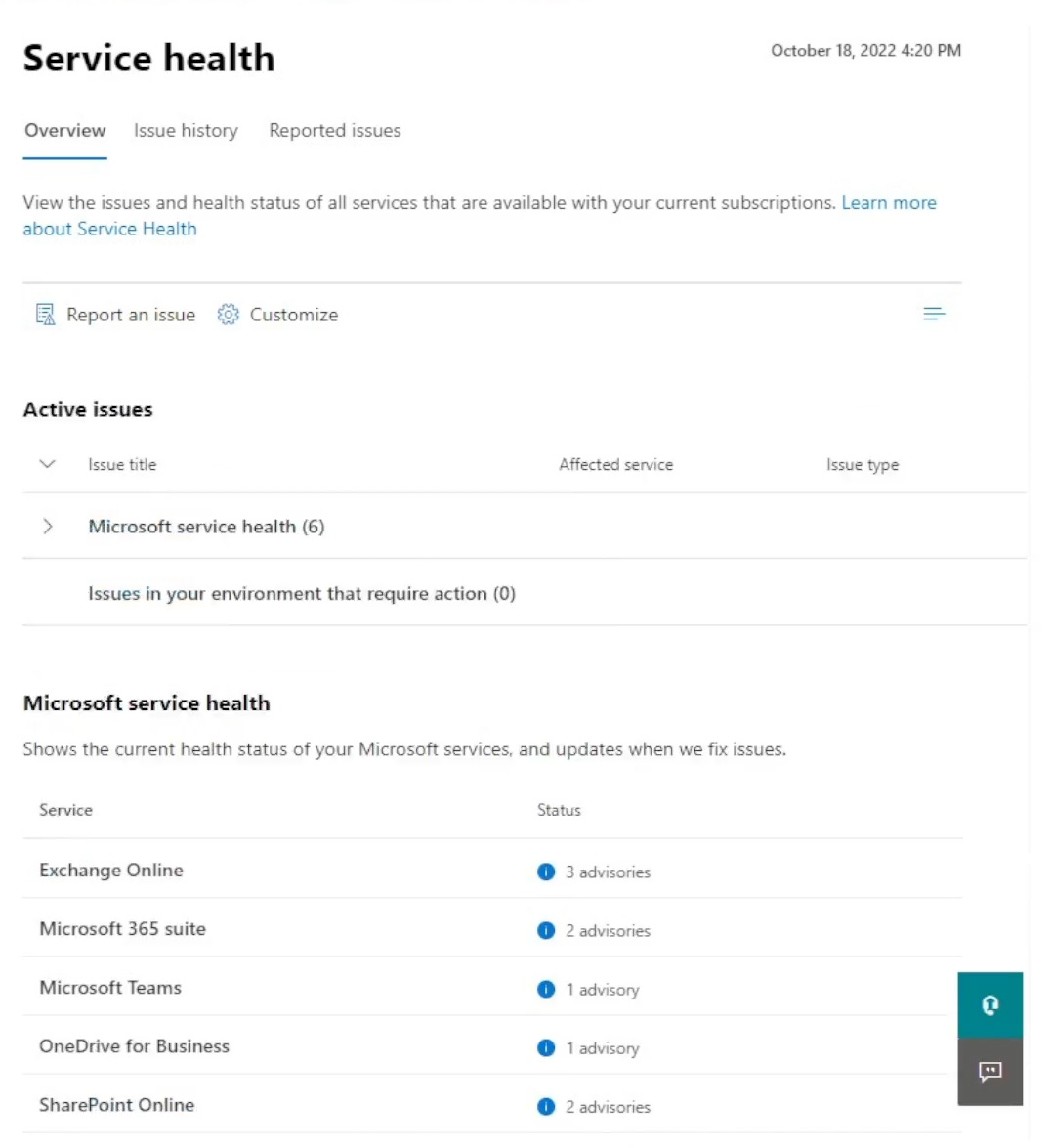
You view the Service health Overview as shown in the following exhibit.
You need to ensure that a user named User1 can view the advisories to investigate service health issues.
Which role should you assign to User1?
A.Message Center Reader
B.Reports Reader
C.Service Support AdministratorCorrect
D.Compliance Administrator
Explanation
The Service Support Administrator role can view the Service health dashboard, including advisories and incidents, read Message center posts and open support requests with Microsoft, which is exactly what is needed to investigate service health issues. Message Center Reader can read only Message center posts, and Reports Reader can view only usage reports; neither gives access to the service health advisories. Compliance Administrator is a compliance management role that grants far more than this task needs, so it is not the appropriate role to assign.
You have a Microsoft 365 E5 subscription that contains the users shown in the following table.
| Name | Member of |
|---|---|
| Admin1 | Group1 |
| Admin2 | Group2 |
| Admin3 | Group1, Group2 |
You add the following assignment for the User Administrator role:
- Scope type: Directory
- Selected members: Group1
- Assignment type: Active
- Assignment starts: Mar 15, 2023
- Assignment ends: Aug 15, 2023
You add the following assignment for the Exchange Administrator role:
- Scope type: Directory
- Selected members: Group2
- Assignment type: Eligible
- Assignment starts: Jun 15, 2023
- Assignment ends: Oct 15, 2023
For each of the following statements, select Yes if the statement is true. Otherwise, select No.
NOTE: Each correct selection is worth one point.
Explanation
Statement 1 (Yes): Admin1 is a member of Group1, which holds an active User Administrator assignment from Mar 15 to Aug 15, 2023. July 15, 2023 falls inside that window and an active assignment needs no activation, so Admin1 can reset user passwords. Statement 2 (No): Admin2 is a member of Group2, whose Exchange Administrator assignment is eligible from Jun 15 to Oct 15, 2023. An eligible assignment grants nothing until the user activates the role in Privileged Identity Management, so on June 20, 2023 Admin2 cannot manage Exchange Online just because of the assignment. Statement 3 (Yes): Admin3 is a member of Group1 as well as Group2, so the active User Administrator assignment applies. May 1, 2023 is between Mar 15 and Aug 15, 2023, so Admin3 can reset user passwords; the Exchange Administrator assignment, which has not started yet on that date, has no bearing on this.
You have a Microsoft 365 subscription.
You have an Azure AD tenant that contains the users shown in the following table.
| Name | Role |
|---|---|
| User1 | Security Administrator |
| User2 | Global Administrator |
| User3 | Service Support Administrator |
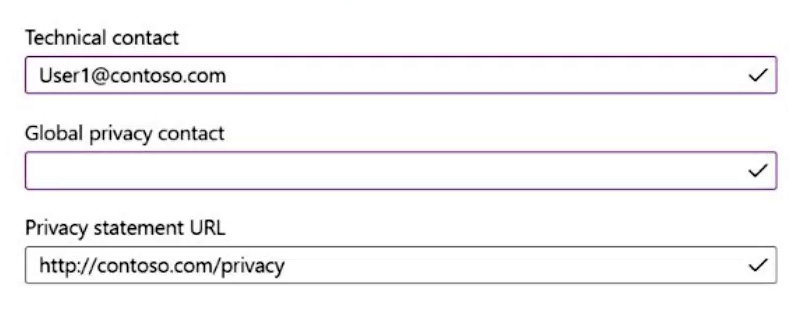
You configure Tenant properties as shown in the following exhibit.
Which users will be contacted by Microsoft if the tenant experiences a data breach?
A.User1 only
B.User2 onlyCorrect
C.User3 only
D.User1 and User2 only
E.User2 and User3 only
Explanation
According to Microsoft documentation, in the event of a data breach related to Azure Active Directory services, Microsoft contacts the Global privacy contact specified. If no Global privacy contact is listed, then Global Administrators are contacted. User2, as a Global Administrator, will be contacted.
Your network contains an Active Directory forest named contoso.local.
You purchase a Microsoft 365 subscription.
You plan to move to Microsoft 365 and to implement a hybrid deployment solution for the next 12 months.
You need to prepare for the planned move to Microsoft 365.
What is the best action to perform before you implement directory synchronization? More than one answer choice may achieve the goal. Select the BEST answer.
A.Purchase a third-party X.509 certificate.
B.Create an external forest trust.
C.Rename the Active Directory forest.
D.Purchase a custom domain name.Correct
Explanation
The forest is named contoso.local, and .local is a non-routable suffix that cannot be added and verified as a domain in Microsoft 365. Users synchronized with a non-routable user principal name would be given sign-in names in the tenant's onmicrosoft.com domain instead of matching their on-premises names. Purchasing a custom, publicly routable domain name, verifying it in Microsoft 365 and adding it as a UPN suffix for the users before directory synchronization is therefore the best preparation. A third-party certificate and a forest trust are not required for directory synchronization, and renaming the forest is a disruptive operation that is unnecessary because an alternative UPN suffix achieves the same result.
You have a Microsoft 365 subscription.
You configure a new Azure AD enterprise application named App1. App1 requires that a user be assigned the Reports Reader role.
Which type of group should you use to assign the Reports Reader role and to access App1?
A.a Microsoft 365 group that has assigned membership
B.a Microsoft 365 group that has dynamic user membership
C.a security group that has assigned membershipCorrect
D.a security group that has dynamic user membership
Explanation
A security group with assigned membership is the correct choice for assigning Azure AD roles such as Reports Reader to users. Dynamic groups cannot be used for role assignments in Azure AD.
You have a new Microsoft 365 E5 tenant.
You need to enable an alert policy that will be triggered when an elevation of Microsoft Exchange Online administrative privileges is detected.
What should you do first?
A.Enable auditing.Correct
B.Enable Microsoft 365 usage analytics.
C.Create an Insider risk management policy.
D.Create a communication compliance policy.
Explanation
Enabling auditing is necessary to record events such as changes in administrative privileges. This step allows for the creation and triggering of alert policies when specific activities, like elevation of Exchange Online administrative privileges, are detected.
Your network contains an on-premises Active Directory domain named contoso.com. The domain contains 1,000 Windows 10 devices.
You perform a proof of concept (PoC) deployment of Microsoft Defender for Endpoint for 10 test devices. During the onboarding process, you configure Microsoft Defender for Endpoint-related data to be stored in the United States.
You plan to onboard all the devices to Microsoft Defender for Endpoint.
You need to store the Microsoft Defender for Endpoint data in Europe.
What should you do first?
A.Delete the workspace.
B.Create a workspace.
C.Onboard a new device.
D.Offboard the test devices.Correct
Explanation
Offboarding the test devices is necessary before creating a new workspace configured to store data in Europe. Once a workspace is created with a specific data storage location, this setting cannot be changed.
You have a Microsoft 365 E5 subscription that contains a user named User1.
User1 exceeds the default daily limit of allowed email messages and is on the Restricted entities list.
You need to remove User1 from the Restricted entities list.
What should you use?
A.the Exchange admin center
B.the Microsoft Purview compliance portal
C.the Microsoft 365 admin center
D.the Microsoft 365 Defender portalCorrect
E.the Microsoft Entra admin center
Explanation
The Microsoft 365 Defender portal is the correct tool to manage restricted entities, including removing a user from the Restricted entities list after they exceed email limits. This action can be performed under Email & collaboration > Review > Restricted entities.
Your company has a Microsoft 365 E5 subscription.
Users in the research department work with sensitive data.
You need to prevent the research department users from accessing potentially unsafe websites by using hyperlinks embedded in email messages and documents. Users in other departments must not be restricted.
What should you do?
A.Create a data loss prevention (DLP) policy that has a Content is shared condition.
B.Modify the safe links policy Global settings.
C.Create a data loss prevention (DLP) policy that has a Content contains condition.
D.Create a new safe links policy.Correct
Explanation
Creating a new safe links policy allows for targeted restrictions on accessing potentially unsafe websites through hyperlinks specifically for users in the research department, without affecting other departments.
You have an Azure AD tenant that contains the users shown in the following table.
| Name | Member of |
|---|---|
| User1 | Group1 |
| User2 | Group2 |
| User3 | Group3 |
Your company uses Microsoft Defender for Endpoint. Microsoft Defender for Endpoint contains the roles shown in the following table.
| Name | Permission | Assigned user group |
|---|---|---|
| Microsoft Defender for Endpoint administrator (default) | View data, Alerts investigation, Active remediation actions, Manage security settings | Group3 |
| Role1 | View data, Alerts investigation | Group1 |
| Role2 | View data | Group2 |
Microsoft Defender for Endpoint contains the device groups shown in the following table.
| Rank | Device group | Device name | User access |
|---|---|---|---|
| 1 | ATP1 | Device1 | Group1 |
| Last | Ungrouped devices (default) | Device2 | Group2 |
For each of the following statements, select Yes if the statement is true. Otherwise, select No.
NOTE: Each correct selection is worth one point.
Explanation
Statement 1 (No): Role1 gives User1 the Alerts investigation permission, which does cover running antivirus scans, but a role applies only to devices in device groups the user's Microsoft Entra group can access. Device2 is in the Ungrouped devices group, whose user access is limited to Group2, so User1 cannot act on Device2. Statement 2 (No): User2 can access Device2 through Group2, but Role2 contains only View data. Collecting an investigation package requires the Alerts investigation permission. Statement 3 (Yes): User3 is in Group3, which holds the default Microsoft Defender for Endpoint administrator role. That role includes Active remediation actions, which covers isolating a device, and it has access to all device groups regardless of the user access configured on ATP1.
You have a Microsoft 365 E5 tenant.
You need to ensure that administrators are notified when a user receives an email message that contains malware. The solution must use the principle of least privilege.
Which type of policy should you create, and which Microsoft Purview solutions role is required to create the policy? To answer, select the appropriate options in the answer area.
NOTE: Each correct selection is worth one point.
Explanation
For Policy type, select Alert. An alert policy watches for an activity such as malware being detected in an email message and sends an email notification to the recipients you list, which is exactly the notification the administrators need. Threat policies filter and act on mail but are not the feature that notifies administrators of an event, and compliance policies deal with data governance. For Role, select Security Administrator. Creating an alert policy requires the Manage Alerts role, which the Security Administrator role group includes, and that group can also see alerts in the Threat management category. Organization Management also contains Manage Alerts but adds many unrelated permissions, including managing role groups, so it breaks least privilege, while Quarantine Administrator and Communication Compliance Administrators do not include Manage Alerts.
You have a Microsoft 365 E5 subscription.
You need to compare the current Safe Links configuration to the Microsoft recommended configurations.
What should you use?
A.Microsoft Purview
B.Azure AD Identity Protection
C.Microsoft Secure Score
D.the configuration analyzerCorrect
Explanation
The Configuration Analyzer in Microsoft Defender for Office 365 is specifically designed to compare your current Safe Links configuration against Microsoft's recommended settings, ensuring adherence to best practices.
You have a Microsoft 365 E5 subscription that uses Microsoft Defender for Endpoint.
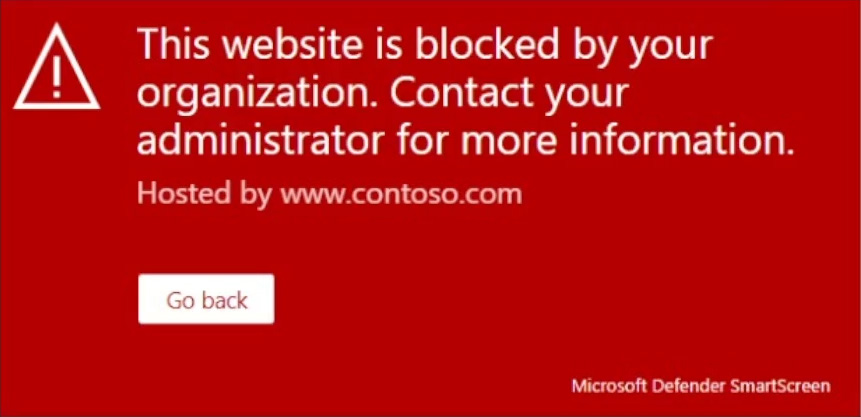
When users attempt to access the portal of a partner company, they receive the message shown in the following exhibit.
You need to enable user access to the partner company's portal.
Which Microsoft Defender for Endpoint setting should you modify?
A.Alert notifications
B.Alert suppression
C.Custom detections
D.Advanced hunting
E.IndicatorsCorrect
Explanation
The message indicates that the website is blocked by Defender SmartScreen. To enable access to the partner company's portal, you need to modify the Indicators setting in Microsoft Defender for Endpoint to allow specific URLs or domains.
You have a Microsoft 365 E3 subscription.
You plan to launch Attack simulation training for all users.
Which social engineering technique and training experience will be available? To answer, select the appropriate options in the answer area.
NOTE: Each correct selection is worth one point.
Explanation
For the social engineering technique, Credential harvest is the one available: with Microsoft 365 E3, Attack simulation training is limited to a basic set of capabilities, and Credential Harvest is the technique offered, while Link to malware and Malware attachment require Defender for Office 365 Plan 2 (included in E5). For the training experience, Mass Market Phishing is the selection, because that is the training experience offered at the E3 level, whereas Identity Theft and Web Phishing are part of the richer experiences that need the higher licence.
You have a Microsoft 365 subscription that uses Microsoft Defender for Office 365.
You need to ensure that users are prevented from opening or downloading malicious files from Microsoft Teams, OneDrive, or SharePoint Online.
What should you do?
A.Create a new Anti-malware policy.
B.Configure the Safe Links global settings.
C.Create a new Anti-phishing policy.
D.Configure the Safe Attachments global settings.Correct
Explanation
Configuring the Safe Attachments global settings in Microsoft Defender for Office 365 ensures that potentially malicious files are scanned and actioned upon when accessed from Microsoft Teams, OneDrive, or SharePoint Online.
Your company uses Microsoft Defender for Endpoint. Microsoft Defender for Endpoint includes the device groups shown in the following table.
| Rank | Device group | Members |
|---|---|---|
| 1 | Group1 | Tag Equals demo And OS In Windows 10 |
| 2 | Group2 | Tag Equals demo |
| 3 | Group3 | Domain Equals adatum.com |
| 4 | Group4 | Domain Equals adatum.com And OS In Windows 10 |
| Last | Ungrouped devices (default) | Not applicable |
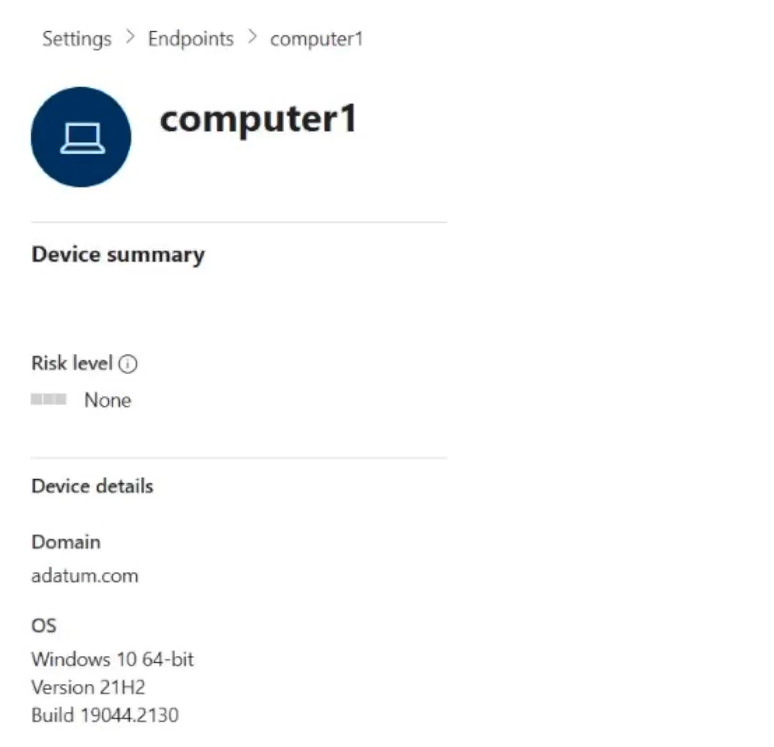
You onboard a computer named computer1 to Microsoft Defender for Endpoint as shown in the following exhibit.
Use the drop-down menus to select the answer choice that completes each statement.
NOTE: Each correct selection is worth one point.
Explanation
For the dropdown about the current membership of Computer1, the answer is Group3 only. Computer1 is in the adatum.com domain and runs Windows 10, so its properties match the rules of both Group3 and Group4. In Microsoft Defender for Endpoint a device that matches several device groups is added only to the highest ranked one, and Group3 (rank 3) outranks Group4 (rank 4). For the dropdown about adding the tag demo, the answer is Group1 only. With the tag, Computer1 matches the rules of all four groups, because it has the demo tag, runs Windows 10 and belongs to adatum.com. The same ranking rule applies, so the device lands only in Group1, which has rank 1.
Verifying access...
Access Required
You need to purchase this exam to access practice mode
Unlock a few more questions every day for 300 points you earn free on
Godlike Academy. Everything you unlock with the Daily Climb stays open for 7 days after your last unlock.