Question
Your company uses Microsoft Defender for Endpoint. Microsoft Defender for Endpoint includes the device groups shown in the following table.
| Rank | Device group | Members |
|---|---|---|
| 1 | Group1 | Tag Equals demo And OS In Windows 10 |
| 2 | Group2 | Tag Equals demo |
| 3 | Group3 | Domain Equals adatum.com |
| 4 | Group4 | Domain Equals adatum.com And OS In Windows 10 |
| Last | Ungrouped devices (default) | Not applicable |
You onboard a computer named computer1 to Microsoft Defender for Endpoint as shown in the following exhibit.
Use the drop-down menus to select the answer choice that completes each statement.
NOTE: Each correct selection is worth one point.
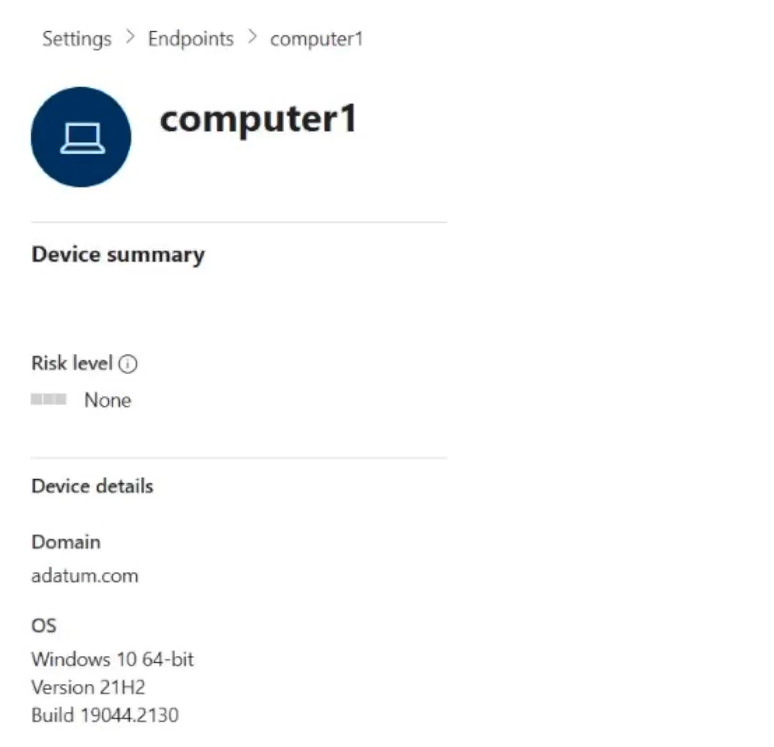
Explanation
For the dropdown about the current membership of Computer1, the answer is Group3 only. Computer1 is in the adatum.com domain and runs Windows 10, so its properties match the rules of both Group3 and Group4. In Microsoft Defender for Endpoint a device that matches several device groups is added only to the highest ranked one, and Group3 (rank 3) outranks Group4 (rank 4). For the dropdown about adding the tag demo, the answer is Group1 only. With the tag, Computer1 matches the rules of all four groups, because it has the demo tag, runs Windows 10 and belongs to adatum.com. The same ranking rule applies, so the device lands only in Group1, which has rank 1.
