You are using Microsoft 365 Copilot to enhance your productivity in Microsoft Excel.
Which two tasks can you achieve by using Copilot in Excel? Each correct answer presents a complete solution.
NOTE: Each correct selection is worth one point.
A.Customize the conditional formatting rules for your data.
B.Insert a custom chart that has specific formatting.
C.Generate a summary of key insights from your data.Correct
D.Build a pivot table based on your data.Correct
Explanation
Copilot in Excel is built to interpret your data and give insights about it, so asking for a summary of key insights is a core task. It can also create and organize PivotTables that summarize your data. Fine-tuning conditional formatting rules and producing a chart to an exact formatting specification are precise formatting jobs better suited to Excel's own Conditional Formatting and chart tools, so they are not the best answers here.
You are using Microsoft 365 Copilot to enhance your productivity in Microsoft Word.
Which two tasks can you achieve by using Copilot in Word? Each correct answer presents a complete solution.
NOTE: Each correct selection is worth one point.
A.Insert a table of contents based on the headings in your document.Correct
B.Customize the page margins to match your company's document standards.
C.Generate a summary of the key points in your document.Correct
D.Insert a custom watermark that has specific text and formatting.
Explanation
Copilot in Word helps you create, summarize, understand and refine documents, so summarizing the key points is a direct use. Because it works from the document's content and structure, it can also produce a table of contents from the headings. Page margins and custom watermarks are page layout settings that you set with Word's Layout and Design tools.
You are using Microsoft 365 Copilot to enhance your productivity in Microsoft Outlook.
Which two tasks can you achieve by using Copilot in Outlook? Each correct answer presents a complete solution.
NOTE: Each correct selection is worth one point.
A.Insert a custom HTML signature that has specific formatting.
B.Generate a draft response to an email based on the context of the conversation.Correct
C.Create a summary of unread emails in your inbox.Correct
D.Customize the folder structure to organize your emails.
Explanation
Copilot in Outlook helps you manage your inbox and write more efficiently: it can suggest replies from the context of a thread, adjust the length and tone of a draft, and summarize email so that you can catch up on what you have not read. Signatures and folder structures are mailbox settings that you manage in Outlook itself, so they are not Copilot tasks.
You have a Microsoft 365 Copilot license.
You are preparing a business presentation by using Copilot in PowerPoint.
Which two tasks can you achieve by using Copilot in PowerPoint? Each correct answer presents a complete solution.
NOTE: Each correct selection is worth one point.
A.Insert a custom animation for a specific object on a slide.
B.Create a slide layout based on the content of your presentation.Correct
C.Customize the design theme of your presentation to match your company's branding.
D.Produce a summary slide based on the key points in your presentation.Correct
Explanation
Copilot in PowerPoint works from your content: it can generate slides, improve their layouts, and summarize a presentation, so a content-based layout and a summary slide are both within reach. A custom animation for one object is detailed manual work on the Animations tab. Company branding normally comes from your organization's templates and the Design tab rather than from having Copilot customize the theme, so that is not the best answer.
You are using Microsoft 365 Copilot to enhance your productivity in Microsoft Teams.
Which two tasks can you achieve by using Copilot in Teams? Each correct answer presents a complete solution.
NOTE: Each correct selection is worth one point.
A.Mute and unmute participants in a meeting based on their location.
B.Create a custom background and add the background to your video calls.
C.Create a meeting summary, including key decisions and action items.Correct
D.Draft a response to a channel message based on the context of the conversation.Correct
Explanation
Copilot in Teams can recap conversations, organize key discussion points and summarize key actions, which makes a meeting summary with decisions and action items a core task. It also works with chat and channel conversations, so it can help you write a reply that fits the context. Muting participants by location is not something Copilot does, and custom backgrounds are a Teams meeting setting rather than a Copilot task.
A colleague from another company shares a link to a prompt.
When you select the link, you receive the following response: "Prompt not found. Sorry, it looks like the prompt is no longer available."
What is a possible cause of the response?
A.The prompt is outdated.
B.The prompt is outside of your organization.Correct
C.The prompt contains a reference to a file that you do NOT have access to.
D.The prompt is a scheduled prompt.
E.The prompt contains a file that has a sensitivity label applied.
Explanation
Prompts that users create and save are stored in user and group collections inside their own Microsoft 365 tenant, so a prompt saved in another company's tenant cannot be reached from yours. That fits the colleague being from another company. Prompts do not expire because they are old, and being scheduled does not stop a prompt from being found. A file reference or sensitivity label affects the file a prompt uses, not whether the prompt itself can be found.
You run a saved prompt and receive the following response: "You asked for a summary of File.docx. However, the file appears to be either empty, corrupted, or in a format that I cannot process."
What is a possible cause of the response?
A.You did NOT schedule the prompt to run.
B.You ran the prompt from a web app instead of a desktop app.
C.You used the wrong agent to run the prompt.
D.You do NOT have access to the file.Correct
Explanation
Copilot only surfaces organizational data that you have at least view permission for, so a saved prompt that references a file you cannot open has no content to summarize. Copilot then reports that it cannot process the file. A saved prompt does not need a schedule to run, and running it from a web app rather than a desktop app does not change whether the file can be read. The choice of agent would not make a Word file look empty or corrupted.
You receive several images from a colleague.
You suspect that the images were generated by using Microsoft 365 Copilot.
What can you use to verify whether the images were AI-generated?
A.file names
B.watermarks
C.content credentialsCorrect
D.file descriptions
Explanation
Images generated with Microsoft 365 Copilot carry content credentials, provenance metadata based on the C2PA standard that shows whether an image was generated or edited with AI, and you can inspect them on the Content Credentials site. Visible watermarks are not reliable because each user chooses whether to turn them on for images, so their absence proves nothing. File names and descriptions can be anything the author types, so they verify nothing.
You are a merchandiser who is planning for the upcoming season.
You prompt Microsoft 365 Copilot to suggest which products to stock based on historical sales data. Without reviewing the suggestions or checking current market trends, you place a large order based solely on the output of Copilot.
What is this an example of?
A.verification
B.overrelianceCorrect
C.fabrication
D.prompt injection
Explanation
Acting on Copilot output without reviewing it or checking it against other information is overreliance, because the user trusts the tool more than is warranted. Copilot responses are not guaranteed to be factual, and users are expected to apply their own judgment before acting on them. Verification is the opposite behavior, since it means checking the output. Fabrication would mean Copilot produced invented content, and nothing in the scenario says it did. Prompt injection is an attack that uses malicious instructions to manipulate the model, which did not happen here.
You are comparing the difference between Microsoft 365 Copilot and Microsoft 365 Copilot Chat.
What is available in both versions?
A.the Researcher agent
B.Copilot PagesCorrect
C.Copilot Notebooks
Explanation
Copilot Pages is available in both experiences because its license requirement is only a OneDrive license and an active OneDrive site, not a Microsoft 365 Copilot license. The Researcher agent is an advanced agent experience that belongs to the licensed Microsoft 365 Copilot offering, so it is not a shared capability. Copilot Notebooks is listed as requiring a Microsoft Copilot license in the at-a-glance requirements, so it is not the feature common to both.
You are discussing Microsoft 365 Copilot with a colleague. The colleague asks which data Copilot uses to answer questions when using the Work scope.
What should you tell your colleague?
A.Copilot provides responses based only on data that the user can access and the general knowledge that Copilot was trained on.Correct
B.Copilot provides responses based on all the data in your organization's Microsoft 365 environment and the general knowledge that Copilot was trained on.
C.Copilot provides responses based only on data that the user can access.
D.Copilot provides responses based only on the general knowledge that Copilot was trained on.
Explanation
Copilot coordinates large language models with Microsoft Graph content, and it only surfaces organizational data to which the individual user has at least view permissions. A response therefore combines the data the user can access with the model's general knowledge. It does not draw on everything in the tenant, which rules out the option about all organizational data. The options that use only accessible data or only general knowledge each leave out one of the two parts.
For each of the following statements, select Yes if the statement is true. Otherwise, select No.
NOTE: Each correct selection is worth one point.
Explanation
Statement 1 (Yes): Copilot accesses content through Microsoft Graph and anchors responses in organizational data that includes chats. It only surfaces chats the user has permission to access.
Statement 2 (No): Copilot can help draft and summarize email in Outlook, but it does not act as a conditional rule that schedules and sends messages on its own. Copilot provides drafts for the user to review rather than fully automating the task. Conditional automation of this kind calls for a dedicated agent or automation tool.
Statement 3 (Yes): Copilot in Teams can summarize meetings, capture action items, and answer questions about meeting content. To reference a meeting after it ends, transcription or recording must be configured.
For each of the following statements, select Yes if the statement is true. Otherwise, select No.
NOTE: Each correct selection is worth one point.
Explanation
Statement 1 (No): Prompts, responses, and data accessed through Microsoft Graph are not used to train the foundation language models used by Copilot. Your organization's data grounds individual responses but does not become training data.
Statement 2 (Yes): Copilot supports primary mailboxes in Exchange Online and can also use content the user is permitted to access in archive, shared, and delegate mailboxes. Group mailboxes are the exception.
Statement 3 (Yes): Copilot uses the same underlying access controls as other Microsoft 365 services and honors the existing permissions model. It presents only the data each individual is already able to access.
You use Microsoft 365 Copilot.
For each of the following statements, select Yes if the statement is true. Otherwise, select No.
NOTE: Each correct selection is worth one point.
Explanation
Statement 1 (No): Users can delete their own Copilot activity history, which includes their prompts and the responses, by going to the My Account portal. Admins set retention through Microsoft Purview, but the deletion itself does not depend on an admin granting permission.
Statement 2 (No): Deleting a conversation removes its prompts and responses, which are stored in the user's mailbox. Files are separate content that stays in SharePoint or OneDrive under its own permissions and retention.
Statement 3 (Yes): Copilot messages are removed when a user deletes the chat or when the user's activity history is deleted. Uninstalling an agent is not one of those actions, so the conversations remain.
For each of the following statements, select Yes if the statement is true. Otherwise, select No.
NOTE: Each correct selection is worth one point.
Explanation
Statement 1 (No): Prompts, responses, and data accessed through Microsoft Graph are not used to train the foundation language models, including those used by Copilot. The same applies to the stored record of your interactions.
Statement 2 (No): Copilot does not grant or change access to content. It operates within existing permissions, so managing who can reach which content remains the job of the Microsoft 365 permission models, such as those in SharePoint.
Statement 3 (Yes): Copilot presents only data that each individual can access, using the same underlying controls for data access used in other Microsoft 365 services. The semantic index also honors the user's identity-based access boundary during grounding.
For each of the following statements, select Yes if the statement is true. Otherwise, select No.
NOTE: Each correct selection is worth one point.
Explanation
Statement 1 (Yes): A prompt injection attack tries to coerce the model into doing something it should not, so it can lead to unintended behavior and to sensitive data being revealed. This is why Copilot applies layered protections against these attacks throughout prompt processing.
Statement 2 (Yes): Malicious instructions can be typed directly into a prompt or embedded indirectly in content the model processes, such as text files, images, code, or encoded text. Indirect attacks work because the instructions are not in the prompt itself.
Statement 3 (Yes): Prompt injection targets the way generative AI systems interpret natural language, where instructions and data are not cleanly separated. Other injection attacks, such as SQL injection, exploit different mechanisms and are not the same vulnerability.
You have a Microsoft 365 subscription.
You do NOT have a Microsoft 365 Copilot license.
For each of the following statements, select Yes if the statement is true. Otherwise, select No.
NOTE: Each correct selection is worth one point.
Explanation
Statement 1 (Yes): File upload and analysis are part of Copilot Chat, with or without a Microsoft 365 Copilot license. Uploading a file is one of the ways you give Copilot Chat organizational content, because it has no automatic access to Microsoft Graph.
Statement 2 (Yes): Copilot Chat is the baseline experience included with eligible Microsoft 365 licenses, and it does not require a Copilot license. Microsoft 365 Business Standard is one of the eligible business plans.
Statement 3 (Yes): Without a Copilot license, agents grounded in instructions and public websites are included, and agents that reach work data are available on a pay-as-you-go basis. Copilot Chat can therefore use an agent with access to organizational content such as SharePoint, as long as pay-as-you-go billing is set up.
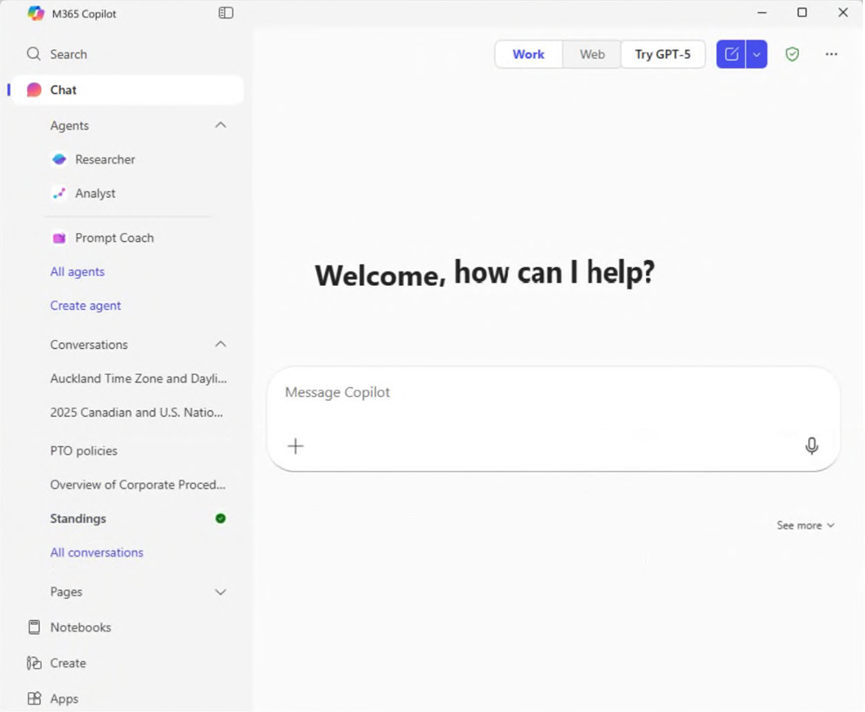
You open Microsoft 365 Copilot as shown in the following exhibit.
What can you infer about the Standings conversation?
A.The conversation contains only anonymous data.
B.The conversation contains a verified response.
C.The conversation was added to a notebook.
D.The conversation contains a scheduled prompt.Correct
E.The conversation was shared.
Explanation
Standings is the only conversation in the list shown in bold and with a green dot, which points to something that finished on its own and has not been read yet. A scheduled prompt fits this, because it runs without you and adds its result to its conversation. Sharing a conversation does not add new content to it, and adding one to a notebook is managed from Notebooks rather than flagged here. Copilot has no marker for verified responses or anonymous data.
Select the answer that correctly completes the sentence.
Explanation
The answer choice is Enterprise data protection (EDP). EDP is the set of controls and commitments that apply to Copilot prompts and responses, including isolation between tenants and the commitment that your data is not used to train foundation models. Sensitivity labels classify and protect individual content, and Copilot honors them, but they make no commitment about model training. Zero Trust is a general security strategy, and the Common Data Model is a standard data schema.
Select the answer that correctly completes the sentence.
Explanation
The answer choice is all the Microsoft 365 Copilot activity. The My Account portal is where users delete their Copilot activity history, which includes their prompts and the responses Copilot returned. Delete history there applies to the activity history as a whole, so it does not target one conversation, a date range, or a single agent. To remove one conversation, you delete it from the conversation list in Copilot.
Verifying access...
Access Required
You need to purchase this exam to access practice mode
Unlock a few more questions every day for 300 points you earn free on
Godlike Academy. Everything you unlock with the Daily Climb stays open for 7 days after your last unlock.