You are investigating an incident by using Microsoft 365 Defender.
You need to create an advanced hunting query to count failed sign-in authentications on three devices named CFOLaptop, CEOLaptop, and COOLaptop.
How should you complete the query? To answer, drag the appropriate values to the four lines of the query in the answer area, in order. The second and third lines are joined by the operator "and".
NOTE: Each correct selection is worth one point.
Explanation
Sign-in (logon) activity on devices is recorded in the DeviceLogonEvents table, not the general DeviceEvents table. The query filters to the three laptops with where DeviceName in (...) and, joined by "and", keeps only failed attempts with ActionType == "LogonFailed". FailureReason is a separate column that describes why a logon failed, so comparing ActionType to FailureReason never matches a failed logon. Finally, summarize LogonFailures=count() by DeviceName, LogonType produces the count per device; project cannot use the count() aggregation.
You need to receive a security alert when a user attempts to sign in from a location that was never used by the other users in your organization to sign in.
Which anomaly detection policy should you use?
A.Impossible travel
B.Activity from anonymous IP addresses
C.Activity from infrequent countryCorrect
D.Malware detection
Explanation
The Activity from infrequent country policy in Microsoft Defender for Cloud Apps alerts on activity from a location that was not recently or never visited by the user or by any user in the organization. Impossible travel looks at two sign-ins from distant locations within a time too short to travel between them. Activity from anonymous IP addresses flags proxy or anonymizer IPs, and Malware detection scans files in cloud storage, so neither is about rare locations.
You have a Microsoft 365 subscription that uses Microsoft Defender for Office 365.
You have Microsoft SharePoint Online sites that contain sensitive documents. The documents contain customer account numbers that each consists of 32 alphanumeric characters.
You need to create a data loss prevention (DLP) policy to protect the sensitive documents.
What should you use to detect which documents are sensitive?
A.SharePoint search
B.a hunting query in Microsoft 365 Defender
C.Azure Information Protection
D.RegEx pattern matchingCorrect
Explanation
A DLP policy detects sensitive content through sensitive information types, and a custom sensitive information type for a 32-character alphanumeric account number is defined with a regular expression pattern. Azure Information Protection is a labeling and protection solution; it does not by itself define how to recognize this custom number format. SharePoint search and advanced hunting queries are not detection mechanisms that a DLP policy uses.
Your company uses line-of-business apps that contain Microsoft Office VBA macros.
You need to prevent users from downloading and running additional payloads from the Office VBA macros as additional child processes.
Which two commands can you run to achieve the goal? Each correct answer presents a complete solution.
NOTE: Each correct selection is worth one point.
GUID D4F940AB-401B-4EFC-AADC-AD5F3C50688A is the attack surface reduction rule Block all Office applications from creating child processes, which stops macros from launching further payloads as child processes. To actually prevent the behavior the rule must be set to Enabled (block mode), and both Set-MpPreference and Add-MpPreference can configure it, so A and D each work. AuditMode only logs what the rule would have blocked and lets the child process run, so B and C do not meet the goal.
Your company uses Microsoft Defender for Endpoint.
The company has Microsoft Word documents that contain macros. The documents are used frequently on the devices of the company's accounting team.
You need to hide false positive in the Alerts queue, while maintaining the existing security posture.
Which three actions should you perform? Each correct answer presents part of the solution.
NOTE: Each correct selection is worth one point.
A.Resolve the alert automatically.
B.Hide the alert.Correct
C.Create a suppression rule scoped to any device.
D.Create a suppression rule scoped to a device group.Correct
E.Generate the alert.Correct
Explanation
A suppression rule is created from an existing alert, so the alert must first be generated. In the suppression rule you choose to hide the alert (rather than resolve it) so it stays out of the queue, and you scope the rule to the accounting team's device group so that the same macro activity on any other device still raises an alert. Scoping to any device would weaken detection everywhere, and automatically resolving the alert changes alert state instead of simply keeping the false positive out of the queue.
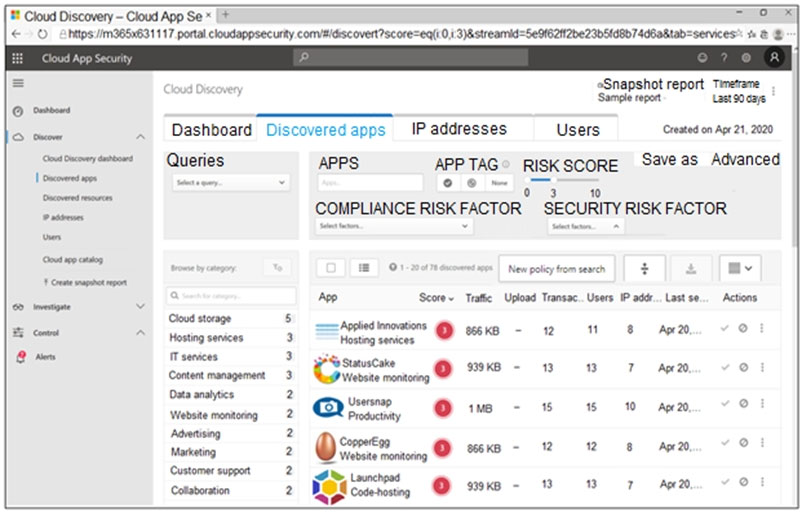
You open the Cloud App Security portal as shown in the following exhibit.
Your environment does NOT have Microsoft Defender for Endpoint enabled.
You need to remediate the risk for the Launchpad app.
Which four actions should you perform in sequence? To answer, move the appropriate actions from the list of actions to the answer area and arrange them in the correct order.
Explanation
Launchpad has a low risk score, so it should be blocked: select the app in Discovered apps and tag it as Unsanctioned. Without Microsoft Defender for Endpoint integration, unsanctioned apps are not blocked automatically on endpoints, so you generate a block script for your firewall or proxy and run it on the source appliance that uploaded the discovery logs. Azure Cloud Shell cannot change the on-premises appliance, and tagging the app as Sanctioned would allow it.
You have a Microsoft 365 E5 subscription.
You plan to perform cross-domain investigations by using Microsoft 365 Defender.
You need to create an advanced hunting query to identify devices affected by a malicious email attachment.
How should you complete the query? To answer, select the appropriate options in the answer area.
NOTE: Each correct selection is worth one point.
```
EmailAttachmentInfo
| where SenderFromAddress =~ "MaliciousSender@example.com"
| where isnotempty(SHA256)
| [Dropdown 1] (
DeviceFileEvents
| [Dropdown 2] FileName, SHA256
) on SHA256
| [Dropdown 3] Timestamp, FileName, SHA256, DeviceName, DeviceId, NetworkMessageId, SenderFromAddress, RecipientEmailAddress
```
Explanation
Dropdown 1 is join: the attachments from the malicious sender must be matched to device file activity on a common column, which is what join (...) on SHA256 does; union would just append the rows of both tables without matching them. Dropdown 2 is project, which keeps only the FileName and SHA256 columns from DeviceFileEvents before the join; extend would add columns instead of selecting them. Dropdown 3 is project again, selecting the final set of columns to display, including the device and the email details.
You have the following advanced hunting query in Microsoft 365 Defender.
You need to receive an alert when any process disables System Restore on a device managed by Microsoft Defender during the last 24 hours.
Which two actions should you perform? Each correct answer presents part of the solution.
NOTE: Each correct selection is worth one point.
A.Create a detection rule.Correct
B.Create a suppression rule.
C.Add | order by Timestamp to the query.
D.Replace DeviceProcessEvents with DeviceNetworkEvents.
E.Add DeviceId and ReportId to the output of the query.Correct
Explanation
To get alerts from an advanced hunting query you create a custom detection rule from it. For Defender for Endpoint tables, the rule's query must return Timestamp, DeviceId and ReportId so alerts can be tied to the device and the original event, and the current project line returns only Timestamp, AccountName and ProcessCommandLine. A suppression rule hides alerts instead of creating them, sorting the output does not matter, and process creation is recorded in DeviceProcessEvents, not DeviceNetworkEvents.
You are investigating a potential attack that deploys a new ransomware strain.
You have three custom device groups. The groups contain devices that store highly sensitive information.
You plan to perform automated actions on all devices.
You need to be able to temporarily group the machines to perform actions on the devices.
Which three actions should you perform? Each correct answer presents part of the solution.
NOTE: Each correct selection is worth one point.
A.Assign a tag to the device group.Correct
B.Add the device users to the admin role.
C.Add a tag to the machines.Correct
D.Create a new device group that has a rank of 1.Correct
E.Create a new admin role.
F.Create a new device group that has a rank of 4.
Explanation
In Defender for Endpoint, device group membership can be based on a device tag, so you add a tag to the machines and use that tag as the matching condition of a new device group. A device belongs only to the highest-ranked group it matches, so the temporary group must have rank 1 to take precedence over the three existing custom groups; a rank of 4 would leave the devices in their current groups. Admin roles control who can manage devices, not how devices are grouped for automated actions.
Note: This question is part of a series of questions that present the same scenario. Each question in the series contains a unique solution that might meet the stated goals. Some question sets might have more than one correct solution, while others might not have a correct solution.
After you answer a question in this section, you will NOT be able to return to it. As a result, these questions will not appear in the review screen.
You are configuring Microsoft Defender for Identity integration with Active Directory.
From the Microsoft Defender for identity portal, you need to configure several accounts for attackers to exploit.
Solution: From Entity tags, you add the accounts as Honeytoken accounts.
Does this meet the goal?
A.YesCorrect
B.No
Explanation
Honeytoken accounts are decoy accounts set up as traps for attackers; any activity on them, such as a sign-in attempt, raises an alert. In Defender for Identity you mark them under Entity tags as Honeytoken, so this meets the goal.
Note: This question is part of a series of questions that present the same scenario. Each question in the series contains a unique solution that might meet the stated goals. Some question sets might have more than one correct solution, while others might not have a correct solution.
After you answer a question in this section, you will NOT be able to return to it. As a result, these questions will not appear in the review screen.
You are configuring Microsoft Defender for Identity integration with Active Directory.
From the Microsoft Defender for identity portal, you need to configure several accounts for attackers to exploit.
Solution: From Azure AD Identity Protection, you configure the sign-in risk policy.
Does this meet the goal?
A.Yes
B.NoCorrect
Explanation
A sign-in risk policy in Identity Protection (now Microsoft Entra ID Protection) responds to risky sign-ins with controls such as MFA or blocking; it does not create decoy accounts and is not configured in Defender for Identity. Decoy accounts for attackers are configured as Honeytoken entity tags in Defender for Identity.
Note: This question is part of a series of questions that present the same scenario. Each question in the series contains a unique solution that might meet the stated goals. Some question sets might have more than one correct solution, while others might not have a correct solution.
After you answer a question in this section, you will NOT be able to return to it. As a result, these questions will not appear in the review screen.
You are configuring Microsoft Defender for Identity integration with Active Directory.
From the Microsoft Defender for identity portal, you need to configure several accounts for attackers to exploit.
Solution: You add the accounts to an Active Directory group and add the group as a Sensitive group.
Does this meet the goal?
A.Yes
B.NoCorrect
Explanation
The Sensitive tag marks high-value accounts and groups, such as administrators, so that Defender for Identity monitors them more closely and shows them in lateral movement paths; it does not make them decoys. Accounts meant as bait for attackers are tagged as Honeytoken accounts instead.
You implement Safe Attachments policies in Microsoft Defender for Office 365.
Users report that email messages containing attachments take longer than expected to be received.
You need to reduce the amount of time it takes to deliver messages that contain attachments without compromising security. The attachments must be scanned for malware, and any messages that contain malware must be blocked.
What should you configure in the Safe Attachments policies?
A.Dynamic DeliveryCorrect
B.Replace
C.Block and Enable redirect
D.Monitor and Enable redirect
Explanation
Dynamic Delivery delivers the message body immediately with a placeholder for each attachment while the attachment is scanned in the sandbox, then reattaches it if it is clean, so users are not delayed and attachments are still scanned. Block holds the whole message until scanning finishes, which is the delay users report. Monitor delivers malware rather than blocking it, and Replace is a legacy action that strips attachments rather than speeding delivery.
You are informed of an increase in malicious email being received by users.
You need to create an advanced hunting query in Microsoft 365 Defender to identify whether the accounts of the email recipients were compromised. The query must return the most recent 20 sign-ins performed by the recipients within an hour of receiving the known malicious email.
How should you complete the query? To answer, select the appropriate options in the answer area.
NOTE: Each correct selection is worth one point.
```
let MaliciousEmails = [Dropdown 1]
| where MalwareFilterVerdict == "Malware"
| project TimeEmail = Timestamp, Subject, SenderFromAddress, AccountName = tostring(split(RecipientEmailAddress, "@")[0]);
MaliciousEmails
| join (
[Dropdown 2]
| project LogonTime = Timestamp, AccountName, DeviceName
) on AccountName
| where (LogonTime - TimeEmail) between (0min.. 60min)
| [Dropdown 3]
```
Explanation
Dropdown 1 is EmailEvents, the table that holds each message with its recipient, subject and malware verdict, so it can supply the malicious messages and recipient account names; EmailAttachmentInfo describes attachments only. Dropdown 2 is IdentityLogonEvents, which records sign-in activity per AccountName and lets the query compare logon time with email arrival time. Dropdown 3 is take 20, which limits the output to 20 rows as in Microsoft's own sample for this scenario; top 20 is incomplete without a by clause, and select is not a KQL operator.
You receive a security bulletin about a potential attack that uses an image file.
You need to create an indicator of compromise (IoC) in Microsoft Defender for Endpoint to prevent the attack.
Which indicator type should you use?
A.a URL/domain indicator that has Action set to Alert only
B.a URL/domain indicator that has Action set to Alert and block
C.a file hash indicator that has Action set to Alert and blockCorrect
D.a certificate indicator that has Action set to Alert and block
Explanation
The threat is a specific file, so a file hash indicator identifies it wherever it appears, and the Alert and block action prevents it from being used while raising an alert. URL/domain indicators act on network locations, not on the file itself, and Alert only would not prevent the attack. Certificate indicators apply to signed executables and their signing certificates, not to an image file.
Your company deploys the following services:
- Microsoft Defender for Identity
- Microsoft Defender for Endpoint
- Microsoft Defender for Office 365
You need to provide a security analyst with the ability to use the Microsoft 365 security center. The analyst must be able to approve and reject pending actions generated by Microsoft Defender for Endpoint. The solution must use the principle of least privilege.
Which two roles should you assign to the analyst? Each correct answer presents part of the solution.
NOTE: Each correct selection is worth one point.
A.the Compliance Data Administrator in Azure Active Directory (Azure AD)
B.the Active remediation actions role in Microsoft Defender for EndpointCorrect
C.the Security Administrator role in Azure Active Directory (Azure AD)
D.the Security Reader role in Azure Active Directory (Azure AD)Correct
Explanation
The Security Reader role in Azure AD (Microsoft Entra ID) gives the analyst read-only access to the security portal, which is the least-privileged way to sign in and view incidents and the Action center. Approving or rejecting pending automated investigation actions requires the Defender for Endpoint RBAC permission Active remediation actions, granted through a Defender for Endpoint role. Security Administrator would also work but grants far more rights than needed, and Compliance Data Administrator is unrelated to remediation actions.
You have a Microsoft 365 E5 subscription that uses Microsoft Defender and an Azure subscription that uses Azure Sentinel.
You need to identify all the devices that contain files in emails sent by a known malicious email sender. The query will be based on the match of the SHA256 hash.
How should you complete the query? To answer, select the appropriate options in the answer area.
NOTE: Each correct selection is worth one point.
```
EmailAttachmentInfo
| where SenderFromAddress =~ "MaliciousSender@example.com"
where isnotempty [Dropdown 1]
| join (
DeviceFileEvents
| project FileName, SHA256
) on [Dropdown 2]
| project Timestamp, FileName, SHA256, DeviceName, DeviceId, NetworkMessageId, SenderFromAddress, RecipientEmailAddress
```
Explanation
For the where isnotempty dropdown, choose (SHA256): only attachments that have a hash can be matched against device file events, so rows with an empty SHA256 are discarded before the join. EmailAttachmentInfo has no DeviceId column, and filtering on sender or recipient does not help the hash match.
For the join on dropdown, choose SHA256: it is the only column common to both sides of the join (the inner query projects only FileName and SHA256), and the requirement is to match files by their hash. Joining on DeviceId, RecipientEmailAddress or SenderFromAddress would fail because those columns are not in the DeviceFileEvents projection.
You need to configure Microsoft Cloud App Security to generate alerts and trigger remediation actions in response to external sharing of confidential files.
Which two actions should you perform in the Cloud App Security portal? Each correct answer presents part of the solution.
NOTE: Each correct selection is worth one point.
A.From Settings, select Information Protection, select Azure Information Protection, and then select Only scan files for Azure Information Protection classification labels and content inspection warnings from this tenant.
B.Select Investigate files, and then filter App to Office 365.
C.Select Investigate files, and then select New policy from search.
D.From Settings, select Information Protection, select Azure Information Protection, and then select Automatically scan new files for Azure Information Protection classification labels and content inspection warnings.Correct
E.From Settings, select Information Protection, select Files, and then enable file monitoring.Correct
F.Select Investigate files, and then filter File Type to Document.
Explanation
Cloud App Security (now Defender for Cloud Apps) can only evaluate files and their sensitivity labels after file monitoring is enabled, and it must be set to automatically scan new files for sensitivity (Azure Information Protection) labels so that confidential files are identified. With those two settings in place, file policies can alert on and remediate external sharing of labelled files. Only scanning files from this tenant restricts label detection rather than enabling it, and filtering the Files page by app or file type only changes a view.
You purchase a Microsoft 365 subscription.
You plan to configure Microsoft Cloud App Security.
You need to create a custom template-based policy that detects connections to Microsoft 365 apps that originate from a botnet network.
What should you use? To answer, select the appropriate options in the answer area.
NOTE: Each correct selection is worth one point.
Explanation
For Policy template type, choose Activity policy: activity policies evaluate activities from connected apps such as Microsoft 365 against filters you define, and the policy templates for risky IP addresses are activity policies. Access policies require Conditional Access App Control session routing, and anomaly detection policies are built-in behavioral detections that you cannot filter by a custom condition.
For Filter based on, choose IP address tag: Defender for Cloud Apps applies the built-in Botnet tag from Microsoft threat intelligence to IP addresses, so filtering on the IP address tag Botnet catches these connections. Source and user agent string do not identify botnet origin.
Your company has a single office in Istanbul and a Microsoft 365 subscription.
The company plans to use conditional access policies to enforce multi-factor authentication (MFA).
You need to enforce MFA for all users who work remotely.
What should you include in the solution?
A.a fraud alert
B.a user risk policy
C.a named locationCorrect
D.a sign-in user policy
Explanation
Define the Istanbul office IP range as a trusted named location, then create a Conditional Access policy that requires MFA for all locations except that named location, so only remote sign-ins are challenged. A fraud alert lets users report unexpected MFA prompts, and user risk or sign-in risk policies react to Identity Protection risk levels rather than to where the user works from.
Verifying access...
Access Required
You need to purchase this exam to access practice mode
Unlock a few more questions every day for 300 points you earn free on
Godlike Academy. Everything you unlock with the Daily Climb stays open for 7 days after your last unlock.