Question
You have a Microsoft 365 subscription.
You use Microsoft Intune Suite to manage devices.
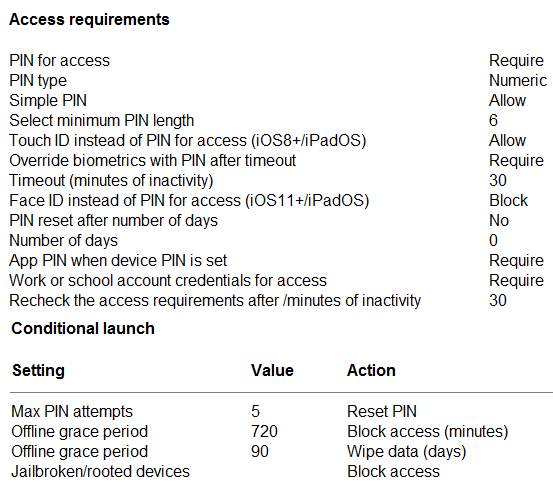
You have the iOS app protection policy shown in the following exhibit.
Use the drop-down menus to select the answer choice that completes each statement based on the information presented in the graphic.
NOTE: Each correct selection is worth one point.
Explanation
After 30 minutes of inactivity: the Recheck the access requirements after (minutes of inactivity) value is 30, and Intune documents that when this timer expires the app PIN screen is shown again, so the user is prompted for the PIN. Override biometrics with PIN after timeout is also set to 30 minutes, so Touch ID cannot be used in place of the PIN at that point; work account sign-in is not what the inactivity timer re-prompts.
Entering the wrong PIN five times: Max PIN attempts is 5 with the action Reset PIN, which makes the user sign in with their work account and set a new app PIN. App protection policies act only on the app, never on the device passcode, so reset the device PIN is wrong; block access and wipe company data are other actions that are not configured here.
