You have a Microsoft 365 subscription.
You use Microsoft Intune Suite to manage devices.
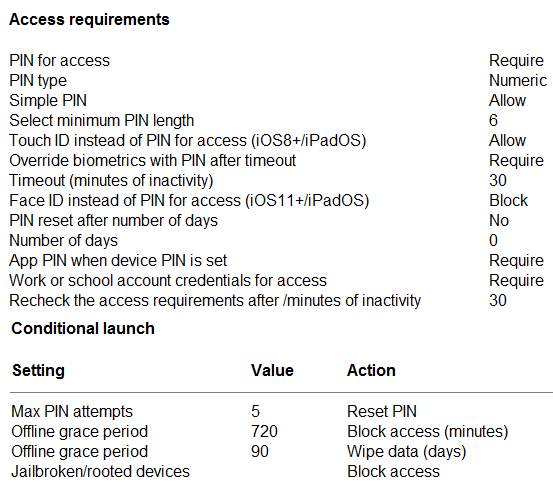
You have the iOS app protection policy shown in the following exhibit.
Use the drop-down menus to select the answer choice that completes each statement based on the information presented in the graphic.
NOTE: Each correct selection is worth one point.
Explanation
After 30 minutes of inactivity: the Recheck the access requirements after (minutes of inactivity) value is 30, and Intune documents that when this timer expires the app PIN screen is shown again, so the user is prompted for the PIN. Override biometrics with PIN after timeout is also set to 30 minutes, so Touch ID cannot be used in place of the PIN at that point; work account sign-in is not what the inactivity timer re-prompts.
Entering the wrong PIN five times: Max PIN attempts is 5 with the action Reset PIN, which makes the user sign in with their work account and set a new app PIN. App protection policies act only on the app, never on the device passcode, so reset the device PIN is wrong; block access and wipe company data are other actions that are not configured here.
You have a Microsoft 365 E5 subscription and a computer that runs Windows 11.
You need to create a customized installation of Microsoft 365 Apps for enterprise.
Which four actions should you perform in sequence? To answer, move the appropriate actions from the list of actions to the answer area and arrange them in the correct order.
Explanation
First download the Office Deployment Tool and run it to extract setup.exe and sample configuration files. Next edit the XML configuration file to define the products, languages, channel and excluded apps for the custom installation. Then run setup.exe /download with that file to download the installation files, and finally run setup.exe /configure to install Microsoft 365 Apps with the customized settings. The /packager switch creates an App-V package, which is not needed for a standard customized installation.
You have devices enrolled in Microsoft Intune as shown in the following table.
| Name | Platform |
|---|---|
| Device1 | Windows 10 |
| Device2 | Windows 11 |
| Device3 | Android |
| Device4 | iOS |
On which devices can you apply app configuration policies?
A.Device2 only
B.Device1 and Device2 only
C.Device3 and Device4 onlyCorrect
D.Device2, Device3, and Device4 only
E.Device1, Device2, Device3, and Device4
Explanation
Intune app configuration policies target iOS/iPadOS and Android apps, either through managed devices or through managed apps with the Intune App SDK. Windows 10 and Windows 11 apps are configured with device configuration profiles (for example Settings catalog or ADMX), not app configuration policies, so only the Android and iOS devices qualify.
You have an Azure AD tenant named contoso.com that contains the devices shown in the following table.
| Name | Operating system |
|---|---|
| Device1 | Windows 10 |
| Device2 | Android 8.0 |
| Device3 | Android 9 |
| Device4 | iOS 11.0 |
| Device5 | iOS 11.4.1 |
All devices contain an app named App1 and are enrolled in Microsoft Intune.
You need to prevent users from copying data from App1 and pasting the data into other apps.
Which type of policy and how many policies should you create in Intune? To answer, select the appropriate options in the answer area.
NOTE: Each correct selection is worth one point.
Explanation
Policy type: restricting cut, copy and paste between apps is a data protection setting of an Intune app protection policy. App configuration policies only supply app settings, compliance policies evaluate device state, and Conditional Access controls sign-in, so none of them can stop a paste.
Minimum number of policies: app protection policies are created per platform, and a single policy covers every OS version of that platform. The devices span three platforms (Windows, Android and iOS), so three policies are needed: one for Windows, one for Android and one for iOS.
You have a Microsoft 365 subscription that uses Microsoft Intune Suite.
You use Microsoft Intune to manage devices.
You plan to deploy two apps named App1 and App2 to all Windows devices. App1 must be installed before App2.
From the Intune admin center, you create and deploy two Windows app (Win32) apps.
You need to ensure that App1 is installed before App2 on every device.
What should you configure?
A.the App1 deployment configurations
B.a dynamic device group
C.a detection rule
D.the App2 deployment configurationsCorrect
Explanation
Win32 app dependencies are defined on the app that needs the other app, so you add App1 as a dependency in App2's configuration. Intune then installs App1 before it installs App2. Configuring App1 would not create the ordering, a detection rule only checks whether an app is installed, and a dynamic group only controls targeting.
You have a Microsoft Intune subscription.
You have devices enrolled in Intune as shown in the following table.
| Name | Operating system |
|---|---|
| Device1 | Android 8.1.0 |
| Device2 | Android 9 |
| Device3 | iOS 11.4.1 |
| Device4 | iOS 12.3.1 |
| Device5 | iOS 12.3.2 |
An app named App1 is installed on each device.
What is the minimum number of app configuration policies required to manage App1?
A.1
B.2Correct
C.3
D.4
E.5
Explanation
An app configuration policy for managed devices is created for one platform, either Android Enterprise or iOS/iPadOS, and applies to all OS versions of that platform. The devices run Android and iOS, so you need one policy per platform, two in total. One policy cannot span both platforms, and separate policies per OS version are unnecessary.
You have a Microsoft 365 E5 subscription that contains 100 iOS devices enrolled in Microsoft Intune.
You need to deploy a custom line-of-business (LOB) app to the devices by using Intune.
Which extension should you select for the app package file?
A..intunemac
B..ipaCorrect
C..apk
D..appx
Explanation
An iOS/iPadOS line-of-business app is uploaded to Intune as an .ipa package. The .apk format is for Android, .appx for Windows, and .intunemac was the old wrapped macOS package format.
You have a Microsoft 365 E5 subscription that contains a user named User1 and a web app named App1.
App1 must only accept modern authentication requests.
You plan to create a Conditional Access policy named CAPolicy1 that will have the following settings:
- Assignments
- Users or workload identities: User1
- Cloud apps or actions: App1
- Access controls
- Grant: Block access
You need to block only legacy authentication requests to App1.
Which condition should you add to CAPolicy1?
A.Filter for devices
B.Device platforms
C.User risk
D.Sign-in risk
E.Client appsCorrect
Explanation
The Client apps condition lets a Conditional Access policy target legacy authentication clients (Exchange ActiveSync clients and other clients) separately from browsers and modern authentication clients. Combined with Block access, it blocks only legacy authentication. Device filters, device platforms and risk conditions do not distinguish legacy from modern authentication.
All users have Microsoft 365 apps deployed.
You need to configure Microsoft 365 apps to meet the following requirements:
- Enable the automatic installation of WebView2 Runtime.
- Prevent users from submitting feedback.
Which settings should you configure in the Microsoft 365 Apps admin center? To answer, select the appropriate setting for each requirement.
NOTE: Each correct selection is worth one point.
Explanation
Enable the automatic installation of WebView2 Runtime: this is set under Customization > Device Configuration > Modern Apps Settings > Microsoft Edge WebView2, using the Enable automatic installation of WebView2 Runtime check box; there is no Cloud Policy setting for it.
Prevent users from submitting feedback: Policy Management (Cloud Policy) holds the Office policy settings such as Allow users to submit feedback to Microsoft, which you set to Disabled and assign to the users. Servicing, Health and Inventory pages only manage updates and reporting.
You have a Microsoft 365 subscription.
You have 10 computers that run Windows 10 and are enrolled in mobile device management (MDM).
You need to deploy the Microsoft 365 Apps for enterprise suite to all the computers.
What should you do?
A.From the Microsoft Intune admin center, create a Windows 10 device profile.
B.From Azure AD, add an app registration.
C.From Azure AD, add an enterprise application.
D.From the Microsoft Intune admin center, add an app.Correct
Explanation
In the Intune admin center you add an app of type Microsoft 365 Apps (Windows 10 and later) and assign it to the devices, and Intune installs the suite. A device configuration profile configures settings rather than deploying the suite, and app registrations or enterprise applications in Azure AD (Microsoft Entra ID) handle identity integration, not software installation.
You have a Microsoft 365 subscription that uses Microsoft Intune Suite.
You use Microsoft Intune to manage devices.
You have a Windows 11 device named Device1 that is enrolled in Intune. Device1 has been offline for 30 days.
You need to remove Device1 from Intune immediately. The solution must ensure that if the device checks in again, any apps and data provisioned by Intune are removed. User-installed apps, personal data, and OEM-installed apps must be retained.
What should you use?
A.a Delete actionCorrect
B.a Retire action
C.a Fresh Start action
D.an Autopilot Reset action
Explanation
Delete removes the device from the Intune admin center immediately, and the next time the device checks in, the company apps and data that Intune provisioned are removed while personal data stays. Retire also removes only company data, but on an offline device it waits until the device checks in before the device is removed, so it is not immediate. Fresh Start and Autopilot Reset reinstall or reset Windows and remove user-installed apps.
You have a Microsoft 365 subscription that uses Microsoft Intune Suite.
You use Microsoft Intune to manage devices.
You need to review the startup times and restart frequencies of the devices.
What should you use?
A.Azure Monitor
B.Intune Data Warehouse
C.Microsoft Defender for Endpoint
D.Endpoint analyticsCorrect
Explanation
Endpoint analytics in the Intune admin center provides the Startup performance report (boot and sign-in times) and restart frequency data, so it is the tool for reviewing device startup times and restarts. Azure Monitor requires devices to send data to a workspace and has no built-in startup performance view for Intune devices. Intune Data Warehouse exposes inventory and compliance data, not boot performance, and Defender for Endpoint focuses on security signals.
You have a Microsoft 365 E5 subscription.
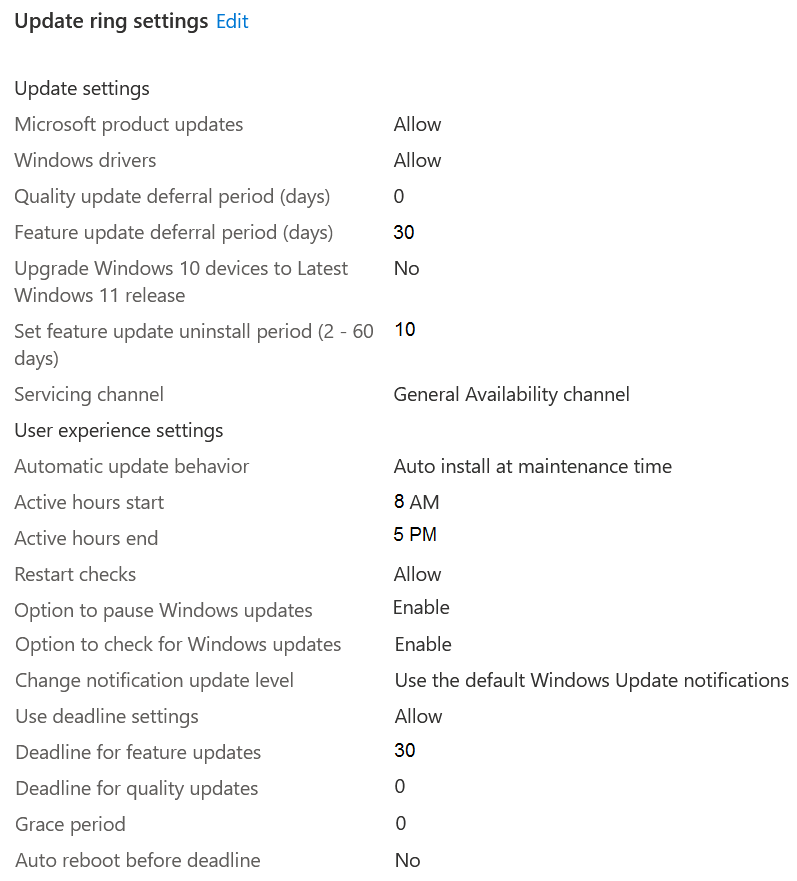
You create a new update rings policy named Policy1 as shown in the following exhibit.
Use the drop-down menus to select the answer choice that completes each statement based on the information presented in the graphic.
Explanation
Fixes and improvements to existing functionality are quality updates. Policy1 sets the quality update deferral period to 0, the deadline for quality updates to 0 and the grace period to 0, so quality updates are offered as soon as they are released and must be installed immediately; nothing allows them to be deferred for 30 days or indefinitely.
New Windows functionality is delivered by feature updates. The feature update deferral period of 30 days delays the offer for 30 days after release, and the deadline for feature updates then gives the user another 30 days before installation is forced (grace period 0), so feature updates are installed within 60 days of release, not 30 days.
You have computers that run Windows 10 and connect to an Azure Log Analytics workspace. The workspace is configured to collect all available events from the Windows event logs.
The computers have the logged events shown in the following table.
| Event ID | Log | Type | Computer |
|---|---|---|---|
| 1 | Application | Success | Computer1 |
| 2 | System | Information | Computer1 |
| 3 | Security | Audit Success | Computer2 |
| 4 | System | Error | Computer2 |
Which events are collected in the Log Analytics workspace?
A.1 only
B.2 and 3 only
C.1 and 3 only
D.1, 2, and 4 only
E.1, 2, 3, and 4Correct
Explanation
With the Azure Monitor Agent, a Windows Event Logs data source in a data collection rule can collect the Application, System and Security logs at every level, and Security events are written to the Event table alongside the others. Because the workspace collects all available events from the Windows event logs, all four events, including the Security audit success event, are collected. Answer D reflects the retired Log Analytics agent, whose Windows event log data source could not collect the Security log.
You have a Microsoft 365 E5 subscription that contains 10 Android Enterprise devices. Each device has a corporate-owned work profile and is enrolled in Microsoft Intune.
You need to configure the devices to run a single app in kiosk mode.
Which Configuration settings should you modify in the device restrictions profile?
A.Users and Accounts
B.General
C.System security
D.Device experienceCorrect
Explanation
In an Android Enterprise device restrictions profile, kiosk settings (Single app or Multi app kiosk mode) are configured in the Device experience category, where you choose the experience type and the app to lock to. General, System security and Users and Accounts contain settings such as screen capture, password and account controls, but no kiosk mode options.
You have a Microsoft 365 E5 subscription that contains 500 macOS devices enrolled in Microsoft Intune.
You need to ensure that you can apply Microsoft Defender for Endpoint antivirus policies to the macOS devices. The solution must minimize administrative effort.
What should you do?
A.Onboard the macOS devices to the Microsoft Purview compliance portal.
B.From the Microsoft Intune admin center, create a security baseline.
C.Install Defender for Endpoint on the macOS devices.Correct
D.From the Microsoft Intune admin center, create a configuration profile.
Explanation
Intune antivirus policies for macOS manage the settings of Microsoft Defender for Endpoint on Mac, and the documented prerequisite is that Defender for Endpoint must be installed on the device for Intune to manage its antivirus settings. Creating a configuration profile alone does not provide an antivirus engine to configure; the macOS Antivirus profile in Endpoint security actually replaces the need for configuration profiles or .plist files. Security baselines do not target macOS antivirus, and onboarding to the Purview compliance portal is for data loss prevention, not antivirus.
You have an Azure AD tenant and 100 Windows 10 devices that are Azure AD joined and managed by using Microsoft Intune.
You need to configure Microsoft Defender Firewall and Microsoft Defender Antivirus on the devices. The solution must minimize administrative effort.
Which two actions should you perform? Each correct answer presents part of the solution.
A.To configure Microsoft Defender Antivirus, create a Group Policy Object (GPO) and configure the Windows Defender Antivirus settings.
B.To configure Microsoft Defender Firewall, create a device configuration profile and configure the Device restrictions settings.
C.To configure Microsoft Defender Antivirus, create a device configuration profile and configure the Endpoint protection settings.
D.To configure Microsoft Defender Antivirus, create a device configuration profile and configure the Device restrictions settings.Correct
E.To configure Microsoft Defender Firewall, create a device configuration profile and configure the Endpoint protection settings.Correct
F.To configure Microsoft Defender Firewall, create a Group Policy Object (GPO) and configure Windows Defender Firewall with Advanced Security.
Explanation
In Intune device configuration templates, the Microsoft Defender Antivirus settings are in the Device restrictions profile, while Microsoft Defender Firewall settings are in the Endpoint protection profile. The Endpoint protection template covers Firewall, Application Guard, SmartScreen, encryption and Exploit Guard, but not the core antivirus settings, and Device restrictions has no firewall section. GPOs do not apply to Azure AD joined devices without an on-premises domain, so they do not meet the requirement.
You have an Azure AD group named Group1. Group1 contains two Windows 10 Enterprise devices named Device1 and Device2.
You create a device configuration profile named Profile1. You assign Profile1 to Group1.
You need to ensure that Profile1 applies to Device1 only.
What should you modify in Profile1?
A.AssignmentsCorrect
B.Settings
C.Scope (Tags)
D.Applicability Rules
Explanation
Which devices receive a profile is controlled by its Assignments, where you can target a group containing only Device1, exclude Device2, or add a device filter. Applicability rules only filter by OS edition or version, and both devices run Windows 10 Enterprise, so they cannot distinguish Device1 from Device2. Scope tags control which administrators can see the profile, and Settings define what is configured, not who gets it.
You have a Microsoft 365 subscription that includes Microsoft Intune.
You need to implement a Microsoft Defender for Endpoint solution that meets the following requirements:
- Enforces compliance for Defender for Endpoint by using Conditional Access
- Prevents suspicious scripts from running on devices
What should you configure? To answer, drag the appropriate features to the correct requirements. Each feature may be used once, more than once, or not at all.
Explanation
To use Defender for Endpoint device risk in Intune compliance policies and Conditional Access, you must enable the connection between Microsoft Defender for Endpoint and Intune, so devices report their machine risk score to Intune. Attack surface reduction rules include rules that block execution of potentially obfuscated scripts and block JavaScript or VBScript from launching downloaded content, which prevents suspicious scripts from running. Security baselines and device restriction policies configure general settings and do not provide either capability on their own.
Your network contains an on-premises Active Directory domain and an Azure AD tenant.
The Default Domain Policy Group Policy Object (GPO) contains the settings shown in the following table.
| Name | GPO value |
|---|---|
| LockoutBadCount | 0 |
| MaximumPasswordAge | 42 |
| MinimumPasswordAge | 1 |
| MinimumPasswordLength | 7 |
| PasswordComplexity | True |
| PasswordHistorySize | 24 |
You need to migrate the existing Default Domain Policy GPO settings to a device configuration profile.
Which device configuration profile type template should you use?
A.Administrative Templates
B.Endpoint protection
C.Device restrictionsCorrect
D.Custom
Explanation
All the settings are account password and lockout policies, and the Windows Device restrictions template has a Password section with password expiration, minimum length, complexity, password history and the number of sign-in failures before wipe. Administrative Templates contain ADMX-backed settings and do not include account password policy. A Custom OMA-URI profile could also work but is not the least-effort template, and Endpoint protection has no password policy settings.
Verifying access...
Access Required
You need to purchase this exam to access practice mode
Unlock a few more questions every day for 300 points you earn free on
Godlike Academy. Everything you unlock with the Daily Climb stays open for 7 days after your last unlock.