You are configuring the year-end setup in Dynamics 365 Finance.
You need to configure the year-end setup to meet the following requirements:
✑ The accounting adjustments that are received in the first quarter must be able to be posted into the previous year's Period 13.
✑ The fiscal year closing can be run again, but only the most recent closing entry will remain in the transactions.
✑ All dimensions from profit and loss must carry over into the retained earnings.
✑ All future and previous periods must have an On Hold status.
Solution:
✑ Configure General ledger parameters.
- Set the Delete close of year transactions option to Yes.
- Set the Create closing transactions during transfer option to Yes.
- Set the Fiscal year status to permanently closed option to No.
✑ Define the Year-end close template.
- Designate a retained earnings main account for each legal entity.
- Set the Financial dimensions will be used on the Opening transactions option to No.
- Set the Transfer profit and loss dimensions option to Close All.
✑ Set all prior and future Ledger periods to a status of On Hold.
Does the solution meet the goal?
A.YesCorrect
B.No
Explanation
The solution meets all four requirements. Setting Delete existing year-end entries when re-closing the year to Yes means a rerun deletes the earlier closing entries and leaves only the most recent one. Setting the fiscal year status to permanently closed to No keeps the year open to adjustments, so first-quarter adjustments can still be posted to the previous year's period 13. Transfer profit and loss dimensions set to Close all keeps every dimension combination on the retained earnings opening balances, and putting the periods On hold satisfies the last requirement.
You are configuring the year-end setup in Dynamics 365 Finance.
You need to configure the year-end setup to meet the following requirements:
✑ The accounting adjustments that are received in the first quarter must be able to be posted into the previous year's Period 13.
✑ The fiscal year closing can be run again, but only the most recent closing entry will remain in the transactions.
✑ All dimensions from profit and loss must carry over into the retained earnings.
✑ All future and previous periods must have an On Hold status.
Solution:
✑ Configure General ledger parameters.
- Set the Delete close of year transactions option to Yes.
- Set the Create closing transactions during transfer option to Yes.
- Set the Fiscal year status to permanently closed option to Yes.
✑ Define the Year-end close template.
- Designate a retained earnings main account for each legal entity.
- Set the Financial dimensions will be used on the Opening transactions option to Yes.
- Set the Transfer profit and loss dimensions to Close All.
✑ Set all prior and future Ledger periods to a status of On Hold.
Does the solution meet the goal?
A.Yes
B.NoCorrect
Explanation
The solution does not meet the goal. Setting the fiscal year status to permanently closed to Yes makes the periods impossible to reopen, so adjusting entries can no longer be posted to the previous year's period 13. The other settings are consistent with the requirements, but this one setting breaks the first requirement.
You are configuring the year-end setup in Dynamics 365 Finance.
You need to configure the year-end setup to meet the following requirements:
✑ The accounting adjustments that are received in the first quarter must be able to be posted into the previous year's Period 13.
✑ The fiscal year closing can be run again, but only the most recent closing entry will remain in the transactions.
✑ All dimensions from profit and loss must carry over into the retained earnings.
✑ All future and previous periods must have an On Hold status.
Solution:
✑ Configure General ledger parameters.
- Set the Delete close of year transactions option to No.
- Set the Create closing transactions during transfer option to No.
- Set the Fiscal year status to permanently closed option to No.
✑ Define the Year-end close template.
- Designate a retained earnings main account for each legal entity.
- Set the Financial dimensions will be used on the Opening transactions option to No.
- Set the Transfer profit and loss dimensions to Close All.
✑ Set all prior and future Ledger periods to a status of On Hold.
Does the solution meet the goal?
A.Yes
B.NoCorrect
Explanation
The solution does not meet the goal. Setting Delete existing year-end entries when re-closing the year to No means earlier opening and closing transactions remain and extra ones are added on each rerun, so more than the most recent closing entry stays in the transactions. Setting Create closing transactions during transfer to No also means no closing transactions are created, which the stated closing behaviour relies on.
You are implementing a Dynamics 365 Finance general ledger module for a client that has multiple legal entities.
The client has the following requirements:
- Configure automatic creation of due to/due from transactions based on when LegalEntityA transacts with LegalEntityB.
- Automatically split the dollar amount in half between DimensionA and DimensionB when the journal is posted.
- Set up fixed or variable allocations, and then review the allocations in a journal before posting.
- Automatically post year-end results to account 30016 during year-end close.
You need to configure the system.
Which system capability should you configure? To answer, select the appropriate configuration in the answer area.
NOTE: Each correct selection is worth one point.
Explanation
Due to/due from: an intercompany journal posts across legal entities, and the due to/due from entries are created automatically when LegalEntityA transacts with LegalEntityB. Split in half: allocation terms on a main account define the percentage of a voucher that is posted automatically to destination dimensions when the voucher is posted, so a 50/50 split fits. Fixed or variable allocations: ledger allocation rules support basis (variable), fixed percentage and fixed weight methods and generate allocation journals that can be reviewed before posting. Year-end results to account 30016: accounts for automatic transactions is the capability chosen for automatic postings to a defined account. Ledger allocation rules are wrong for the second row because they generate a journal to review rather than posting automatically.
A company is preparing to complete a year-end close process.
You need to configure the Dynamics 365 Finance general ledger module.
Which three configuration actions should you perform? Each correct answer presents part of the solution.
NOTE: Each correct selection is worth one point.
A.Configure the Fiscal year close parametersCorrect
B.Configure the ledger calendar for the new fiscal year
C.Set up the year end close templateCorrect
D.Validate the main account type
E.Create the next fiscal yearCorrect
Explanation
Configure the Fiscal year close parameters on the General ledger parameters page (delete existing entries, create closing transactions, permanently closed status). Set up the year-end close template, which holds the retained earnings accounts and the dimension transfer settings. Create the next fiscal year so the opening balances have a year and periods to be transferred into. Validating the main account type is a check made on existing accounts rather than a configuration action, and the ledger calendar for the new year is created with the fiscal year itself.
A client has unique accounting needs that sometimes require posting definitions.
You need to implement posting definitions.
In which situation should you implement posting definitions?
A.when financial dimensions need to default from the vendor record onto an invoice
B.when only certain dimensions are allowed to post with certain main account combinations
C.when creating multiple balanced ledger entries based on transaction types or accountsCorrect
D.when the system needs to automatically post a transaction to the accounts receivable account on invoice posting
Explanation
Posting definitions generate multiple balanced ledger entries from a source document's transactions, based on transaction types or accounts, which suits unique accounting needs. Defaulting dimensions from a vendor record is dimension default setup. Restricting which dimensions can post with a main account is done with account structures and rules. Automatically posting to the accounts receivable account on invoice posting is standard posting profile behaviour.
An organization is setting up cost accounting.
You need to set up fiscal calendars for Dynamics 365 Finance.
What are three uses for fiscal calendars? Each correct answer presents a complete solution.
NOTE: Each correct selection is worth one point.
A.standard work hours
B.financial transactionsCorrect
C.fixed asset depreciationCorrect
D.budget cyclesCorrect
E.shift work hours
Explanation
Fiscal calendars are used with financial transactions (the ledger calendar of a legal entity), fixed asset depreciation (a calendar selected on the fixed asset book) and budget cycles (the budget calendar). Standard work hours and shift work hours belong to working-time calendars, not fiscal calendars.
You are configuring automatic bank reconciliation functionality for a company that has multiple bank accounts. The company wants to import their bank statements.
You need to import electronic bank statements to reconcile the bank accounts.
Which three actions can you perform? Each correct answer presents a complete solution.
NOTE: Each correct selection is worth one point.
A.Select all the bank accounts for the bank statement files, and then upload all files
B.Select Account reconciliation on the bank account form
C.Import bank statements from the Data management workspaceCorrect
D.Navigate to Import statement on the Bank Statements page of Cash and Bank ManagementCorrect
E.Select Import statement for multiple bank accounts in all legal entities, and then upload a zip fileCorrect
Explanation
On the Bank statements page of Cash and bank management you use Import statement, and when a file or a zip file holds statements for several accounts you set Import statement for multiple bank accounts in all legal entities to Yes and upload it. Bank statements can also be imported through the data entity framework, which is the Data management workspace. Selecting every bank account and uploading all files does not work because the accounts are identified from the statement contents. Account reconciliation on the bank account form is a setting, not an import action.
A company plans to create a new allocation rule for electric utilities expenses.
The allocation rule must meet the following requirements:
- Distribute overhead utility expense to each department.
- Define how and in what proportion the source amounts must be distributed on various destination lines.
You need to configure the allocation rule.
Which allocation method should you use?
A.Distribute the source document amount equally
B.Fixed weight
C.Equally
D.BasisCorrect
Explanation
Basis is the variable method that spreads the source amount across the destination lines in proportion to actual ledger balances selected by separate allocation basis rules, for example each department's share of a measure. Equally splits the amount into identical parts and cannot reflect different proportions. Fixed weight (and fixed percentage) uses weights typed directly on the rule rather than values derived from ledger balances, so it does not define the proportion from the underlying data.
A food manufacturer uses commodities such as beans, corn, and chili peppers as raw materials. The prices of the commodities fluctuate frequently. The manufacturer wants to use cost versions to simulate these fluctuations.
You need to set up cost versions and prices to accomplish the manufacturer's goal.
For which purpose should you use each costing type? To answer, select the appropriate options in the answer area.
Explanation
Standard cost: a costing version of the standard cost type holds the standard cost records that support the standard cost inventory model for items and manufacturing processes. Planned cost: a costing version of the planned cost type is used for cost calculation simulations, such as the effect of changing purchased material prices on the calculated cost of manufactured items, which is what the manufacturer needs for fluctuating commodity prices.
A rental service company hires you to configure their system to implement accrual schemes.
You need to configure the accrual schemes for the company for both rentals and associated expenses.
Which configuration and transaction options should you use? To answer, select the appropriate options in the answer area.
Explanation
Applicable function area: the company needs accruals for rental income and for the associated expenses, so the scheme must apply to both revenue and costs rather than to only one side. Accrual setup: an accrual scheme is defined by its period frequency (for example monthly) and number of occurrences, which determine how the amount is spread over periods; the journal type and reversibility are not what the scheme setup specifies.
A company provides employee life insurance to all full-time employees. Employee life insurance policies are paid twice a year to the insurance company.
Transactions for current employees must be recognized in the general ledger twice a month with an employee's pay. Transactions for new employees must be recognized in the general ledger based upon the employee's first pay date.
You need to configure accrual schemes for the new fiscal year.
Which two configurations should you use? Each correct answer presents part of the solution.
A.For new employees, use a Credit accrual scheme. In the ledger accrual, set the offset to the first day of the fiscal year.
B.For current employees, use a Credit accrual scheme. In the ledger accrual, set the offset to the employee's first pay date.
C.For new employees, use a Debit accrual scheme. In the ledger accrual, set the offset to the employee's first pay date.Correct
D.For current employees, use a Debit accrual scheme. In the ledger accrual, set the offset to the first day of the fiscal year.Correct
Explanation
Insurance expense is recognized by a debit accrual scheme, so options A and B, which use credit schemes, do not fit. For current employees the accrual starts at the beginning of the fiscal year, so the offset is the first day of the fiscal year (D). For new employees recognition must start at their first pay date, so the offset is that date (C). Pairing the offsets the other way round would start the accruals at the wrong time.
A client plans to use the cost accounting module in Dynamics 365 Finance.
You need to associate the correct definitions to the correct cost accounting concepts.
Which terms match the definitions? To answer, select the appropriate configuration in the answer area.
Explanation
Machine hours example: this is an allocation base, which measures activity such as machine hours, kilowatt hours or square footage and is used to allocate costs to cost objects. Data connector transfer result: this is a cost entry, produced from general ledger entries, cost allocations and posted cost journal entries. Anything selected for cost control: this is a cost object, onto which costs or revenues are posted or allocated. Track and categorize costs: this is a cost element, which can correspond to a main account. Grouping by shared characteristics: this is cost classification, for example by elements, traceability or behavior.
An organization uses Dynamics 365 Finance.
Several posted journal entries contain invalid main account and dimension combinations. This leads to incorrect financial reporting.
You need to prevent these invalid combinations.
What should you do?
A.Configure the account structure to specify which financial dimensions are valid for which main accounts.Correct
B.Train users to select the Validate button in the current journal configuration so that the correct account and dimension combination is used.
C.Configure financial dimension sets to limit which financial dimensions are valid for which main accounts.
D.Associate the correct main accounts to that financial dimension on the financial dimension setup form.
Explanation
Account structures define which segments and financial dimensions are valid with which main accounts, with constraints and rules that are enforced when a transaction is entered, so invalid combinations cannot be posted. Training users to click Validate relies on manual discipline and does not prevent errors. Financial dimension sets only control which dimensions appear in reporting and balances, not which combinations are valid, and the dimension setup form does not restrict main account combinations.
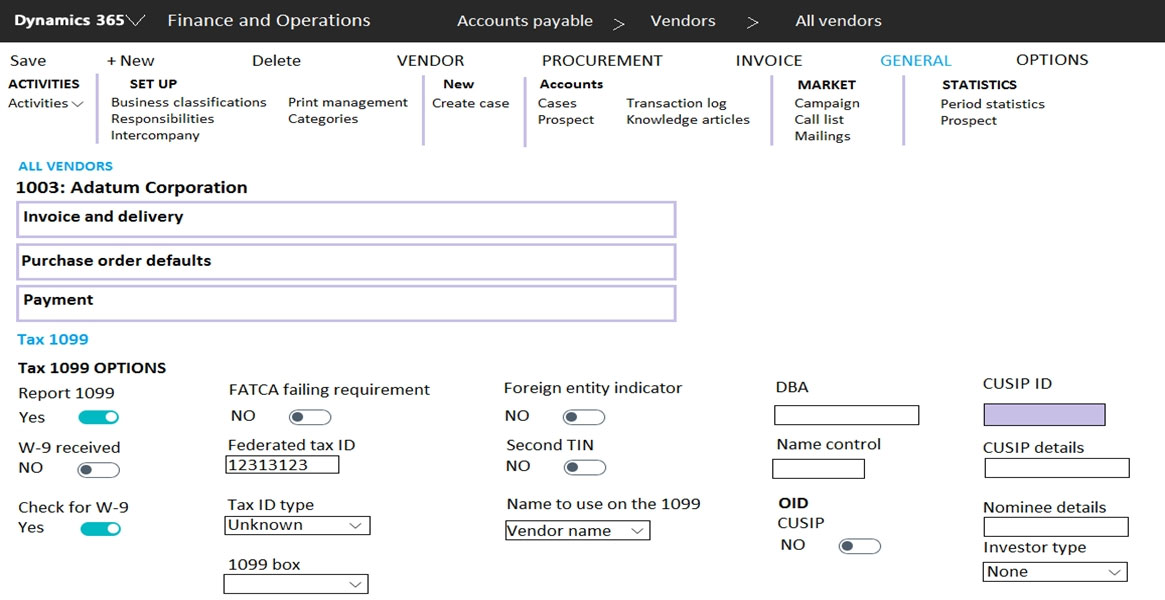
A client plans to use Dynamics 365 Finance for year-end 1099 reporting in the United States.
You are viewing a vendor master data record on the 1099 FastTab.
Use the drop-down menus to select the answer choice that answers each question based on the information presented in the graphic.
Explanation
Which prompt appears: on the vendor record Check for W-9 is set to Yes while W-9 received is No, so when an invoice for this vendor is posted the system warns that the W-9 has not yet been received. The Tax ID type of Unknown and the Foreign entity indicator being off do not trigger that check. Default federal tax withholding type: the 1099 box field on the Tax 1099 FastTab holds the default value that appears on every transaction line created for the vendor, so selecting the withholding box (for example box 4, federal income tax withheld) sets the default on invoice journal lines. The Federal tax ID only records the vendor's taxpayer identification number, and W-9 received only records the form status.
A legal entity has locations and customers in multiple states within the United States.
You need to ensure that taxable customers are charged sales tax for taxable items in their delivery location.
Which three settings must you configure? Each correct answer presents part of the solution.
A.the Sales tax group on the Customer recordCorrect
B.the Terms of delivery setup
C.the Item Sales tax group on the Item recordCorrect
D.the Sales reporting codes
E.the Sales tax codesCorrect
Explanation
Sales tax applies where the sales tax codes in the customer's sales tax group intersect with the codes in the item's item sales tax group, so you need the sales tax group on the customer (A), the item sales tax group on the item (C), and the sales tax codes themselves, with the rates for each state (E). Terms of delivery describe shipping terms and do not drive tax calculation. Sales reporting codes only group amounts for reporting and do not determine whether tax is charged.
You are configuring Dynamics 365 Finance.
You need to implement posting definitions for all available transaction types.
For which type of transactions can you implement posting definitions?
A.Accounts payable, Accounts receivable, Bank, Budget, Payroll, and PurchasingCorrect
B.Accounts payable, Bank, Budget, Fixed assets, and Payroll
C.Accounts payable, Accounts receivable, Fixed assets, Payroll, and Purchasing
D.Accounts payable, Accounts receivable, Budget, and Fixed assets
Explanation
Posting definitions are assigned to transaction types on the Transaction posting definitions page, which groups the supported documents by module: Accounts payable, Accounts receivable, Bank, Budget, Payroll and Purchasing. Fixed assets is not among the supported modules, so options B, C and D, which all include it, are wrong. Posting profiles are still needed for originating entries and for unsupported posting types.
You need to set up a process of tracking, recording, and analyzing costs associated with the products or activities of a nonmanufacturing organization.
You need to configure the prerequisite setup for the standard costing version for the current period.
In which order should you perform the actions? To answer, move all actions from the list of actions to the answer area and arrange them in the correct order.
Explanation
Start by creating an item model group that uses the standard cost inventory model, because items must be assigned to it. Next define the ledger accounts that will receive standard cost variances, then assign those accounts to the related item postings (inventory posting setup). Finally define the inventory parameters for standard costs, which the costing version for the current period relies on.
A public sector company is configuring encumbrance for managing capital budgets.
The finance department needs to configure posting definitions for bank transactions.
You need to configure Dynamics 365 Finance for cash settlements.
What should you do?
A.Configure combined deposit amountsCorrect
B.Configure budget appropriations
C.Configure general ledger year-end close
D.Configure advanced ledger entries
Explanation
In the public sector, posting definitions for settlements use the Bank module and apply to pooled cash settlements, where amounts that individual funds deposit into a combined ledger account get due-to and due-from entries on the settlement voucher. That is the combined deposit amounts scenario. Budget appropriations and year-end close use the Budget and General ledger transaction types, and advanced ledger entries are not tied to a transaction type at all, so none of them addresses cash settlements.
A retail company has outlets in multiple locations. Taxes vary depending on the location.
You need to configure the various components of the tax framework.
In which order should you perform the actions? To answer, move all actions from the list of actions to the answer area and arrange them in the correct order.
Explanation
Begin with the main accounts and ledger posting groups, because sales tax codes post to those accounts. Then set up the sales tax authorities and settlement periods, which each sales tax code references. Next create the sales tax codes, then group them into sales tax groups and item sales tax groups. Finish with the sales tax parameters on the application parameter pages.
Verifying access...
Access Required
You need to purchase this exam to access practice mode
Unlock a few more questions every day for 300 points you earn free on
Godlike Academy. Everything you unlock with the Daily Climb stays open for 7 days after your last unlock.