Question
Your network contains an on-premises Active Directory Domain Services (AD DS) domain named contoso.com that syncs with an Azure AD tenant. The tenant contains a group named Group1 and the users shown in the following table.
| Name | In organizational unit (OU) |
| --- | --- |
| User1 | OU1 |
| User2 | OU2 |
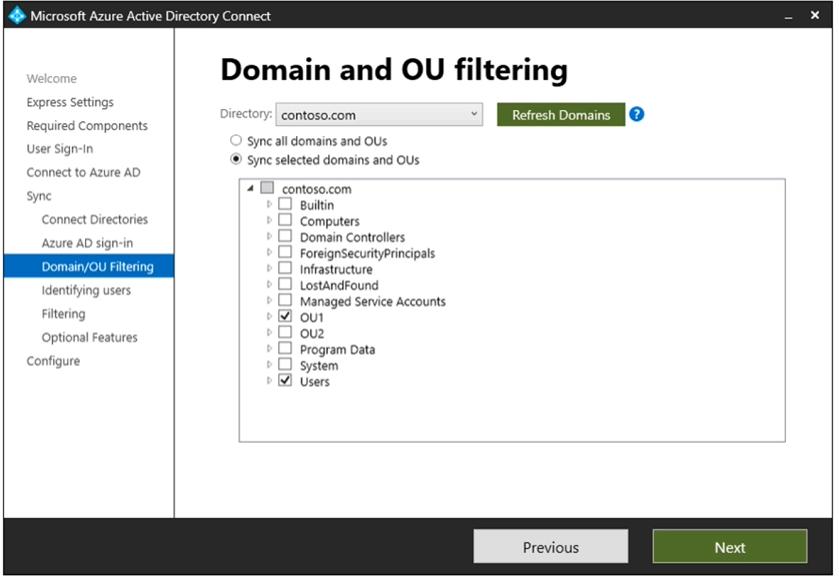
Domain/OU filtering in Azure AD Connect is configured as shown in the Filtering exhibit. (Click the Filtering tab.)
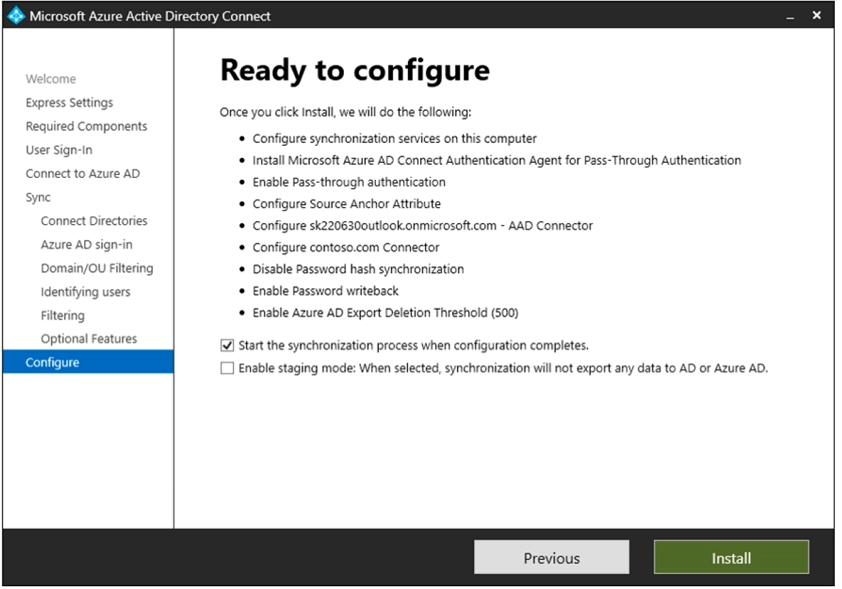
You review the Azure AD Connect configurations as shown in the Configure exhibit. (Click the Configure tab.)
For each of the following statements, select Yes if the statement is true. Otherwise, select No.
NOTE: Each correct selection is worth one point.
Explanation
Statement 1 (Yes): User1 is in OU1, which is selected in Domain/OU filtering, so User1 is a synchronized user. The Configure exhibit shows Enable Password writeback, which lets a synchronized user reset the password with SSPR and have the new password written back to on-premises AD DS. Pass-through authentication is integrated with self-service password management, including password writeback.
Statement 2 (Yes): The Configure exhibit shows Enable Pass-through authentication and Disable Password hash synchronization. With pass-through authentication, passwords are not stored in Azure AD; the on-premises authentication agent validates the password directly against Active Directory, so an on-premises domain controller authenticates User1 when he signs in to Exchange Online.
Statement 3 (Yes): The question states that the tenant contains Group1 and User2. OU2 is not selected for synchronization, so User2 is not a synchronized account, and Group1 is not shown as a group synchronized from AD DS. Both objects are therefore managed in Azure AD, so you can add User2 to Group1 as a member.
