Question
Your network contains an Active Directory Domain Services (AD DS) domain named adatum.com. The domain contains a server named Server1 and the users shown in the following table.
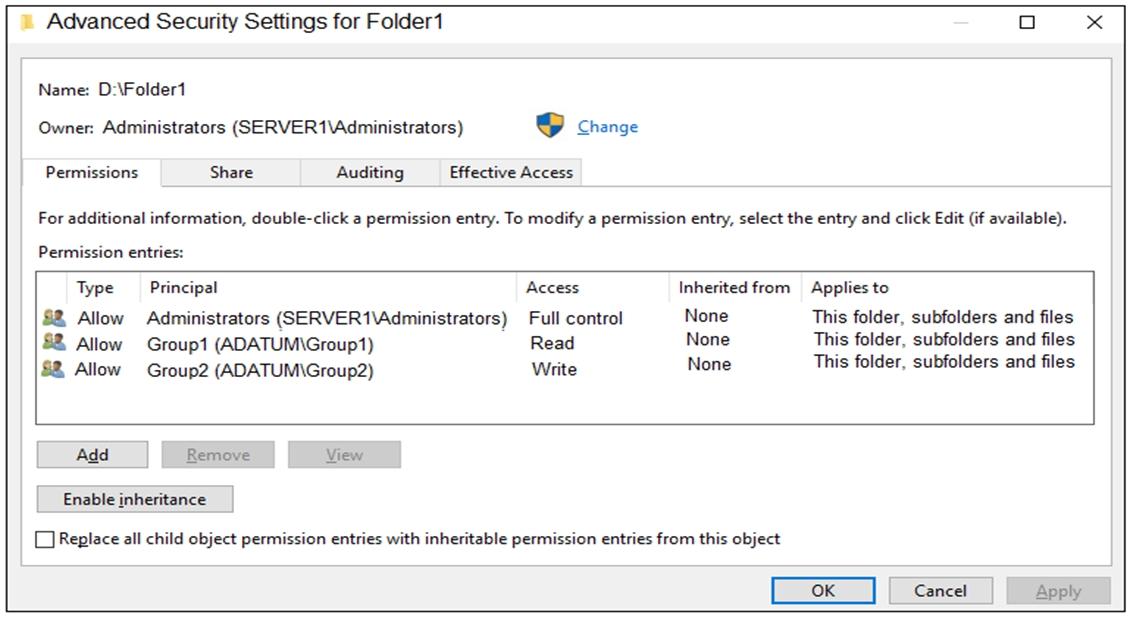
Server1 contains a folder named D:\Folder1. The advanced security settings for Folder1 are configured as shown in the Permissions exhibit. (Click the
Permissions tab.)
Folder1 is shared by using the following configurations:
The share permissions for Share1 are shown in the following table.
For each of the following statements, select Yes if the statement is true. Otherwise, select No.
NOTE: Each correct selection is worth one point.
Hot Area:
| Name | Member of |
| --- | --- |
| User1 | Group1 |
| User2 | Group2 |
| User3 | Group3 |
| Group | Permission |
| --- | --- |
| Group1 | Allow – Change |
| Group3 | Allow – Full Control |

Explanation
Statement 1 (Yes): User1 is a member of Group1. Group1 has Allow - Change on Share1 and Allow - Read in the NTFS permissions on D:\Folder1. Effective access over the share is the more restrictive of the two, which is Read, so User1 can read the files.
Statement 2 (No): User3 is a member of Group3. Group3 has Full Control on the share but no NTFS entry on Folder1 (only Administrators, Group1 and Group2 are listed). Without NTFS permission, User3 cannot access the files, so User3 cannot delete them.
Statement 3 (Yes): FolderEnumerationMode for Share1 is Unrestricted, which means access-based enumeration is off. Every user who browses \\Server1.adatum.com sees Share1, even User2, whose group (Group2) has no share permission. User2 can see the share but cannot open it.
