Question
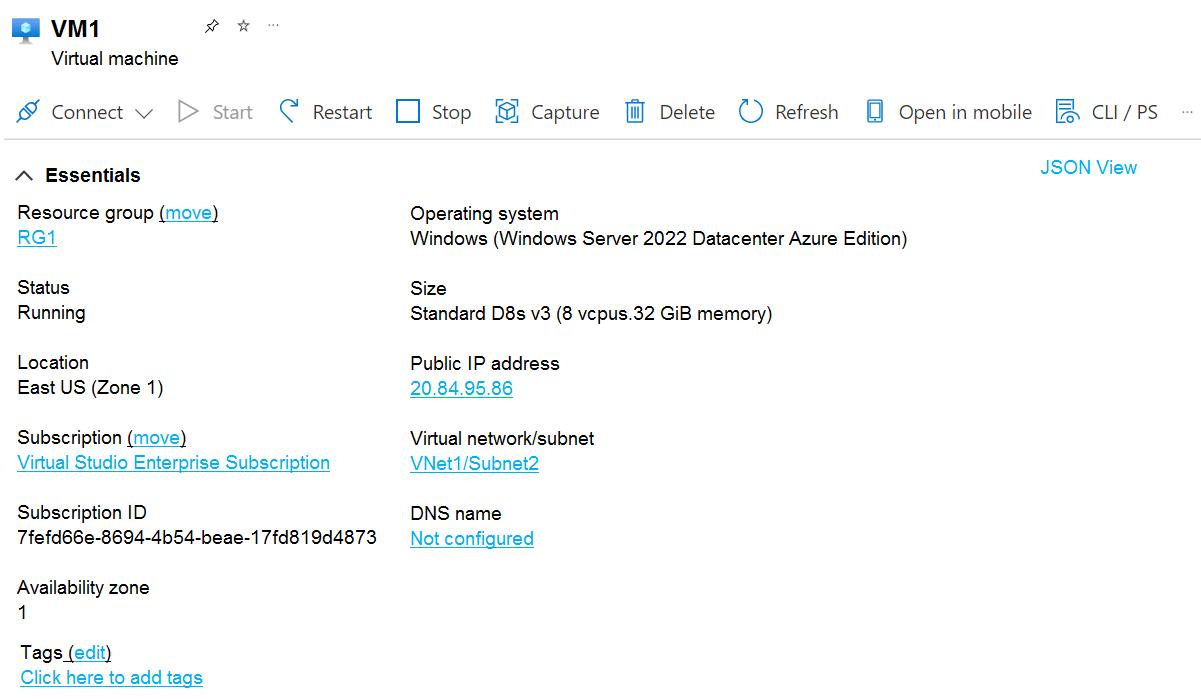
You have an Azure subscription that contains a virtual machine named VM1 as shown in the following exhibit.
The subscription has the disks shown in the following table.
| Name | Resource group | Location | Availability zone |
|---|---|---|---|
| Disk1 | RG1 | East US | None |
| Disk2 | RG2 | East US | 1 |
| Disk3 | RG1 | Central US | None |
| Disk4 | RG1 | Central US | 1 |
Which disks can you attach as data disks to VM1?
- A. Disk2 only Correct
- B. Disk4 only
- C. Disk1 and Disk2 only
- D. Disk2 and Disk4 only
- E. Disk1, Disk3, and Disk4 only
- F. Disk1, Disk2, Disk3, and Disk4
Explanation
The exhibit shows that VM1 runs in East US, availability zone 1. A managed data disk must be in the same region as the VM, and a zonal VM can attach a zonal (locally redundant) disk only when the disk is in the same zone as the VM. The resource group does not matter: a VM can attach a disk from a different resource group.
Disk2 is in East US, zone 1, so it can be attached, even though it is in RG2.
Disk1 is in East US but is a regional disk with no zone pinned to zone 1, so it cannot be attached to the zonal VM1.
Disk3 and Disk4 are in Central US, a different region, so neither can be attached.
Only Disk2 can be attached as a data disk to VM1.
