You want to view the administrative actions taken by a service administrator in Microsoft 365.
For each of the following statements, select Yes if the statement is true. Otherwise, select No.
NOTE: Each correct selection is worth one point.
Explanation
Statement 1 (No): Search & intelligence is where administrators manage Microsoft Search, including answers, connectors and verticals. It helps users find content and does not record what administrators did.
Statement 2 (Yes): The Microsoft Defender portal has an Audit page at https://security.microsoft.com/auditlogsearch. It searches the unified audit log, which records supported user and admin operations, and it is identical to audit log search in the Microsoft Purview portal.
Statement 3 (Yes): The Audit solution in the Microsoft Purview portal searches the unified audit log. That log holds audit records for both user and admin activities, including directory activities performed in the Microsoft 365 admin center.
Select the answer that correctly completes the sentence.
Explanation
Privileged Identity Management provides time-bound role activation: an eligible user activates a privileged role for a limited period, and assignments can have start and end dates, optionally with approval and multifactor authentication. This limits how long elevated permissions exist. User lifecycle management and enterprise application management are separate Microsoft Entra capabilities, and PIM governs privileged roles rather than general access to Microsoft 365 services.
Your organization has a Microsoft 365 E5 subscription.
You need to ensure that a third-party cloud service can authenticate to Microsoft Entra.
What should you configure?
A.a Microsoft 365 Copilot connector
B.multifactor authentication (MFA)
C.a Conditional Access policy
D.an app registrationCorrect
Explanation
An app registration establishes the trust relationship between an application and the Microsoft identity platform, and gives the application the client ID it uses to authenticate. A Copilot connector brings external content into the Microsoft 365 index and does not provide authentication. Multifactor authentication and Conditional Access add requirements to sign-ins and access decisions, but they do not make a service known to Microsoft Entra.
Select the answer that correctly completes the sentence.
Explanation
Conditional Access policies provide control over how users can access cloud apps: they evaluate signals such as user, location, device and risk, then block access or grant it with requirements such as multifactor authentication. Policies are managed in the Microsoft Entra admin center, not the Defender portal. They cover cloud apps as well as on-premises applications, so they are not limited to on-premises resources, and they have no mailbox requirement.
Select the answer that correctly completes the sentence.
Explanation
Accountability is the principle that the people who design and deploy AI systems answer for how those systems operate, so AI is not the final authority on decisions affecting people and humans keep meaningful control over highly autonomous systems. Transparency concerns understanding how decisions are made, and reliability and safety concerns consistent, safe operation. Privacy and security protects data, and inclusiveness concerns serving everyone fairly.
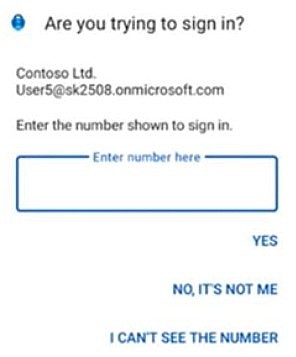
A user named User5 navigates to https://myapps.microsoft.com. After entering their username and password, User5 receives the following message on their mobile device.
Use the drop-down menus to select the answer choice that completes the statement based on the information presented in the graphic.
Explanation
The prompt asks User5 to enter the number shown at sign-in, which is number matching, the way Microsoft Authenticator push notifications work. Email OTP and SMS deliver a code in a message for the user to type into the sign-in page, rather than an approval prompt on the device. A Temporary Access Pass is a time-limited passcode entered at sign-in, not a notification.
Your organization has a Microsoft 365 subscription.
You need to evaluate your organization's Identity Secure Score.
Which two factors affect the score? Each correct answer presents a complete solution.
NOTE: Each correct selection is worth one point.
A.the SharePoint site permissions
B.the number of global administratorsCorrect
C.passwords that are never expiredCorrect
D.the location of the users
Explanation
Identity Secure Score compares your configuration with recommended identity practices, and its recommendations include designating more than one Global Administrator and not expiring passwords. Your administrator count and password expiration settings therefore both affect the score. SharePoint site permissions are not among the identity recommendations, and where users are located is a Conditional Access signal rather than a scored item.
Your organization has a Microsoft 365 subscription.
You need to review the impact of a recent phishing incident that targeted email users.
What should you use?
A.the Microsoft Defender portalCorrect
B.the Microsoft 365 admin center
C.the Microsoft Entra admin center
D.the Microsoft Exchange admin center
Explanation
The Microsoft Defender portal is where you investigate email threats. Its Explorer Phish view shows messages identified as phishing, along with delivery locations, URL clicks and the most targeted users, which reveals the impact of an attack. The Microsoft 365 admin center handles general tenant administration, the Microsoft Entra admin center handles identity, and the Exchange admin center handles mail configuration, so none of them is the tool for assessing a phishing incident.
For each of the following statements, select Yes if the statement is true. Otherwise, select No.
NOTE: Each correct selection is worth one point.
Explanation
Statement 1 (Yes): Defender for Office 365 protects email and collaboration tools from threats such as zero-day malware, phishing and business email compromise. Safe Attachments, Safe Links and anti-phishing policies are its core features.
Statement 2 (Yes): Defender for Identity monitors identity signals from on-premises Active Directory, using sensors on your identity infrastructure. It detects attacks against domains, including credential abuse, lateral movement and domain dominance techniques such as Golden Ticket.
Statement 3 (No): Defender Vulnerability Management discovers, prioritizes and remediates vulnerabilities and misconfigurations on assets such as Windows, macOS, Linux, Android, iOS and network devices. Protecting SaaS applications is the job of Microsoft Defender for Cloud Apps, so the two products are easy to confuse here.
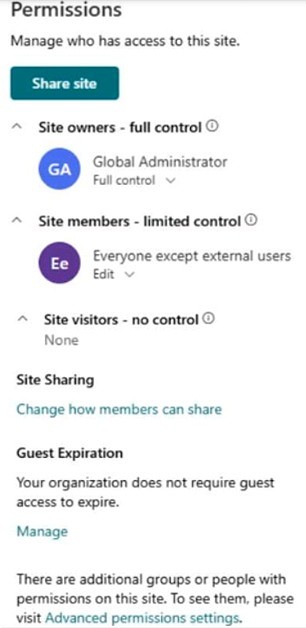
Your organization has a Microsoft 365 subscription that contains a Microsoft SharePoint site named Site1. The permissions for Site1 are configured as shown in the following exhibit.
You create a new user named User1 in the subscription.
Use the drop-down menus to select the answer choice that completes the statement based on the information presented in the graphic.
Explanation
For the User1 drop-down, the answer is a site member of. The exhibit lists Everyone except external users under Site members, and that claim covers every internal account in the organization, including a newly created one, so User1 gets membership without being added individually. The Site owners list contains only the Global Administrator and the Site visitors list is empty, so neither of those applies. User1 is an internal user, so nothing prevents access.
Your organization has a Microsoft 365 subscription.
You create a security group named Group1 and assign a Microsoft 365 E3 license to the group.
You discover that a user named User1 does NOT have access to the Microsoft 365 E3 features.
You need to ensure that User1 can access all the Microsoft 365 E3 features.
Which two actions can you perform? Each correct answer presents a complete solution.
NOTE: Each correct selection is worth one point.
A.Add User1 to Group1.Correct
B.Assign a Conditional Access policy to Group1.
C.Assign a Conditional Access policy to User1.
D.Assign a license to User1.Correct
Explanation
With group-based licensing, members of a licensed group receive the group's license, so adding User1 to Group1 gives User1 the E3 features. Assigning an E3 license directly to User1 also works, because licenses can be assigned to individual users as well as to groups. Conditional Access policies only control the conditions under which users can sign in and reach apps. They do not grant a license, so neither policy option gives access to E3 features.
Select the answer that correctly completes the sentence.
Explanation
For the From the SharePoint admin center, you can create a drop-down, the answer is site. On the Active sites page, a SharePoint Administrator selects Create and then chooses a team site or communication site. Users are created in the Microsoft 365 admin center or the Microsoft Entra admin center, and administrator roles are managed there as well. SharePoint in Microsoft 365 is a cloud service, so there are no servers to create.
Your organization has a Microsoft 365 subscription.
You discover that some users cannot sign in to Microsoft 365.
You need to view the failed Microsoft 365 sign-in attempts.
What should you use?
A.the Microsoft Defender portal
B.the Microsoft Entra admin centerCorrect
C.the Microsoft Purview portal
D.the Microsoft 365 admin center
Explanation
Microsoft 365 signs users in through Microsoft Entra ID, and Microsoft Entra logs all sign-ins to the tenant. In the Microsoft Entra admin center, go to Entra ID, then Monitoring & health, then Sign-in logs, where you can see failed attempts and their errors. The Microsoft 365 admin center is for managing users, licenses and services, and it is not where these sign-in logs are reviewed. The Defender and Purview portals focus on threat protection and on data compliance.
Select the answer that correctly completes the sentence.
In Microsoft Entra Privileged Identity Management (PIM), an administrator has made you eligible for the User Administrator role.
Explanation
For the Before you can create a user account, you must drop-down, the answer is activate the role. An eligible assignment gives no permissions by itself: you must activate it in PIM, under My roles, when you need to perform privileged actions, and PIM then adds an active assignment for a limited time. Activation can require multifactor authentication, but that does not depend on installing the Authenticator app specifically. A license and location information play no part in using an eligible role.
Your organization has a Microsoft 365 subscription that contains a Microsoft SharePoint site named Site1.
You need to prevent users from sharing the content of Site1 to external users.
What should you use?
A.the Site1 content
B.the SharePoint admin centerCorrect
C.the Microsoft 365 admin center
D.the Microsoft Entra admin center
Explanation
External sharing for an individual site is set in the SharePoint admin center: on Active sites, select the site, then on the Settings tab select More sharing settings and choose Only people in your organization. That option prevents all site users from sharing any site content externally. Site owners cannot change this setting from the site itself, which rules out the Site1 content. The Microsoft Entra external collaboration settings control guest invitations across the organization rather than the sharing of one site, and the Microsoft 365 admin center does not hold this per-site setting.
Select the answer that correctly completes the sentence.
Explanation
For the drop-down that opens the sentence, the answer is Microsoft Defender XDR. Microsoft describes it as a unified pre- and post-breach enterprise defense suite that natively coordinates detection, prevention, investigation and response across endpoints, identities, email and applications. Conditional Access enforces access policies at sign-in, and Microsoft Entra ID Protection focuses only on identity risk. Microsoft Purview is for data governance and compliance rather than coordinated threat response.
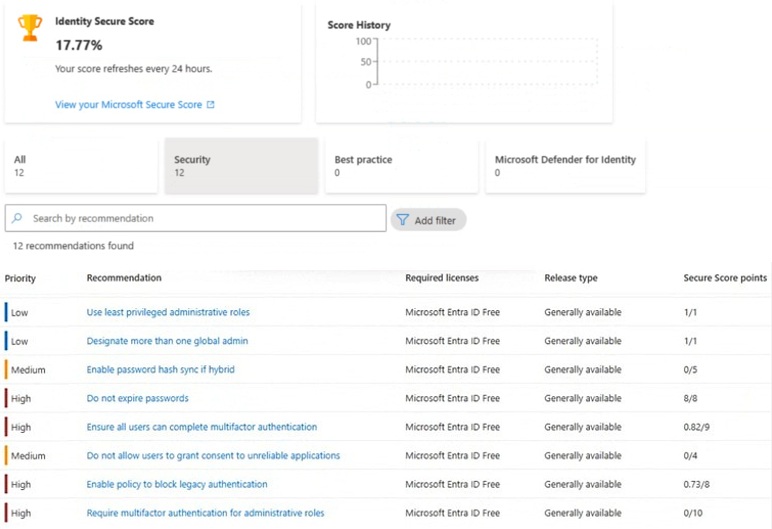
You open the Microsoft Entra admin center as shown in the following exhibit.
Use the drop-down menus to select the answer choice that completes the statement based on the information presented in the graphic.
Explanation
For the recommendation dropdown, the answer is Require multifactor authentication for administrative roles, because the Secure Score points column shows earned points out of the maximum, and this item is at 0/10, so resolving it gains the full 10 points. Enable policy to block legacy authentication is at 0.73/8 and can add only about 7.27 points, even though it has the same High priority. Do not expire passwords (8/8) and Use least privileged administrative roles (1/1) already have all their points, so resolving them adds nothing.
Microsoft Entra ID Protection calculates a risk level for each sign-in in real time and feeds it to risk-based Conditional Access policies, which can block access automatically when the risk level matches. Microsoft Defender for Identity detects threats against on-premises Active Directory identities, not sign-in risk policies. Microsoft Defender for Office 365 protects email and collaboration content. Privileged Identity Management controls just-in-time activation of privileged roles and does not respond to risky sign-ins.
Your organization has a Microsoft 365 subscription.
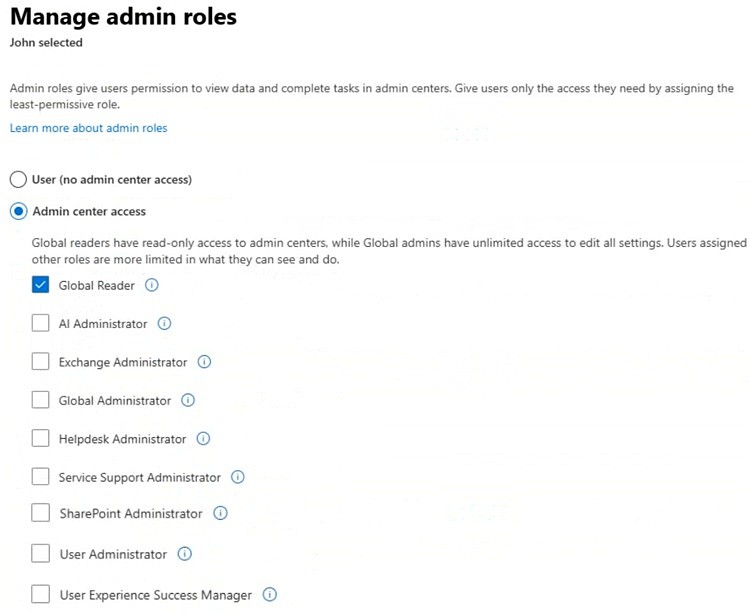
A user named John is assigned an admin role as shown in the following exhibit.
Use the drop-down menus to select the answer choice that completes the statement based on the information presented in the graphic.
Explanation
For the John can dropdown, the answer is view all the users in the Microsoft Entra tenant, because the exhibit shows John holds the Global Reader role, which includes reading all user properties. Global Reader is the read-only counterpart to Global Administrator and covers settings and administrative information across Microsoft 365 services, not business content, so it does not open SharePoint site content or Exchange mailbox content. It also cannot perform eDiscovery: the role cannot run content search and Microsoft Purview does not support it.
For each of the following statements, select Yes if the statement is true. Otherwise, select No.
NOTE: Each correct selection is worth one point.
Explanation
Statement 1 (Yes): Security groups exist to manage access to shared resources. Assigning a group to a resource gives all its members access, including permissions on objects in your Microsoft Entra organization.
Statement 2 (Yes): Group-based licensing works with security groups, mail-enabled groups and Microsoft 365 groups. You assign the license to the group on the Licenses page of the Microsoft 365 admin center, and members receive it.
Statement 3 (No): Exchange Online mailbox permissions such as Full Access and Send As can be delegated to users or to mail-enabled security groups. A standard Microsoft Entra security group is not mail-enabled, so it is not an available delegate type for these permissions.
Verifying access...
Access Required
You need to purchase this exam to access practice mode
Unlock a few more questions every day for 300 points you earn free on
Godlike Academy. Everything you unlock with the Daily Climb stays open for 7 days after your last unlock.