The owner of a company needs to know who signs into the system.
You need to ensure that the owner can view the user audit logs.
Where does each action need to be performed? To answer, select the appropriate options in the answer area.
NOTE: Each correct selection is worth one point.
Hot Area:
Explanation
Activate user auditing.: System Settings — Organization-wide auditing is switched on in the Dataverse/Dynamics 365 System Settings under the Auditing tab, where "Start Auditing" and specifically "Audit user access" are enabled; the "Audit user access" option is what records user sign-in (access) events rather than data changes. Customize the System only lets you turn auditing on for individual tables and columns once the organization-level setting exists, and Personal Settings holds per-user preferences with no auditing control at all.
View the user audit logs.: Microsoft 365 Compliance — User access/sign-in events captured by Dataverse auditing surface in the unified audit log, which is searched from the Microsoft 365 compliance (Microsoft Purview) portal audit log search, so that is where the owner reviews who signed in. The in-app options do not work for this: an Individual record only shows the audit history of that one row, Advanced Find cannot query the Audit table, and there is no User Summary report that returns sign-in activity.
Question 2
Your organization does not permit the use of custom code for solutions.
You need to create a view that can be viewed by all users in an organization.
Where should you create the view?
Options:
A. List view of the entity
B. Microsoft Visual Studio
C. Templates area
D. Maker portal
A.List view of the entity
B.Microsoft Visual Studio
C.Templates area
D.Maker portalCorrect
Explanation
The Maker portal is the designated platform for creating views accessible to all users within an organization without using custom code, aligning with Power Apps solutions. This approach adheres to organizational policies that prohibit the use of custom code.
Question 3
You create a Power Apps portal to provide training and documentation for students. Students create a profile on the portal and then select and pay for courses.
You plan to add free courses to the training portfolio. Free courses must be automatically available to all students after they sign in.
You need to assign default permissions to students.
What should you do?
Options:
A. Create a Students web role and set the Authenticated Users Role option to true. Assign the web role to each registered user.
B. Create an entity for managing free courses. Create entity permission records to provide access to entity records for free courses and assign the entity permissions to users when they register on the portal for the first time.
C. Create an entity for managing free courses. Create a Students web role and set the Authenticated Users role option to true. Create appropriate entity permissions to access the free course entity records and assign the entity permissions to the web role.
A.Create a Students web role and set the Authenticated Users Role option to true. Assign the web role to each registered user.
B.Create an entity for managing free courses. Create entity permission records to provide access to entity records for free courses and assign the entity permissions to users when they register on the portal for the first time.
C.Create an entity for managing free courses. Create a Students web role and set the Authenticated Users role option to true. Create appropriate entity permissions to access the free course entity records and assign the entity permissions to the web role.Correct
Explanation
Option C correctly involves creating a Students web role with the Authenticated Users Role option set to true and assigning appropriate entity permissions for free course access, ensuring all authenticated users automatically have access to free courses upon signing in.
Question 4
You create workflows to automate business processes.
You need to configure a workflow to meet the following requirements:
✑ Be triggered when a condition is met.
✑ Run immediately.
✑ Perform an action when a condition is met.
You need to create a workflow that automatically sends emails based on a mail merge template. To answer, select the appropriate configuration in the answer area.
NOTE: Each correct selection is worth one point.
Hot Area:
Explanation
Be triggered when a condition is met.: Subject contains data. — A classic Dataverse background workflow starts from a record event plus a condition, so the trigger here is the evaluation of record data (the email/case subject containing data), which is what fires the workflow automatically when the criterion is satisfied. "Trigger when a Power Automate button is pressed." is wrong because a manual button press is user-initiated rather than condition-driven, and "Publish workflow." is an activation step for the workflow definition, not a trigger event.
Run immediately.: Configure the workflow to run now. — Dataverse workflows can execute either in the background (asynchronously, queued as a system job) or in real time; selecting the "run now"/real-time option makes the logic execute synchronously the moment the triggering condition occurs instead of waiting for the async queue. "Approve the workflow." is not a workflow execution setting, and "Configure child workflow to run now." only applies to a subprocess called by another workflow, which does not control when the parent process itself runs.
Perform an action when a condition is met.: Send an email. — The requirement is to automatically send mail-merge-style messages, and "Send Email" is the workflow step that creates and sends an email record from a template, so it is the action placed under the condition branch. "View chart." is a user interface operation that is not available as a workflow action, and "Update a security role." does not send any communication and is unrelated to the emailing requirement.
Question 5
You are a Dynamics 365 Customer Service administrator.
You need to configure the following automation for the sales team:
✑ Send an email when the status changes on an Opportunity.
✑ Text the sales manager when an Opportunity is created.
Create a Wunderlist task when an Opportunity is open for 30 days.
Which tool should you use for each requirement? To answer, select the appropriate options in the answer area.
NOTE: Each correct selection is worth one point.
Hot Area:
Explanation
Email when the status changes.: Dynamics 365 workflow — A classic Dynamics 365 (Dataverse) background workflow can be registered to run on the Opportunity table when a specific field such as Status/Status Reason changes, and the built-in Send Email step delivers the message natively from the CRM record with no external connector required. A Business Process Flow is wrong here because it only guides a user through stages and cannot itself fire an automated email on a field change.
Text when the Opportunity is created.: Microsoft Flow — Sending an SMS message requires reaching outside Dataverse to a messaging service (Twilio, a phone/SMS connector, etc.), and Microsoft Flow (Power Automate) is the tool with those connectors; a Dataverse "When a row is added" trigger on Opportunity then calls the SMS action. A classic Dynamics 365 workflow is wrong because its native step list has no SMS capability and cannot call third-party services without custom code.
Create a Wunderlist task.: Microsoft Flow — Wunderlist is an external third-party service, and Microsoft Flow has a connector for it, so a scheduled or condition-based flow can create the task when an Opportunity has stayed open for 30 days. Neither a classic Dynamics 365 workflow nor a Business Process Flow can create records in an outside system like Wunderlist.
Question 6
A company uses Microsoft Dataverse to manage prospects. The company has a business process flow named BPFA that is associated with the Prospect entity to streamline the prospect management process.
You add a field named Category to the Prospect entity. You create additional business process flows. You apply the business process flows to Prospect records based on the selected category. Users can switch to any other newly configured business process flows but must not use BPFA.
You need to configure the solution.
What are two possible ways to achieve this goal? Each correct answer presents a complete solution.
NOTE: Each correct selection is worth one point.
Options:
A. Remove all of the privileges for BPFA.
B. Use a business rule to prevent users from switching to BPFA.
C. Deactivate BPFA.
D. Change the display order of the business process flows to move BPFA to the bottom of the list.
A.Remove all of the privileges for BPFA.Correct
B.Use a business rule to prevent users from switching to BPFA.
C.Deactivate BPFA.Correct
D.Change the display order of the business process flows to move BPFA to the bottom of the list.
Explanation
Deactivating BPFA prevents users from selecting it for new Prospect records, ensuring they use the newly configured business process flows instead. Changing display order does not prevent selection of BPFA.
Question 7
You are creating a business rule to implement new business logic.
You must apply the business logic to a canvas app that has a single screen named Screen1.
You need to configure the scope for the business rule.
Which scope should you use?
Options:
A. Screen1
B. Entity
C. All Forms
D. Global
A.Screen1
B.EntityCorrect
C.All Forms
D.Global
Explanation
For a canvas app in Power Apps, business rules must be scoped at the entity level to apply logic across the entire application. This ensures that the rule is applied consistently regardless of the specific screen or form being used.
Question 8
You are a Dynamics 365 Customer Services administrator. You have a Production instance and Sandbox instance.
Users record Production instance data in the Sandbox instance.
You need to ensure that the users only record data in the Production instance.
Which security function needs to be edited to prevent access to the Sandbox? To answer, select the appropriate options in the answer area.
NOTE: Each correct selection is worth one point.
Hot Area:
Explanation
Microsoft 365 admin center: Groups — Access to a Dynamics 365 / Dataverse environment is gated by the Microsoft 365 (Microsoft Entra ID) security group that is associated with that environment, so in the admin center you edit the security group membership and remove the users who should not touch the Sandbox; once a user is outside the group linked to the Sandbox instance, they are disabled in that environment and cannot sign in to it. Licenses is not the answer because the users still need their Dynamics 365 licenses to work in Production, and removing a license would block both environments rather than just the Sandbox.
Dynamics 365 Sandbox instance: Roles — Inside the Sandbox environment itself, access is controlled by security roles: a user with no security role assigned in that environment has no privileges and cannot open or record data there, so you edit the role assignments in the Sandbox to strip the users' access. Access rights (read, write, append, and so on) are not edited directly per user — they are the privileges defined inside a security role, so the security role is the object you actually modify.
Question 9
You must create a new entity to support a new feature for an app. Records for the entity must be associated with a business unit and specify security roles for the business unit.
You need to configure entity ownership.
Which entity ownership type should you use?
Options:
A. user or team owned
B. organization-owned
C. none
D. business-owned
A.user or team ownedCorrect
B.organization-owned
C.none
D.business-owned
Explanation
User or team owned entities allow for specific business unit associations and security role assignments, fulfilling the requirement to associate records with a business unit and specify security roles.
Question 10
You need to ensure that there are no leads for a customer before you create a new opportunity for the customer.
How can you use duplicate detection rules to achieve this goal? To answer, select the appropriate options in the answer area.
NOTE:
Each correct selection is worth one point.
Hot Area:
Explanation
Base record type: Opportunity — In a Dataverse duplicate detection rule the base record type is the table of the record being created or checked at that moment, and the matching record type is the table you compare it against. Because the check must fire when a new opportunity is created (looking for existing leads for that customer), Opportunity is the base and Lead is the matching record type; choosing Lead or Account as the base would run the check when a lead or account is saved, not when the opportunity is created.
Base record field: Account — The comparison has to be made on the field that identifies the customer, and on the Opportunity table that is the Account (customer) lookup, which is matched against the corresponding company/account value on the Lead records. Topic is only the free-text name of the opportunity and would not identify the customer, and Originating Lead only points at the single lead an opportunity was converted from, so it would never surface other existing leads for that customer.
Question 11
You have two Microsoft Power Platform environments.
Users in one environment must not be able to see the other environment.
You need to grant salespeople access to the sales company environment.
What should you do?
Options:
A. Add salespeople to an Office 365 security group.
B. Add salespeople to a security role.
C. Set privileges.
D. Set app security.
A.Add salespeople to an Office 365 security group.Correct
B.Add salespeople to a security role.
C.Set privileges.
D.Set app security.
Explanation
Adding salespeople to an Office 365 security group allows for the isolation of environments and control over who can access which environment. This ensures users in one environment cannot see or access another.
Question 12
A veterinary office plans to use Power Platform to streamline customer experiences. The customer creates a canvas apps to manage appointments.
On the client appointment form, there is a dropdown field for clients to select their type of pet. If a client selects the option Other, the veterinarian wants a text field to appear so that additional details can be added.
You need to create a dynamically visible field.
What should you configure?
Options:
A. workflow
B. business process flow
C. business rule
A.workflow
B.business process flow
C.business ruleCorrect
Explanation
Business rules in Power Apps can be used to control the visibility of fields based on conditions. Although not all actions are available for canvas apps, setting field visibility is supported when configured correctly.
Question 13
You create an app for the sales team at a company.
Members of the sales team cannot access the app.
You need to ensure that sales team members can access the app.
Where should you configure app permissions?
Options:
A. Dynamics administration center
B. Manage Roles
C. Security Roles
A.Dynamics administration center
B.Manage Roles
C.Security RolesCorrect
Explanation
Security Roles in Power Platform are used to manage user access permissions for apps. Assigning the appropriate Security Role ensures that sales team members have the necessary permissions to access the app.
Question 14
You create a parent entity and a child entity. The parent entity has a 1:N relationship with the child entity.
You need to ensure that when the owner changes on the parent record that all child records are assigned to the new owner.
You need to configure the relationship behavior type.
What should you use?
Options:
A. Referential
B. Referential, Restrict Delete
C. Parental
D. Restrict
A.Referential
B.Referential, Restrict Delete
C.ParentalCorrect
D.Restrict
Explanation
The 'Parental' relationship behavior type ensures that when the owner of a parent record changes, all related child records are automatically assigned to the new owner. This meets the requirement specified in the question.
Question 15
You need to recommend a role for users to perform several required tasks. The solution must use the principle of least privilege.
Which roles should you recommend? To answer, drag the appropriate roles to the correct functions. Each role may be used once, more than once, or not at all.
You may need to drag the split bar between panes or scroll to view content.
NOTE: Each correct selection is worth one point.
Select and Place:
Explanation
The Microsoft 365 Global Administrator role is required for creating and assigning roles to users due to its broad administrative privileges. The Dynamics 365 administrator role, which aligns with the principle of least privilege, is sufficient for performing backups on an instance.
Question 16
You are designing an app for a bank.
You must create entities for the app and configure relationships between entities:
Which relationship types should you use? To answer, drag the appropriate relationship types to the correct requirements. Each relationship type may be used once, more than once, or not at all. You may need to drag the split bar between panes or scroll to view content.
NOTE: Each correct selection is worth one point.
| Entity | Requirements |
|--------|--------------|
| LoanApplicant | This entity represents a person who is applying for a loan. The entity must contain an attribute named Email. This attribute must provide look-up for the name of the applicant. |
| Loan | This entity represents a loan application. Loan applicants may apply for one loan per application. Loan applicants may have more than one active application. |
| Property | This entity represents the property that the applicant intends to purchase. |
Explanation
The N:1 relationship is appropriate when an entity in the 'many' side (like LoanApplicant) references a single instance on the other side (such as Application). The N:N relationship indicates that multiple applicants can be associated with one loan application and vice versa. A 1:N relationship exists where one entity (e.g., Property) can have many instances of another entity (e.g., Loans) referencing it.
Question 17
Note: This question is part of a series of questions that present the same scenario. Each question in the series contains a unique solution that might meet the stated goals. Some question sets might have more than one correct solution, while others might not have a correct solution.
After you answer a question in this section, you will NOT be able to return to it. As a result, these questions will not appear in the review screen.
You administer the Microsoft 365 and Power Platform environments for Contoso, Ltd. The company has a model-driven app that is used to track customer interactions with employees. The app uses standard table types for customers. A user named Elisabeth Rice signs in to the app by using the following sign in name: [email protected].
After marriage, Elisabeth changes her legal name to Elisabeth Mueller.
You need to update the sign in name for the user without losing any application history.
Solution: Change Elizabeth's username in the user record for the app.
Does the solution meet the goal?
Options:
A. Yes
B. No
A.Yes
B.NoCorrect
Explanation
Changing Elisabeth's username only in the app user record does not update her sign-in name across all Microsoft 365 and Power Platform environments. To maintain application history and ensure consistency, her email address should be updated in Azure AD, which will then sync to other services.
Question 18
Note: This question is part of a series of questions that present the same scenario. Each question in the series contains a unique solution that might meet the stated goals. Some question sets might have more than one correct solution, while others might not have a correct solution.
After you answer a question in this section, you will NOT be able to return to it. As a result, these questions will not appear in the review screen.
You administer the Microsoft 365 and Power Platform environments for Contoso, Ltd. The company has a model-driven app that is used to track customer interactions with employees. The app uses standard table types for customers. A user named Elisabeth Rice signs in to the app by using the following sign in name: [email protected].
After marriage, Elisabeth changes her legal name to Elisabeth Mueller.
You need to update the sign in name for the user without losing any application history.
Solution: Ask the Microsoft 365 administrator to sign in to the admin portal and change the username.
Does the solution meet the goal?
Options:
A. Yes
B. No
A.Yes
B.NoCorrect
Explanation
Changing the username in the Microsoft 365 admin portal does not update the sign-in name for applications that rely on the original email address, potentially losing application history. To preserve history, the email address should be updated instead of changing the username.
Question 19
Note: This question is part of a series of questions that present the same scenario. Each question in the series contains a unique solution that might meet the stated goals. Some question sets might have more than one correct solution, while others might not have a correct solution.
After you answer a question in this section, you will NOT be able to return to it. As a result, these questions will not appear in the review screen.
You administer the Microsoft 365 and Power Platform environments for Contoso, Ltd. The company has a model-driven app that is used to track customer interactions with employees. The app uses standard table types for customers. A user named Elisabeth Rice signs in to the app by using the following sign in name: [email protected].
After marriage, Elisabeth changes her legal name to Elisabeth Mueller.
You need to update the sign in name for the user without losing any application history.
Solution: Delete the user account in the Power Platform admin portal and recreate the account by using the new name.
Does the solution meet the goal?
Options:
A. Yes
B. No
A.Yes
B.NoCorrect
Explanation
Deleting and recreating the user account in the Power Platform admin portal would result in losing all application history associated with Elisabeth Rice. To preserve this history, updating the user's profile directly within the system is necessary without deleting the account.
Question 20
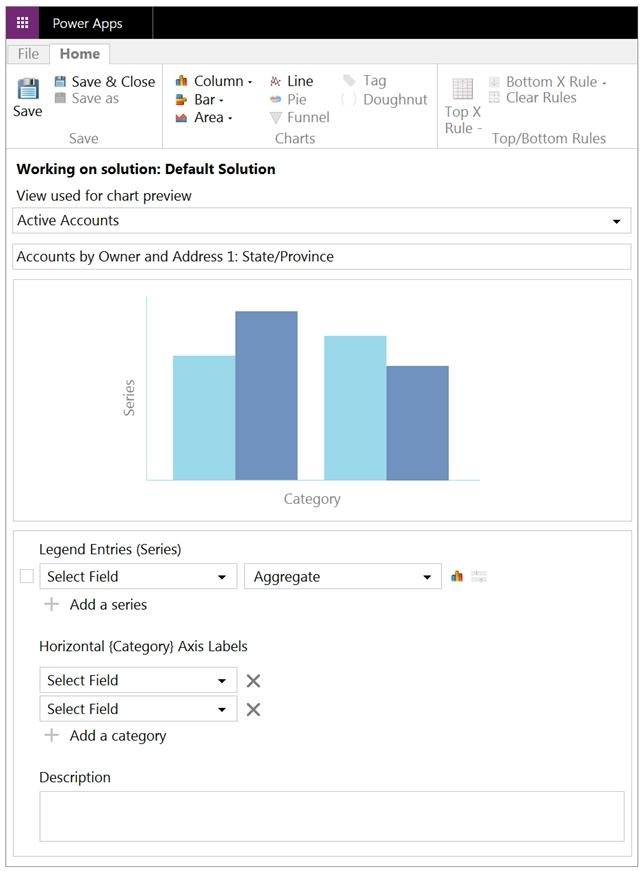
You need to create a system chart for the Account entity.
The chart must display a count of accounts grouped by owner and then display the accounts by Address 1: State/Province for each owner. You begin to configure chart options as shown in the image below.
How should you complete the configuration? To answer, select the appropriate options in the answer area.
NOTE: Each correct selection is worth one point. The chart must display a count of accounts grouped by owner, and then display the accounts by Address 1 to
State/Province for each owner.
Hot Area:
Explanation
Legend Entries (Series): Select Field: Owner — The series field is the column the chart actually measures, and because the requirement is a count of accounts per owner, Owner is the field that gets aggregated. Choosing Address 1: State/Province here would make the chart count records by state rather than by owner, and Account is the record type itself, not the measured column.
Legend Entries (Series): Aggregate: Count:All — Count:All returns the total number of Account rows for each grouping, which is exactly what "display a count of accounts" asks for. Sum and Avg are numeric aggregates that require a numeric column such as Annual Revenue and would not produce a record count over a lookup field like Owner.
First grouping field: Owner — The first entry under Horizontal (Category) Axis Labels defines the primary grouping on the category axis, so setting it to Owner makes each owner the top-level bucket that the account count is broken out by, matching "grouped by owner."
Second grouping field: Address 1: State/Province — Adding a second category field creates the drill-down/sub-grouping level inside each primary group, so each owner's bar can then be broken down by state or province, satisfying "display the accounts by Address 1: State/Province for each owner." Repeating Owner or picking Account here would give no meaningful secondary breakdown.
Verifying access...
Access Required
You need to purchase this exam to access practice mode