You have an Azure SQL database that contains a table named dbo.Orders.
You have an application that calls a stored procedure named dbo.usp_CreateOrder to insert rows into dbo.Orders.
When an insert fails, the application receives inconsistent error details.
You need to implement error handling to ensure that any failures inside the procedure abort the transaction and return a consistent error to the caller.
How should you complete the stored procedure? To answer, drag the appropriate values to the correct targets. Each value may be used once, more than once, or not at all. You may need to drag the split bar between panes or scroll to view content.
NOTE: Each correct selection is worth one point.
```sql
CREATE OR ALTER PROCEDURE dbo.usp_CreateOrder
@CustomerId int,
@Amount decimal(10,2),
@OrderId int OUTPUT
AS
BEGIN
SET NOCOUNT ON;
BEGIN TRY
BEGIN TRANSACTION;
INSERT INTO dbo.Orders(CustomerId, Amount, CreatedAt)
VALUES (@CustomerId, @Amount, SYSUTCDATETIME());
[Target 1];
COMMIT TRANSACTION;
END TRY
BEGIN CATCH
[Target 2];
THROW;
END CATCH
END
```
Explanation
Target 1 is SET @OrderId = SCOPE_IDENTITY() because the procedure has an OrderId output parameter that must be filled before the commit, and SCOPE_IDENTITY returns the identity value inserted in the same scope. Target 2 is IF @@TRANCOUNT > 0 ROLLBACK TRANSACTION because the catch block must abort the open transaction, and the check prevents a second error when no transaction is active, which an unconditional ROLLBACK TRANSACTION would raise. THROW without parameters then re-raises the caught exception with its original details, so the caller always receives the real error. RAISERROR is wrong here because it would replace those details and would not roll back the transaction.
Your team is developing an Azure SQL dataset solution from a locally cloned GitHub repository by using Microsoft Visual Studio Code and GitHub Copilot Chat.
You need to disable the GitHub Copilot repository-level instructions for yourself without affecting other users.
What should you do?
A.From Visual Studio Code, modify your GitHub Copilot Chat user settings.Correct
B.Add a --debug flag when you start the GitHub Copilot Chat extension.
C.Delete .github/copilot-instructions.md.
Explanation
Whether Copilot Chat loads instruction files is controlled by a setting, and changing it in your own user settings affects only you. Deleting .github/copilot-instructions.md is wrong because the file belongs to the repository, so once the change is pushed it removes the instructions for the whole team. A --debug flag only concerns diagnostics and does not turn off instructions.
You have a SQL database in Microsoft Fabric that contains a column named Payload. Payload stores customer data in JSON documents that have the following format.
```json
{
"date": "2020-01-25",
"customer_email": "user@contoso.com",
...
}
```
Data analysis shows that some customers have subaddressing in their email address, for example, user1+tag@contoso.com.
You need to return a normalized email value that removes the subaddressing, for example, user1+tag@contoso.com must be normalized to user1@contoso.com.
Which Transact-SQL expression should you use?
The pattern \+.*@ matches from the plus sign through the at sign, and replacing that match with @ removes only the tag, so user1+tag@contoso.com becomes user1@contoso.com. Addresses with no plus sign do not match, and REGEXP_REPLACE returns them unchanged. Options A and D match from the plus sign to the end of the string and replace it with nothing, which also removes the domain and leaves user1. Option B cannot return the normalized value: REGEXP_SUBSTR only extracts text, and its pattern ends with a stray equals sign and does not allow a plus sign before the at sign.
You have an Azure SQL database that contains a table named dbo.Orders. dbo.Orders contains a column named CreateDate that stores order creation dates.
You need to create a stored procedure that filters Orders by CreateDate for a single calendar day. The solution must be SARGable.
How should you complete the Transact-SQL code? To answer, drag the appropriate values to the correct targets. Each value may be used once, more than once, or not at all. You may need to drag the split bar between panes or scroll to view content.
NOTE: Each correct selection is worth one point.
```sql
CREATE PROCEDURE dbo.usp_SearchOrders
@StartDate date
AS
BEGIN
SET NOCOUNT ON;
DECLARE @EndDate date;
SET @EndDate = [Target 1]
SELECT o.CreateDate,
o.OrderId,
o.ShipDate
FROM dbo.Orders AS o
WHERE o.CreateDate >= [Target 2]
AND o.CreateDate < [Target 3];
END;
GO
```
Explanation
Target 1 is DATEADD(day, 1, @StartDate), which sets @EndDate to the start of the following day. Target 2 is @StartDate and Target 3 is @EndDate, which together form a half-open range that covers the whole calendar day, including any time portion stored in CreateDate. The predicate is SARGable because the column stands alone on one side of each comparison, so the optimizer can seek on an index. CONVERT(char(10), CreateDate, 121) is wrong because wrapping the column in a function prevents an index seek, and GETDATE() ignores the requested day.
You have an Azure SQL database.
You need to create a scalar user-defined function (UDF) that returns the number of whole years between an input parameter named @OrderDate and the current date/time as a single positive integer. The function must be created in Azure SQL Database.
You write the following code.
```sql
01 CREATE FUNCTION dbo.ufnYearsSinceOrder (@OrderDate datetime2)
02 RETURNS int
03 AS
04 BEGIN
05
06 END
```
What should you insert at line 05?
A scalar function body must end with a RETURN statement, and DATEDIFF takes the start date before the end date, so DATEDIFF(year, @OrderDate, GETDATE()) gives a positive result for a past order. Option A reverses the arguments, which produces a negative number. Options B and C are bare expressions with no RETURN, so the function would not compile. DATEDIFF counts year boundaries crossed rather than elapsed full years, but among these options it is the only valid statement that returns a positive integer.
You have an Azure SQL database.
You deploy Data API builder (DAB) to Azure Container Apps by using the mcr.microsoft.com/azure-databases/data-api-builder:latest image.
You have the following Container Apps secrets:
- MSSQL_CONNECTION_STRING that maps to the SQL connection string
- DAB_CONFIG_BASE64 that maps to the DAB configuration
You need to initialize the DAB configuration to read the SQL connection string.
Which command should you run?
A.dab init --database-type mssql --connection-string "secretref:DAB_CONFIG_BASE64" --host-mode Production --config dab-config.json
B.dab init --database-type mssql --connection-string "@env('MSSQL_CONNECTION_STRING')" --host-mode Production --config dab-config.jsonCorrect
C.dab init --database-type mssql --connection-string "secretref:mssql-connection-string" --host-mode Production --config dab-config.json
D.dab init --database-type mssql --connection-string "@env('DAB_CONFIG_BASE64')" --host-mode Production --config dab-config.json
Explanation
The DAB configuration reads the connection string through the @env() function, which resolves an environment variable when the container runs, so the secret never appears in the file. MSSQL_CONNECTION_STRING is the value that holds the SQL connection string. Options A and C are wrong because secretref is Container Apps syntax for mapping a secret to an environment variable, not something DAB understands in its configuration. Options A and D are also wrong because DAB_CONFIG_BASE64 holds the DAB configuration, not the connection string.
You have a SQL database in Microsoft Fabric that contains a nvarchar(max) column named MessageText. An ID is always contained within the first paragraph of MessageText.
You need to write a Transact-SQL query that uses REGEXP_SUBSTR to extract the ID from MessageText.
What should you include in the query?
A.Apply STRING_ESCAPE(MessageText, 'json') before calling REGEXP_SUBSTR.
B.Cast MessageText to nvarchar(4000) before calling REGEXP_SUBSTR.Correct
C.Add a COLLATE Latin1_General_CS_AS clause to MessageText before calling REGEXP_SUBSTR.
D.Run TRY_CONVERT(varchar(max), MessageText) before calling REGEXP_SUBSTR.
Explanation
The REGEXP_* functions accept nvarchar(max) only up to 2 MB, so a very long value can make the call fail. Because the ID is always in the first paragraph, casting MessageText to nvarchar(4000) keeps the part that holds the ID and removes the large object limit from the call. STRING_ESCAPE changes the text by adding escape characters and solves nothing here. Regular expressions do not honor collation rules, so a COLLATE clause has no useful effect, and converting to varchar(max) is still a large object type and can lose Unicode characters.
You have an Azure SQL database that contains database-level Data Definition Language (DDL) triggers, including a trigger named ddl_Audit.
You need to prevent ddl_Audit from firing during the next deployment. The trigger object must remain in place.
Which Transact-SQL statement should you use?
A.ALTER TRIGGER
B.ALTER DATABASE
C.ALTER SERVER AUDIT SPECIFICATION
D.DISABLE TRIGGERCorrect
E.ALTER DATABASE AUDIT SPECIFICATION
Explanation
DISABLE TRIGGER ddl_Audit ON DATABASE stops the trigger from firing, and the trigger still exists as an object so it can be turned back on later with ENABLE TRIGGER. ALTER TRIGGER changes the definition and actually enables the trigger. ALTER DATABASE does not control individual triggers. The two audit specification statements manage SQL Audit, not DDL triggers.
Your development team uses GitHub Copilot Chat in Microsoft SQL Server Management Studio (SSMS) to generate and run Transact-SQL queries against an Azure SQL database named DB1. DB1 contains tables that store sensitive customer data.
You need to ensure that any Transact-SQL queries that run from GitHub Copilot Chat in SSMS are restricted by the same permissions as the developer's database login.
What prevents the GitHub Copilot Chat-run queries from accessing data beyond the developer's access?
A.GitHub Copilot Chat runs queries in a read-only sandbox that is isolated from production database permissions.
B.GitHub Copilot Chat runs queries by using the developer's database identity and permissions.Correct
C.GitHub Copilot Chat filters query results on the client side to remove rows the developer is unauthorized to see.
D.GitHub Copilot Chat uses different row-level security (RLS) policies than the developer.
Explanation
GitHub Copilot in SSMS executes queries based on the permissions of your login, so a query against a table you cannot select from simply fails. The database engine enforces this with the developer's own identity. There is no separate read-only sandbox, no client-side row filtering, and no separate set of RLS policies for Copilot.
You have an Azure SQL database named AdventureWorksDB that contains a table named dbo.Employee.
You have a C# Azure Functions app that uses an HTTP-triggered function with an Azure SQL input binding to query dbo.Employee.
You are adding a second function that will react to row changes in dbo.Employee and write structured logs.
You need to configure AdventureWorksDB and the app to meet the following requirements:
- Changes to dbo.Employee must trigger the new function within five seconds.
- Each invocation must process no more than 100 changes.
Which two database configurations should you perform? Each correct answer presents part of the solution.
NOTE: Each correct selection is worth one point.
A.Create an AFTER trigger on dbo.Employee for Data Manipulation Language (DML).
B.Set Sql_Trigger_MaxBatchSize to 100.
C.Enable change tracking on the dbo.Employee table.Correct
D.Enable change tracking at the database level.Correct
E.Set Sql_Trigger_PollingIntervalMs to 5000.
F.Enable change data capture (CDC) for dbo.Employee table changes.
Explanation
The Azure SQL trigger for Functions relies on SQL change tracking, which must be enabled first on the database and then on the monitored table. Those are the two database configurations. Sql_Trigger_MaxBatchSize and Sql_Trigger_PollingIntervalMs are function app settings rather than database settings, and their defaults of 100 changes and 1000 ms already meet the requirements. The binding does not use a DML AFTER trigger or change data capture.
You have a Microsoft SQL Server 2025 database that contains a table named dbo.CustomerMessages. dbo.CustomerMessages contains two columns named MessageID (int) and MessageRaw (nvarchar(max)).
MessageRaw can contain a phone number in multiple formats, and some rows do NOT contain a phone number.
You need to write a single SELECT query that meets the following requirements:
- The query must return MessageID, RawNumber, DigitsOnly, and PhoneStatus.
- RawNumber must contain the first substring that matches a phone-number pattern, or NULL if no match exists.
- DigitsOnly must remove all non-digit characters from RawNumber, or return NULL.
- PhoneStatus must return valid when a phone number exists in MessageRaw, otherwise return Missing.
How should you complete the Transact-SQL query? To answer, drag the appropriate values to the correct targets. Each value may be used once, more than once, or not at all.
```sql
SELECT
MessageID,
[Target 1] MessageRaw, '\d{3}[)\-\s]*\d{3}[\-\s]*\d{4}' ) AS RawNumber,
[Target 2] MessageRaw, '\d{3}[)\-\s]*\d{3}[\-\s]*\d{4}' ),'\D', '') AS DigitsOnly,
CASE
WHEN [Target 3] MessageRaw, '\d{3}[)\-\s]*\d{3}[\-\s]*\d{4}') = 1
THEN 'Valid'
ELSE 'Missing'
END AS PhoneStatus
FROM dbo.CustomerMessages;
```
NOTE: Each correct selection is worth one point.
Explanation
REGEXP_SUBSTR returns the first substring that matches the pattern, or NULL when nothing matches, which is what RawNumber needs. For DigitsOnly, REGEXP_REPLACE wraps REGEXP_SUBSTR and replaces every non-digit (\D) with an empty string, and a NULL input stays NULL. For PhoneStatus, the expression is compared to 1, so it needs a function that returns a number: REGEXP_COUNT returns an int. REGEXP_LIKE returns a Boolean and is written as a predicate without = 1, and REGEXP_INSTR returns a position, so = 1 would be true only when the number starts the message. STRING_SIMILARITY measures fuzzy similarity rather than pattern matches.
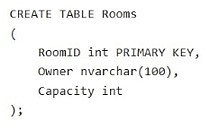
You have an Azure SQL database that contains a table named Rooms. Rooms was created by using the following Transact-SQL statement.
You discover that some records in the Rooms table contain NULL values for the Owner field.
You need to ensure that all future records have a value for the Owner field.
What should you add?
A.a foreign key
B.a check constraintCorrect
C.a nonclustered index
D.a unique constraint
Explanation
A check constraint limits the values a column accepts, so CHECK (Owner IS NOT NULL) rejects any new row without an Owner. It can be added WITH NOCHECK so that the existing rows with NULL do not block it. A foreign key still allows NULL and only validates values that are present. A unique constraint also allows a NULL value, and a nonclustered index does not enforce any value rule.
You have a SQL database in Microsoft Fabric that contains a table named WebSite.Logs. WebSite.Logs stores application telemetry data. WebSite.Logs contains a nvarchar(max) column named log that stores JSON documents.
You have a daily report that filters by the $.severity JSON property and returns LogId, LogDateTime, and log. The report frequently causes full table scans.
You need to modify WebSite.Logs to support efficient filtering by $.severity and avoid key lookups for the columns returned by the report.
How should you complete the Transact-SQL code to avoid full table scans? To answer, drag the appropriate values to the correct targets. Each value may be used once, more than once, or not at all.
```sql
ALTER TABLE WebSite.Logs
ADD severity [Target 1];
GO
CREATE INDEX ix_severity
ON WebSite.Logs(severity)
[Target 2];
GO
```
NOTE: Each correct selection is worth one point.
Explanation
JSON_VALUE extracts a scalar value, so a computed column built on it can be indexed and lets the engine seek on severity instead of scanning the table. JSON_QUERY is for objects and arrays and returns NULL for a scalar such as severity. To avoid key lookups, the index must cover every column the report returns, so INCLUDE (LogId, LogDateTime, [log]) is needed. INCLUDE (log) alone leaves LogId and LogDateTime to be fetched from the table.
You have an Azure SQL database named SalesDB that contains a table named dbo.Articles. dbo.Articles contains two million articles with embeddings. The articles are updated frequently throughout the day.
You query the embeddings by using VECTOR_SEARCH.
Users report that semantic search results do NOT reflect the updates until the following day.
You need to ensure that the embeddings are updated whenever the articles change. The solution must minimize CPU usage on SalesDB.
Which embedding maintenance method should you implement?
A.Modify the query to use VECTOR_DISTANCE instead of VECTOR_SEARCH.
B.Enable change data capture (CDC) on dbo.Articles and use an Azure Functions app to process CDC changes.Correct
C.Run an hourly Transact-SQL job that regenerates embeddings for all the rows in dbo.Articles.
D.On dbo.Articles, create a trigger that calls AI_GENERATE_EMBEDDINGS for each inserted or updated row.
Explanation
CDC records which rows changed by reading the transaction log asynchronously, and an Azure Functions app then generates embeddings for only those rows outside the database, so SalesDB does little of the work. A trigger that calls AI_GENERATE_EMBEDDINGS makes an external call from the engine inside every write, which slows a frequently updated table and uses database resources. An hourly job regenerating two million rows is wasteful and still leaves results out of date. VECTOR_DISTANCE only changes how the search runs; it does not refresh any embedding.
You have a GitHub Codespaces environment that has GitHub Copilot Chat installed and is connected to a SQL database in Microsoft Fabric named DB1. DB1 contains tables named Sales.Orders and Sales.Customers.
You use GitHub Copilot Chat in the context of DB1.
A company policy prohibits sharing customer Personally Identifiable Information (PII), secrets, and query result sets with any AI service.
You need to use GitHub Copilot Chat to write and review Transact-SQL code for a new stored procedure that will join Sales.Orders to Sales.Customers and return customer names and email addresses. The solution must NOT share the actual data in the tables with GitHub Copilot Chat.
What should you do?
A.From Sales.Customers, paste several rows that include email addresses into a chat, so that GitHub Copilot Chat can infer edge cases.
B.Run a SELECT statement that returns customer names and email addresses and provide the result set to GitHub Copilot Chat so that GitHub Copilot Chat can generate the stored procedure.
C.Provide the database connection string to GitHub Copilot Chat so that GitHub Copilot Chat can validate the stored procedure.
D.Ask GitHub Copilot Chat to generate the stored procedure by using schema details only.Correct
Explanation
Table and column names are metadata, not customer data, so schema details are enough for GitHub Copilot Chat to write and review the procedure without breaking the policy. Pasting rows that include email addresses shares PII. Providing a result set shares both PII and query results, which the policy prohibits. A connection string is a secret and would also open a path to the data.
You have an Azure subscription. The subscription contains an Azure SQL database named SalesDB and an Azure App Service app named sales-api. sales-api uses virtual network integration to a subnet named vnet-prod/subnet-app and reads from SalesDB.
You need to configure authentication and network access to meet the following requirements:
- Ensure that sales-api connects to SalesDB by using passwordless authentication.
- Ensure that all the database traffic remains within the subscription.
The solution must minimize administrative effort.
What should you configure? To answer, select the appropriate options in the answer area.
NOTE: Each correct selection is worth one point.
Explanation
Authentication for sales-api: a managed identity with Microsoft Entra authentication is passwordless, and Azure handles the credential, so there is nothing to store or rotate. Rotated SQL credentials and a SQL login in Azure Key Vault still rely on passwords, and Azure SQL Database does not authenticate clients by an App Service client certificate setting.
Network access for SalesDB: a private endpoint gives SalesDB a private address in the virtual network that sales-api is already integrated with, and disabling public network access means that path is the only one. Allowing Azure services and adding IP firewall rules both keep traffic on the public endpoint, and a rule for support IP addresses has nothing to do with the app.
You have a database named DB1. The schema is stored in a GitHub repository as an SDK-style SQL database project.
You use a feature branch workflow to deploy changes to DB1.
You need to update the local feature branch with the latest changes to main, and then create a pull request to merge the feature branch into main for review.
How should you complete the GitHub CLI script? To answer, drag the appropriate values to the correct targets. Each value may be used once, more than once, or not at all.
NOTE: Each correct selection is worth one point.
```bash
git checkout feature/db1-add-staticdata
[Target 1]
[Target 2]
[Target 3] \
--title "Feature Update: DB1" \
--body "Apply latest improvements and updates for review" \
--head feature/db1-add-staticdata \
--base main \
--repo <GitHubOwner>/DB1 \
--web
```
Explanation
While the feature branch is checked out, git fetch origin downloads the latest commits from the remote, and git merge origin/main merges the updated main into the feature branch, so the branch is current before review. gh pr create then opens the pull request; the --title, --body, --head, --base, --repo and --web flags all belong to that command. git checkout main would leave the feature branch, gh pr merge would merge without review, and gh pr ready only marks an existing draft pull request as ready.
You have an Azure SQL database that contains tables named dbo.ProductDocs and dbo.ProductDocsEmbeddings. dbo.ProductDocs contains product documentation and the following columns:
- DocID (int)
- Title (nvarchar(200))
- Body (nvarchar(max))
- LastModified (datetime2)
The documentation is edited throughout the day.
dbo.ProductDocsEmbeddings contains the following columns:
- DocID (int)
- ChunkOrder (int)
- ChunkText (nvarchar(max))
- Embedding (vector(1536))
The current embedding pipeline runs once per night.
You need to ensure that embeddings are updated every time the underlying documentation content changes. The solution must NOT require a nightly batch process.
What should you include in the solution?
A.fixed-size chunking
B.a smaller embedding model
C.table triggersCorrect
D.change tracking on dbo.ProductDocs
Explanation
Microsoft recommends updating embeddings every time the underlying data changes. An AFTER INSERT, UPDATE trigger on dbo.ProductDocs fires with each change and can regenerate the affected chunks and embeddings (for example with AI_GENERATE_EMBEDDINGS) immediately, with no scheduled batch. Change tracking only records which rows changed; something still has to poll it and do the work, which is again a scheduled process. Chunking strategy and model size affect embedding quality and cost, not when embeddings are refreshed.
You have a database named db1. The schema is stored in a Git repository as an SDK-style SQL database project. The repository contains the following GitHub Actions workflow.
```yaml
name: Database CI/CD
on:
push:
branches:
- main
pull_request:
branches:
- main
jobs:
build-and-deploy:
runs-on: ubuntu-latest
steps:
- name: Checkout code
uses: actions/checkout@v3
- name: Setup .NET
uses: actions/setup-dotnet@v3
with:
dotnet-version: '8.x'
- name: Build
run: dotnet build db1.sqlproj --configuration Release
- name: Deploy
run: |
SqlPackage /Action:Publish \
/SourceFile:./bin/Release/db1.dacpac \
/TargetConnectionString:"${{ secrets.Target_Connection_String }}"
unit-tests:
runs-on: ubuntu-latest
needs: build-and-deploy
if: github.ref == 'refs/heads/main'
steps:
- name: Checkout code
uses: actions/checkout@v3
- name: Setup .NET
uses: actions/setup-dotnet@v3
with:
dotnet-version: '8.x'
- name: Run unit tests
run: dotnet test UnitTests.csproj --configuration Release
```
For each of the following statements, select Yes if the statement is true. Otherwise, select No.
NOTE: Each correct selection is worth one point.
Explanation
Statement 1 (Yes): A push to main triggers the workflow, and the unit-tests job runs after build-and-deploy because github.ref is refs/heads/main for that push. On a pull request the ref is a pull request ref, so the condition skips the tests there, but that does not affect pushes to main.
Statement 2 (Yes): Building a SQL database project with dotnet build validates the references between objects and the T-SQL syntax against the target platform, and fails the build on errors, before the .dacpac is produced.
Statement 3 (Yes): SqlPackage Publish compares the .dacpac with the target database and, because VerifyDeployment defaults to True, runs a schema validation step before executing the plan. It stops the publish when issues would block deployment or, with BlockOnPossibleDataLoss, when a change could lose data.
You have a Microsoft SQL Server 2025 instance that contains a database named SalesDB. SalesDB supports a Retrieval Augmented Generation (RAG) pattern for internal support tickets. The SQL Server instance runs without any outbound network connectivity.
You plan to generate embeddings inside the SQL Server instance and store them in a table for vector similarity queries.
You need to ensure that only a database user account named AIApplicationUser can run embedding generation by using the model.
Which two actions should you perform? Each correct answer presents part of the solution.
NOTE: Each correct selection is worth one point.
A.Grant the CONTROL permission on SalesDB to AIApplicationUser.
B.Create a database audit specification on SalesDB owned by AIApplicationUser.
C.Grant the EXECUTE permission on the external model object to AIApplicationUser.Correct
D.Create an external model object by using ONNX Runtime and local paths.Correct
E.Create an external model object that points to a Microsoft Foundry REST endpoint.
Explanation
With no outbound connectivity, the model must run locally: CREATE EXTERNAL MODEL with API_FORMAT = 'ONNX Runtime', a local LOCATION for the model files and LOCAL_RUNTIME_PATH for the runtime. To use an external model in AI_GENERATE_EMBEDDINGS a principal needs EXECUTE on it, so granting EXECUTE on the external model only to AIApplicationUser restricts who can generate embeddings. A Foundry REST endpoint needs outbound network access, CONTROL on the database grants far more than needed, and an audit specification records activity but does not restrict it.
Verifying access...
Access Required
You need to purchase this exam to access practice mode
Unlock a few more questions every day for 300 points you earn free on
Godlike Academy. Everything you unlock with the Daily Climb stays open for 7 days after your last unlock.