You have an Azure Cosmos DB for NoSQL account named account1 that has the disableKeyBasedMetadataWriteAccess property enabled.
You are developing an app named App1 that will be used by a user named DevUser1 to create containers in account1. DevUser1 has a non-privileged user account in the Microsoft Entra ID tenant.
You need to ensure that DevUser1 can use App1 to create containers in account1.
What should you do? To answer, select the appropriate options in the answer area.
NOTE: Each correct selection is worth one point.
Explanation
Grant permissions to create containers by using: Role-based access control (RBAC). With disableKeyBasedMetadataWriteAccess enabled, metadata changes such as creating containers can only be made by a user who holds the proper Azure role (for example Cosmos DB Operator or a custom control-plane role) assigned through Azure RBAC. Account keys are exactly what the property blocks for metadata writes, and resource tokens only grant data-plane access to existing resources, so neither lets DevUser1 create containers.
Create containers by using the: Azure Resource Manager API. When the property is set, create and update operations issued through the Cosmos DB endpoint (the NoSQL SDK) fail with an 'Operation POST ... is not allowed through Azure Cosmos DB endpoint' error, so App1 must send them through Azure Resource Manager (directly or via Azure CLI, PowerShell or templates). The Azure AD Graph API manages directory objects, not Cosmos DB resources.
You have an Azure Cosmos DB for NoSQL account that has a single write region in West Europe.
You run the Azure CLI script shown in the exhibit.
For each of the following statements, select Yes if the statement is true. Otherwise, select No.
NOTE: Each correct selection is worth one point.
Explanation
Statement 1 (Yes): The first command adds North Europe as a second region with failover priority 1, and the failover-priority-change command then gives North Europe priority 0. In a single-write-region account the region with priority 0 is the write region, so North Europe becomes writable.
Statement 2 (No): After the priority change, West Europe has failover priority 1 and becomes a read region. Multi-region writes are not enabled, so only North Europe accepts writes.
Statement 3 (No): Provisioned throughput is reserved in every region of the account and data is stored in every region, so adding North Europe roughly doubles the RU/s and storage billed (T x N RU/s for N regions). Only the failover priority change by itself is cost neutral; the region addition is not.
You are developing an application that will use an Azure Cosmos DB for NoSQL account as a data source.
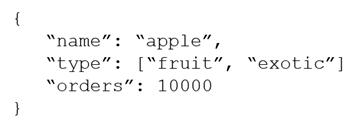
You need to create a report that displays the top five most ordered fruits as shown in the following table.
| Name | Type | Orders |
|---|---|---|
| apple | fruit | 1,000 |
| orange | fruit | 600 |
| banana | fruit, exotic | 400 |
| plum | fruit | 300 |
| mango | fruit, exotic | 200 |
A collection that contains aggregated data already exists. A sample document is shown in the exhibit.
Which two queries can you use to retrieve data for the report? Each correct answer presents a complete solution.
NOTE: Each correct selection is worth one point.
A.SELECT TOP 5 i.name, i.types, i.orders FROM items i WHERE EXISTS(SELECT VALUE t FROM t IN i.types WHERE t.name = 'fruit') ORDER BY i.orders, i.types
B.SELECT TOP 5 i.name, i.types, i.orders FROM items i WHERE EXISTS(SELECT VALUE t FROM t IN i.types WHERE t.name = 'fruit') ORDER BY i.orders DESCCorrect
C.SELECT TOP 5 i.name, i.types, i.orders FROM items i WHERE EXISTS(SELECT VALUE t FROM t IN i.types WHERE t.name = 'fruit') ORDER BY i.types DESC
D.SELECT TOP 5 i.name, i.types, i.orders FROM items i WHERE ARRAY_CONTAINS(i.types, {name: 'fruit'}) ORDER BY i.orders DESCCorrect
Explanation
The report needs fruit items sorted from the most to the least ordered, limited to five rows, so the query must filter on the fruit type and use ORDER BY i.orders DESC. Option B filters with an EXISTS subquery over the types array and option D filters with ARRAY_CONTAINS on the same array; both then sort by orders descending. Option A sorts by orders ascending (and adds an unnecessary second sort on types), so it returns the least ordered fruits, and option C sorts by types instead of orders, so the ranking is wrong.
You have a database in an Azure Cosmos DB for NoSQL account.
You plan to create a container that will store employee data for 5,000 small businesses. Each business will have up to 25 employees. Each employee item will have an emailAddress value.
You need to ensure that the emailAddress value for each employee within the same company is unique.
To what should you set the partition key and the unique key? To answer, select the appropriate options in the answer area.
NOTE: Each correct selection is worth one point.
Explanation
Partition key: companyId. A unique key constraint is enforced only within a logical partition, so partitioning by companyId puts all employees of one company together, and 5,000 companies with up to 25 employees each give many small, evenly sized logical partitions. Using emailAddress, companyId+emailAddress or employeeId would give every employee its own logical partition, so a unique key could never compare addresses across one company.
Unique key: emailAddress. With companyId as the partition key, a unique key on /emailAddress guarantees that no two items in the same company share an email address, while the same address can still exist in a different company. A unique key on companyId would allow only one employee per company, and employeeId does not address the requirement.
You have a container named container1 in an Azure Cosmos DB for NoSQL account. The container1 container has 120 GB of data.
A sample of a document in container1 is shown in the exhibit.
The orderId property is used as the partition key.
For each of the following statements, select Yes if the statement is true. Otherwise, select No.
NOTE: Each correct selection is worth one point.
Explanation
Statement 1 (Yes): The filter is only on orderDate, which is not the partition key. Azure Cosmos DB cannot route the query to one logical partition, so it fans out across all physical partitions of the 120 GB container.
Statement 2 (Yes): customerId is also not the partition key, so the query must check every partition even though it filters on a single value.
Statement 3 (No): The query includes an equality filter on orderId, the partition key, so the gateway or SDK routes it to the single partition that owns that key value. The additional orderDate filter is evaluated inside that partition.
You are designing an Azure Cosmos DB for NoSQL solution to store data from IoT devices. Writes from the devices will occur every second.
A sample of the data is shown in the exhibit.
You need to select a partition key that meets the following requirements for writes:
- Minimizes the partition skew
- Avoids capacity limits
- Avoids hot partitions
What should you do?
A.Use timestamp as the partition key.
B.Create a new synthetic key that contains deviceId and sensor1Value.
C.Create a new synthetic key that contains deviceId and deviceManufacturer.
D.Create a new synthetic key that contains deviceId and a random number.Correct
Explanation
Appending a random suffix to deviceId spreads each device's continuous writes across several logical partitions, which removes hot partitions, keeps partitions evenly sized and stops any one device from reaching the 20 GB logical partition limit. Timestamp concentrates all current writes on one value at a time, creating a hot partition. sensor1Value is a Boolean, so deviceId plus sensor1Value adds at most two values per device, and deviceManufacturer adds nothing because each device has only one manufacturer, so both still leave every device's writes in one or two partitions.
You maintain a relational database for a book publisher. The database contains the following tables.
| Name | Column |
|---|---|
| Author | authorId (primary key) |
| | fullname |
| | address |
| | contactinfo |
| Book | bookId (primary key) |
| | isbn |
| | title |
| | genre |
| Bookauthorlnk | authorId (foreign key) |
| | bookId (foreign key) |
The most common query lists the books for a given authorId.
You need to develop a non-relational data model for Azure Cosmos DB for NoSQL that will replace the relational database. The solution must minimize latency and read operation costs.
What should you include in the solution?
A.Create a container for Author and a container for Book. In each Author document, embed bookId for each book by the author. In each Book document embed authorId of each author.
B.Create Author, Book, and Bookauthorlnk documents in the same container.
C.Create a container that contains a document for each Author and a document for each Book. In each Book document, embed authorId.Correct
D.Create a container for Author and a container for Book. In each Author document and Book document embed the data from Bookauthorlnk.
Explanation
Storing authors and books in one container and embedding authorId in each Book document lets the most common request, list the books for an authorId, be answered by a single query on one container, ideally within one logical partition when authorId is the partition key. Options A and D split the data across two containers, so listing an author's books needs one read for the author's book IDs and then more reads in the Book container, raising latency and RU cost. Option B keeps the relational link documents, which still forces multiple lookups to resolve the books.
You have an Azure Cosmos DB for NoSQL account.
You run the following query against a container in the account.
```sql
SELECT
IS_NUMBER("1234") AS A,
IS_NUMBER(1234) AS B,
IS_NUMBER({prop: 1234}) AS C
```
What is the output of the query?
A.[{"A": false, "B": true, "C": false}]Correct
B.[{"A": true, "B": false, "C": true}]
C.[{"A": true, "B": true, "C": false}]
D.[{"A": true, "B": true, "C": true}]
Explanation
IS_NUMBER returns true only when the expression's type is a JSON number. "1234" is a string, so A is false; 1234 is a number, so B is true; {prop: 1234} is an object, so C is false even though it contains a number. IS_NUMBER does not convert strings or inspect object properties, which rules out the other outputs.
You have a container in an Azure Cosmos DB for NoSQL account.
You need to use the Azure Cosmos DB SDK to replace a document by using optimistic concurrency.
What should you include in the code? To answer, select the appropriate options in the answer area.
NOTE: Each correct selection is worth one point.
Explanation
RequestOptions property to set: AccessCondition, set to an IfMatch condition carrying the ETag read earlier, makes the replace conditional; in the .NET SDK v3 the equivalent is ItemRequestOptions.IfMatchEtag. ConsistencyLevel and SessionToken control read guarantees, not whether a write is rejected when the item has changed.
Document property that will be compared: _etag is the system property the server regenerates on every update and compares with the if-match header; when they differ the replace fails with HTTP 412 Precondition Failed. The id and _rid identify the item but do not change when it is updated, so they cannot detect a concurrent change.
You are creating a database in an Azure Cosmos DB for NoSQL account. The database will be used by an application that will provide users with the ability to share online posts. Users will also be able to submit comments on other users' posts.
You need to store the data shown in the following table.
| Type | Description |
|---|---|
| Users | Information about a user who will use the application |
| Posts | Text of up to 1,000 characters that a user will share with other users |
| Comments | Text of up to 280 characters that users will submit as a comment on a post |
| Interests | Information about a user's interests |
The application has the following characteristics:
- Users can submit an unlimited number of posts.
- The average number of posts submitted by a user will be more than 1,000.
- Posts can have an unlimited number of comments from different users.
- The average number of comments per post will be 100, but many posts will exceed 1,000 comments.
- Users will be limited to having a maximum of 20 interests.
For each of the following statements, select Yes if the statement is true. Otherwise, select No.
NOTE: Each correct selection is worth one point.
Explanation
Statement 1 (Yes): Users average more than 1,000 posts of up to 1,000 characters, unbounded. Embedding them means every new post rewrites an ever-growing user document, and write RU charges scale with item size, so writes get more expensive (and the item can approach the 2 MB limit).
Statement 2 (Yes): Comments are unbounded and many posts exceed 1,000 comments. Embedding them forces each new comment to replace the whole, growing post document, which costs more RUs than inserting a small separate comment document.
Statement 3 (No): Interests are bounded at 20 per user and are read together with the user. Embedding them lets one point read return the user and the interests, which is cheaper than reading or querying separate interest documents.
You have an app that stores data in an Azure Cosmos DB for NoSQL account. The app performs queries that return large result sets.
You need to return a complete result set to the app by using pagination. Each page of results must return 80 items.
Which three actions should you perform in sequence? To answer, move the appropriate actions from the list of actions to the answer area and arrange them in the correct order.
Explanation
MaxItemCount in QueryRequestOptions sets the maximum number of items returned per page, so it is set to 80 first. The query is then run page by page, passing the continuation token from the previous response to get the next page, and each page's results are appended to a variable until no continuation token remains. MaxBufferedItemCount only controls client-side prefetch buffering during parallel queries, and incrementing MaxItemCount would change the page size instead of moving to the next page.
Note: This question is part of a series of questions that present the same scenario. Each question in the series contains a unique solution that might meet the stated goals. Some question sets might have more than one correct solution, while others might not have a correct solution.
You have an Azure Cosmos DB for NoSQL account named account1 that uses autoscale throughput.
You need to run an Azure function when the normalized request units per second for a container in account1 exceeds a specific value.
Solution: You configure an Azure Monitor alert to trigger the function.
Does this meet the goal?
A.YesCorrect
B.No
Explanation
Normalized RU Consumption is an Azure Monitor metric for Azure Cosmos DB, and a metric alert rule can fire when it crosses a threshold for a specific container. The alert's action group can run an Azure Function, so this meets the goal.
Note: This question is part of a series of questions that present the same scenario. Each question in the series contains a unique solution that might meet the stated goals. Some question sets might have more than one correct solution, while others might not have a correct solution.
You have an Azure Cosmos DB for NoSQL account named account1 that uses autoscale throughput.
You need to run an Azure function when the normalized request units per second for a container in account1 exceeds a specific value.
Solution: You configure the function to have an Azure Cosmos DB trigger.
Does this meet the goal?
A.Yes
B.NoCorrect
Explanation
An Azure Cosmos DB trigger for Azure Functions fires on inserts and updates read from a container's change feed. It knows nothing about throughput metrics such as normalized RU consumption, so it cannot fire when that value exceeds a threshold; an Azure Monitor metric alert is needed instead.
Note: This question is part of a series of questions that present the same scenario. Each question in the series contains a unique solution that might meet the stated goals. Some question sets might have more than one correct solution, while others might not have a correct solution.
You have an Azure Cosmos DB for NoSQL account named account1 that uses autoscale throughput.
You need to run an Azure function when the normalized request units per second for a container in account1 exceeds a specific value.
Solution: You configure an application to use the change feed processor to read the change feed and you configure the application to trigger the function.
Does this meet the goal?
A.Yes
B.NoCorrect
Explanation
The change feed contains changed items, not metrics, so a change feed processor cannot tell when normalized RU consumption exceeds a value. Monitoring a metric threshold is done with an Azure Monitor metric alert whose action group runs the function.
You have a database named db1 in an Azure Cosmos DB for NoSQL account.
You are designing an application that will use db1.
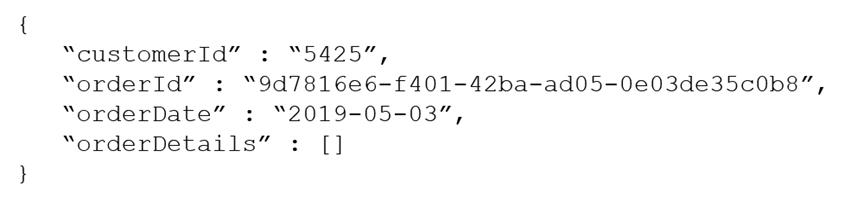
In db1, you are creating a new container named coll1 that will store online orders.
The following is a sample of a document that will be stored in coll1.
```json
{
"customerId" : "bba6fe24-6d97-4935-8d58-36baa4b8a0e1",
"orderId" : "9d7816e6-f401-42ba-ad05-0e03de35c0b8",
"orderDate" : "2021-09-29",
"orderDetails" : []
}
```
The application will have the following characteristics:
- New orders will be created frequently by different customers.
- Customers will often view their past order history.
You need to select the partition key value for coll1 to support the application. The solution must minimize costs.
To what should you set the partition key?
A.orderId
B.customerIdCorrect
C.orderDate
D.id
Explanation
customerId has high cardinality, so writes from many customers spread evenly across partitions, and the frequent order-history query filters on one customer, so it stays in a single partition and avoids costly cross-partition queries. orderId or id would also spread writes but would turn every history lookup into a cross-partition query. orderDate would send all of a day's new orders to one hot partition.
You have a container in an Azure Cosmos DB for NoSQL account that stores data about orders.
The following is a sample of an order document.
```json
{
"orderId" : "d4a9179b-5ead-43a3-b851-add9a71ac4b6",
"customerId" : "f6e39103-bdc7-4346-9cfb-45daa4b2becf",
"orderDate" : "2021-09-29",
"orderItems" : [...],
"total" : 12345
}
```
Documents are up to 2 KB.
You plan to receive one million orders daily.
Customers will frequently view their past order history.
You are evaluating whether to use orderDate as the partition key.
What are two effects of using orderDate as the partition key? Each correct answer presents a complete solution.
NOTE: Each correct selection is worth one point.
A.You will exceed the maximum number of partition key values
B.You will exceed the maximum storage per partition
C.There will always be a hot partitionCorrect
D.Queries will run cross-partitionCorrect
Explanation
With orderDate as the partition key, every order written on a given day lands in the same logical partition, so all write traffic concentrates on one partition at a time and there is always a hot partition. Customers viewing their order history filter by customerId, not by date, so those queries must fan out across every date partition. There is no limit on the number of distinct partition key values, and one million 2 KB orders per day is about 2 GB, well under the 20 GB logical partition limit.
You have a container in an Azure Cosmos DB for NoSQL account. The container stores data about families. Data about parents, children, and pets are stored as separate documents.
Each document contains the address of each family. Members of the same family share the same partition key named familyId.
You need to update the address for each member of the same family that share the same address. The solution must meet the following requirements:
- Be atomic, consistent, isolated, and durable (ACID).
- Provide the lowest latency.
What should you do?
A.Update the document of each family member separately by using a patch operation
B.Update the document of each family member separately and set the consistency level to strong
C.Update the document of each family member by using a transactional batch operationCorrect
Explanation
A transactional batch groups operations on items that share the same partition key value and executes them as a single ACID transaction in one round trip, so all family documents are updated together or not at all with minimal latency. Separate patch operations are each atomic only for a single item, so the set of updates is not one transaction. Strong consistency affects read guarantees and replication, not multi-item atomicity, and it increases latency.
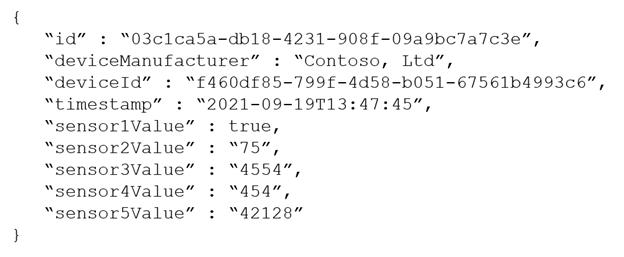
You are designing an Azure Cosmos DB for NoSQL solution to store data from IoT devices. Writes from the devices will occur every second.
The following is a sample of the data.
```json
{
"id" : "03c1ca5a-db18-4231-908f-09a9bc7a7c3e",
"deviceManufacturer" : "Contoso, Ltd",
"deviceId" : "f460df85-799f-4d58-b051-67561b4993c6",
"timestamp" : "2021-09-19T13:47:45",
"sensor1Value" : true,
"sensor2Value" : "75",
"sensor3Value" : "4554",
"sensor4Value" : "454",
"sensor5Value" : "42128"
}
```
You need to select a partition key that meets the following requirements for writes:
- Minimizes the partition skew
- Avoids capacity limits
- Avoids hot partitions
What should you do?
A.Create a new synthetic key that contains deviceId and timestampCorrect
B.Use timestamp as the partition key
C.Use deviceManufacturer as the partition key
D.Use sensor1Value as the partition key
Explanation
A synthetic key combining deviceId and timestamp has very high cardinality and spreads writes evenly, so no logical partition grows toward the 20 GB limit or receives a disproportionate share of writes. Timestamp alone sends every write in the same second to the same partition, creating a hot partition. deviceManufacturer and the boolean sensor1Value have very few distinct values, which causes heavy skew and eventually hits the logical partition size limit.
You need to create a data store for a directory of small and medium-sized businesses (SMBs). The data store must meet the following requirements:
- Store companies and the users employed by them. Each company will have less than 1,000 users.
- Some users have data that is greater than 2 KB.
- Associate each user to only one company.
- Provide the ability to browse by company.
- Provide the ability to browse the users by company.
- Whenever a company or user profile is selected, show a details page for the company and all the related users.
- Be optimized for reading data.
Which design should you implement to optimize the data store for reading data?
A.In a directory container, create a document for each company and a document for each user. Use the company ID as the partition key.Correct
B.Create a user container that uses the user ID as the partition key and a company container that uses the company ID as the partition key. Add the company ID to each user document.
C.In a user container, create a document for each user. Embed the company into each user document. Use the user ID as the partition key.
D.In a company container, create a document for each company. Embed the users into company documents. Use the company ID as the partition key.
Explanation
Storing company and user items as separate documents in one container partitioned by company ID lets a single-partition query return a company and all its users, which is efficient for every browse and details page. Embedding up to 1,000 users, some larger than 2 KB, in one company document can approach or exceed the 2 MB item size limit and makes every user change rewrite the whole company item, so a one-to-many relationship of this size should be referenced rather than embedded. Separate containers keyed by user ID force cross-partition queries to browse users by company, and embedding the company in each user duplicates data and still needs a cross-partition query to list a company's users.
You are building an application that will store data in an Azure Cosmos DB for NoSQL account. The account uses the session default consistency level. The account is used by five other applications. The account has a single read-write region and 10 additional read regions.
Approximately 20 percent of the items stored in the account are updated hourly.
Several users will access the new application from multiple devices.
You need to ensure that the users see the same item values consistently when they browse from the different devices. The solution must NOT affect the other applications.
Which two actions should you perform? Each correct answer presents part of the solution.
NOTE: Each correct selection is worth one point.
A.Set the default consistency level to eventual
B.Associate a session token to the device
C.Use implicit session management when performing read requests
D.Provide a stored session token when performing read requestsCorrect
E.Associate a session token to the user accountCorrect
Explanation
Session consistency guarantees read-your-writes only within a session, and each device would otherwise have its own client and session. Storing the session token with the user account and passing that stored token on read requests makes every device of the same user participate in one session, without changing the account default that the other applications rely on. Associating the token with a device or relying on implicit SDK session management keeps sessions per device, and switching the default to eventual weakens consistency and affects every application.
Verifying access...
Access Required
You need to purchase this exam to access practice mode
Unlock a few more questions every day for 300 points you earn free on
Godlike Academy. Everything you unlock with the Daily Climb stays open for 7 days after your last unlock.