You have 20 Azure SQL databases provisioned by using the vCore purchasing model.
You plan to create an Azure SQL Database elastic pool and add the 20 databases.
Which three metrics should you use to size the elastic pool to meet the demands of your workload? Each correct answer presents part of the solution.
NOTE: Each correct selection is worth one point.
A.total size of all the databasesCorrect
B.geo-replication support
C.number of concurrently peaking databases * peak CPU utilization per databaseCorrect
D.maximum number of concurrent sessions for all the databases
E.total number of databases * average CPU utilization per databaseCorrect
Explanation
Pool compute in the vCore model is estimated as the larger of two values: total number of databases multiplied by average vCore utilization per database, and number of concurrently peaking databases multiplied by peak vCore utilization per database. Pool storage is estimated by adding the data size needed for all the databases in the pool. Geo-replication support is a business continuity feature rather than a sizing input, and the maximum number of concurrent sessions is not part of the sizing calculation.
You have SQL Server 2019 on an Azure virtual machine that contains an SSISDB database.
A recent failure causes the master database to be lost.
You discover that all Microsoft SQL Server Integration Services (SSIS) packages fail to run on the virtual machine.
Which four actions should you perform in sequence to resolve the issue? To answer, move the appropriate actions from the list of actions to the answer area and arrange them in the correct order.
Explanation
With master lost, the instance no longer knows about SSISDB, so the database must be attached first. The SSIS catalog relies on CLR stored procedures, so the TRUSTWORTHY and CLR properties are turned on next. The database master key is then opened with the password used when the catalog was created, and a copy is encrypted by the service master key so the instance can open it automatically when packages run. Azure Key Vault certificates and Transparent Data Encryption do not relate to this failure.
You have an Azure SQL database that contains a table named factSales. FactSales contains the columns shown in the following table.
| Name | Data type |
| --- | --- |
| SalesID | Int |
| Product | Int |
| Total Number | Numeric(8,4) |
| Tax Number | Numeric(8,4) |
| SalesRep | Varchar(30) |
FactSales has 6 billion rows and is loaded nightly by using a batch process. You must provide the greatest reduction in space for the database and maximize performance.
Which type of compression provides the greatest space reduction for the database?
A.page compression
B.row compression
C.columnstore compression
D.columnstore archival compressionCorrect
Explanation
Columnstore archival compression runs the Microsoft XPRESS algorithm on top of the columnstore compression that columnstore tables always use, so it further reduces the data size and gives the greatest space reduction. The question asks specifically which type saves the most space. Archival compression does cost extra time and CPU to store and retrieve data, which is why plain columnstore compression can be tempting, but plain columnstore compression saves less space. Row and page compression apply to rowstore tables and also save less on a large fact table like this one.
You have a Microsoft SQL Server 2019 database named DB1 that uses the following database-level and instance-level features.
- Clustered columnstore indexes
- Automatic tuning
- Change tracking
- PolyBase
You plan to migrate DB1 to an Azure SQL database.
What feature should be removed or replaced before DB1 can be migrated?
A.Clustered columnstore indexes
B.PolyBaseCorrect
C.Change tracking
D.Automatic tuning
Explanation
PolyBase is not supported in Azure SQL Database, so it must be removed or replaced, for example by using the data virtualization capabilities of OPENROWSET and external tables. Columnstore indexes are supported on the Premium, Standard S3 and above, General Purpose, Business Critical and Hyperscale tiers. Change tracking and automatic tuning are also available in Azure SQL Database.
You have a Microsoft SQL Server 2019 instance in an on-premises datacenter. The instance contains a 4-TB database named DB1.
You plan to migrate DB1 to Azure SQL Managed Instance.
What should you use to minimize downtime and data loss during the migration?
A.distributed availability groups
B.database mirroring
C.Always On Availability Group
D.Azure Database Migration ServiceCorrect
Explanation
Azure Database Migration Service is a recommended migration option for SQL Managed Instance and offers migration with near-zero downtime: backups are restored continuously and the cutover happens only after all backups are restored. Database mirroring and a standard Always On Availability Group are not listed migration methods for moving a database to a managed instance. Distributed availability groups are also not one of the documented migration options as such.
You have an on-premises Microsoft SQL Server 2016 server named Server1 that contains a database named DB1.
You need to perform an online migration of DB1 to Azure SQL Managed Instance by using Azure Database Migration Service.
How should you configure the backup of DB1? To answer, select the appropriate options in the answer area.
NOTE: Each correct selection is worth one point.
Explanation
Backup type: an online migration restores a full backup and then catches up with the log backups before cutover, so both are needed; a full backup alone cannot keep the target in sync, and log backups alone have no base to restore onto.
Backup option: WITH CHECKSUM helps prevent migrating a corrupt database and speeds up the restore. WITH NOINIT appends to an existing backup file, and appended backups in a single file are not supported because every backup must go on separate backup media. WITH UNLOAD only controls whether a tape is rewound and unloaded, so it does not help here.
You have a resource group named App1Dev that contains an Azure SQL Database server named DevServer1. DevServer1 contains an Azure SQL database named DB1. The schema and permissions for DB1 are saved in a Microsoft SQL Server Data Tools (SSDT) database project.
You need to populate a new resource group named App1Test with the DB1 database and an Azure SQL Server named TestServer1. The resources in App1Test must have the same configurations as the resources in App1Dev.
Which four actions should you perform in sequence? To answer, move the appropriate actions from the list of actions to the answer area and arrange them in the correct order.
Explanation
Exporting the Azure Resource Manager templates from App1Dev captures a snapshot of the existing resource configuration. The server name and related values are then changed, because exported templates usually need adjusting before they can be reused elsewhere. Deploying the templates creates TestServer1 and DB1 in App1Test with matching configurations, and the SSDT database project then deploys the schema and permissions into the new database. Changing the admin or adding firewall addresses would make the configuration differ from App1Dev or is already covered by the template.
You have an Azure Synapse Analytics dedicated SQL pool named Pool1 and an Azure Data Lake Storage Gen2 account named Account1.
You plan to access the files in Account1 by using an external table.
You need to create a data source in Pool1 that you can reference when you create the external table.
How should you complete the Transact-SQL statement? To answer, select the appropriate options in the answer area.
NOTE: Each correct selection is worth one point.
```sql
CREATE EXTERNAL DATA SOURCE source1
WITH
( LOCATION = 'https://account1.[Dropdown 1].core.windows.net',
[Dropdown 2]
)
```
Explanation
Dropdown 1: dfs is the Data Lake Storage Gen2 endpoint, written as storage_account.dfs.core.windows.net in the location path. The blob endpoint belongs to the Azure Blob Storage entries, and table is a different storage service.
Dropdown 2: TYPE = HADOOP is the type accepted by a dedicated SQL pool for an external data source, and it uses PolyBase to read the files through an external table. TYPE = BLOB_STORAGE is for bulk operations in SQL Server rather than for external tables, and it is not in the dedicated SQL pool syntax. PUSHDOWN = ON is not part of that syntax either.
You plan to develop a dataset named Purchases by using Azure Databricks. Purchases will contain the following columns:
- ProductID
- ItemPrice
- LineTotal
- Quantity
- StoreID
- Minute
- Month
- Hour
- Year
- Day
You need to store the data to support hourly incremental load pipelines that will vary for each StoreID. The solution must minimize storage costs.
How should you complete the code? To answer, select the appropriate options in the answer area.
```python
df.write
[Dropdown 1] [Dropdown 2]
.mode("append")
[Dropdown 3]
```
Explanation
Dropdown 1 is .partitionBy, because it writes the data into a folder for each partition value, so a pipeline can read only the folders it needs. The .bucketBy and .sortBy methods do not create that folder structure, and .range is not a DataFrameWriter method.
Dropdown 2 is ("Year", "Month", "Day", "Hour", "StoreID"). The date parts down to the hour isolate each hourly load, and StoreID as the last level lets each pipeline read just its own store within that hour. Partitioning by StoreID and Hour alone would mix the same hour from different days, and "*" is not a valid partition specification.
Dropdown 3 is .parquet("/Purchases"), because Parquet is a compressed columnar format that needs less storage than CSV or JSON. The .saveAsTable method registers a table rather than simply writing files to the path.
You are designing a streaming data solution that will ingest variable volumes of data.
You need to ensure that you can change the partition count after creation.
Which service should you use to ingest the data?
A.Azure Event Hubs Standard
B.Azure Stream Analytics
C.Azure Data Factory
D.Azure Event Hubs DedicatedCorrect
Explanation
Azure Event Hubs Dedicated lets you increase the partition count of an event hub after it is created, though you cannot decrease it. The Standard tier does not allow the partition count to change after creation. Azure Stream Analytics processes streams and Azure Data Factory orchestrates data movement, so neither is an event ingestion service with a partition count to change.
You are building a database in an Azure Synapse Analytics serverless SQL pool.
You have data stored in Parquet files in an Azure Data Lake Storage Gen2 container.
Records are structured as shown in the following sample.
```json
{
"id":123,
"address_housenumber": "19c",
"address_line1": "Memory Lane",
"applicant1_name": "Jane",
"applicant2_name": "Dev"
}
```
The records contain two applicants at most.
You need to build a table that includes only the address fields.
How should you complete the Transact-SQL statement? To answer, select the appropriate options in the answer area.
```sql
[Dropdown 1] applications
WITH (
LOCATION = 'applications/',
DATA_SOURCE = applications_ds,
FILE_FORMAT = applications_file_format
)
AS
SELECT id, [address_housenumber] as addressnumber, [address_line1] as addressline1
FROM
[Dropdown 2] (BULK 'https://contoso1.dfs.core.windows.net/applications/year=*/*.parquet',
FORMAT = 'PARQUET') AS [r]
GO
```
Explanation
Dropdown 1 is CREATE EXTERNAL TABLE: a statement with LOCATION, DATA_SOURCE and FILE_FORMAT followed by AS SELECT is CREATE EXTERNAL TABLE AS SELECT (CETAS), which stores the query results in storage and exposes them as a table. CREATE TABLE and CREATE VIEW do not take these options.
Dropdown 2 is OPENROWSET, because OPENROWSET with BULK and FORMAT = 'PARQUET' reads the Parquet files directly from storage. OPENJSON parses JSON text rather than reading files, and CROSS APPLY joins rowsets, so neither can take a BULK path.
You have an Azure Synapse Analytics Apache Spark pool named Pool1.
You plan to load JSON files from an Azure Data Lake Storage Gen2 container into the tables in Pool1. The structure and data types vary by file.
You need to load the files into the tables. The solution must maintain the source data types.
What should you do?
A.Load the data by using PySpark.Correct
B.Load the data by using the OPENROWSET Transact-SQL command in an Azure Synapse Analytics serverless SQL pool.
C.Use a Get Metadata activity in Azure Data Factory.
D.Use a Conditional Split transformation in an Azure Synapse data flow.
Explanation
PySpark runs directly on the Spark pool, and its JSON reader infers each file's schema, including its data types, so it handles files whose structure varies and can write them to the pool's tables. OPENROWSET runs in the serverless SQL pool, not in Pool1, and requires you to define how the JSON is parsed. A Get Metadata activity only returns information about files, and a Conditional Split only routes rows, so neither loads the data while keeping its types.
You are designing a date dimension table in an Azure Synapse Analytics dedicated SQL pool. The date dimension table will be used by all the fact tables.
Which distribution type should you recommend to minimize data movement?
A.HASH
B.REPLICATECorrect
C.ROUND_ROBIN
Explanation
A replicated table keeps a full copy on each Compute node, so joining it to any fact table needs no data transfer between nodes. A date dimension suits this because it is small and changes rarely. Joining a round-robin table usually requires reshuffling rows between nodes, and a hash-distributed table avoids movement only when the fact table is distributed on the same column, which is not practical for every fact table.
From a website analytics system, you receive data extracts about user interactions such as downloads, link clicks, form submissions, and video plays.
The data contains the following columns:
| Name | Sample value |
| --- | --- |
| Date | 15 Jan 2021 |
| EventCategory | Videos |
| EventAction | Play |
| EventLabel | Contoso Promotional |
| ChannelGrouping | Social |
| TotalEvents | 150 |
| UniqueEvents | 120 |
| SessionsWithEvents | 99 |
You need to design a star schema to support analytical queries of the data. The star schema will contain four tables including a date dimension.
To which table should you add each column? To answer, select the appropriate options in the answer area.
Explanation
EventCategory goes in DimEvent, because it is a descriptive attribute of the event, alongside EventAction and EventLabel. It describes what happened rather than when or through which channel.
ChannelGrouping goes in DimChannel, because it describes how the visitor arrived, and it is the descriptive attribute that table exists to hold.
TotalEvents goes in FactEvents, because it is a numeric measure that is aggregated in queries. Measures belong in the fact table, and dimensions hold the attributes used to filter and group them.
You plan to create a table in an Azure Synapse Analytics dedicated SQL pool.
Data in the table will be retained for five years. Once a year, data that is older than five years will be deleted.
You need to ensure that the data is distributed evenly across partitions. The solution must minimize the amount of time required to delete old data.
How should you complete the Transact-SQL statement? To answer, drag the appropriate values to the correct targets. Each value may be used once, more than once, or not at all.
```sql
CREATE TABLE [dbo].[FactSales]
(
[ProductKey] int NOT NULL
, [OrderDateKey] int NOT NULL
, [CustomerKey] int NOT NULL
, [SalesOrderNumber] nvarchar(20) NOT NULL
, [OrderQuantity] smallint NOT NULL
, [UnitPrice] money NOT NULL
)
WITH
(
CLUSTERED COLUMNSTORE INDEX
, DISTRIBUTION = [Target 1] ([ProductKey])
, PARTITION ( [ [Target 2] ] RANGE RIGHT FOR VALUES
(20170101, 20180101, 20190101, 20200101, 20210101)
)
)
```
Explanation
Target 1 is HASH, because the statement names a distribution column, [ProductKey], and only hash distribution takes a column; ROUND_ROBIN and REPLICATE do not. Target 2 is OrderDateKey, because the yearly boundary values are dates in yyyymmdd form, so each partition holds one year of orders. Dropping or switching out the oldest year's partition then takes seconds, whereas deleting the same rows one by one could take hours. CustomerKey and SalesOrderNumber do not match date boundaries and cannot separate data by age.
You have an Azure Synapse Analytics workspace named WS1 that contains an Apache Spark pool named Pool1.
You plan to create a database named DB1 in Pool1.
You need to ensure that when tables are created in DB1, the tables are available automatically as external tables to the built-in serverless SQL pool.
Which format should you use for the tables in DB1?
A.JSON
B.CSV
C.ParquetCorrect
D.ORC
Explanation
Azure Synapse automatically shares managed and external Spark tables stored in Parquet with the serverless SQL pool, where they appear as external tables with the same name. Tables in JSON or ORC format are not synchronized automatically, so you would have to create the external tables yourself. Current Microsoft documentation also lists CSV and Delta as shared formats, so a CSV table would be synchronized today as well, but Parquet is the best choice here: it is fully supported in serverless SQL pool and it is the format Microsoft's own examples of this behaviour use.
You are designing an anomaly detection solution for streaming data from an Azure IoT hub. The solution must meet the following requirements:
- Send the output to an Azure Synapse.
- Identify spikes and dips in time series data.
- Minimize development and configuration effort.
Which should you include in the solution?
A.Azure SQL Database
B.Azure Databricks
C.Azure Stream AnalyticsCorrect
Explanation
Azure Stream Analytics has built-in machine learning anomaly detection, and its AnomalyDetection_SpikeAndDip function finds spikes and dips directly in a job's query, so no model has to be built. It reads from IoT Hub and can write its results to Azure Synapse Analytics. Azure Databricks could do this too, but you would have to develop and run the detection code yourself, which fails the minimal-effort requirement. Azure SQL Database is not a stream processing engine for an IoT hub feed.
You are creating a new notebook in Azure Databricks that will support R as the primary language but will also support Scala and SQL.
Which switch should you use to switch between languages?
A.\\[<language>]
B.%<language>Correct
C.\\[<language>]
D.@<language>
Explanation
In a Databricks notebook, a cell runs in the notebook's default language unless you override it, and the language magic command %<language> at the start of a cell does that. The supported commands are %python, %r, %scala and %sql, so this R notebook would use %scala and %sql for its other cells. The backslash and @ forms are not Databricks notebook syntax.
You are creating a managed data warehouse solution on Microsoft Azure.
You must use PolyBase to retrieve data from Azure Blob storage that resides in parquet format and load the data into a large table called FactSalesOrderDetails.
You need to configure Azure Synapse Analytics to receive the data.
Which four actions should you perform in sequence? To answer, move the appropriate actions from the list of actions to the answer area and arrange them in the correct order.
Explanation
PolyBase reaches external data through objects defined in the database, and each one depends on the one before it. The master key comes first because it encrypts the credential secret used to access storage. Next you define the external data source that points to Blob storage and the external file format that describes the parquet files, and the external table then binds its columns to that location and format. Transparent Data Encryption is unrelated to PolyBase access, and loading into a staging table is a later step that uses the external table rather than part of configuring it.
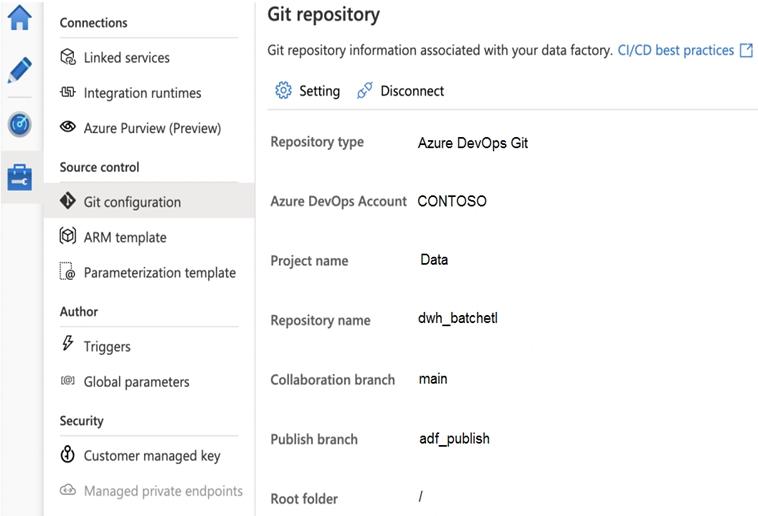
You configure version control for an Azure Data Factory instance as shown in the following exhibit.
Use the drop-down menus to select the answer choice that completes each statement based on the information presented in the graphic.
NOTE: Each correct selection is worth one point.
Explanation
For the ARM templates for the pipeline assets, the answer is adf_publish. The publish branch is where Data Factory stores and updates the Resource Manager templates it generates when you publish, and the exhibit shows adf_publish as that branch. The main branch is the collaboration branch that holds the JSON definitions of resources, and / is only the root folder within it.
For the ARM template named contososales, the answer is /dwh_batchetl/adf_publish/contososales. The exhibit shows the repository dwh_batchetl and the publish branch adf_publish, and Data Factory keeps a factory's generated templates in a folder named after the factory in that branch. The other two paths leave out the publish branch, so they do not point to where generated templates are saved.
Verifying access...
Access Required
You need to purchase this exam to access practice mode
Unlock a few more questions every day for 300 points you earn free on
Godlike Academy. Everything you unlock with the Daily Climb stays open for 7 days after your last unlock.