You are migrating SAP to Azure. The ASCS application servers are in one Azure zone, and the SAP database server is in a different Azure zone. ASCS/ERS is configured for high availability.
During performance testing, you discover increased response times in Azure, even though the Azure environment has better compute and memory configurations than the on-premises environment.
During the initial analysis, you discover an increased wait time for Enqueue.
What are three possible causes of the increased wait time? Each correct answer presents a complete solution.
NOTE: Each correct selection is worth one point.
A.a missing Enqueue profile
B.disk I/O during Enqueue backup operationsCorrect
C.misconfigured load balancer rules and health check probes for Enqueue and ASCS
D.active Enqueue replicationCorrect
E.network latency between the database server and the SAP application serversCorrect
Explanation
Enqueue wait time grows when the lock operations themselves take longer: disk I/O while the enqueue table is backed up, the synchronous replication of every lock to the Enqueue Replication Server, and the round trips across zones between the application servers and the database all add latency to each lock request. A missing Enqueue profile would stop the enqueue server from starting rather than slow it down. Misconfigured load balancer rules or health probes break connectivity or failover to ASCS instead of producing a measurable increase in wait time.
You have an on-premises SAP environment that uses AIX servers and IBM DB2 as the database platform.
You plan to migrate SAP to Azure. In Azure, the SAP workloads will use Windows Server and Microsoft SQL Server as the database platform.
What should you use to export from DB2 and import the data to SQL Server?
A.R3loadCorrect
B.Azure SQL Data Warehouse
C.SQL Server Management Studio (SSMS)
D.R3trans
Explanation
Moving SAP from AIX/DB2 to Windows/SQL Server is a heterogeneous OS/DB migration, and SAP's tool for it is R3load (driven by SWPM and Migration Monitor), which exports the database to platform-independent dump files and imports them into the target database. SSMS is a SQL Server administration tool and cannot export an SAP DB2 database in a form SAP supports. R3trans moves transport objects and client data, not whole databases, and Azure SQL Data Warehouse is not a supported SAP database target.
You are designing the backup for an SAP database.
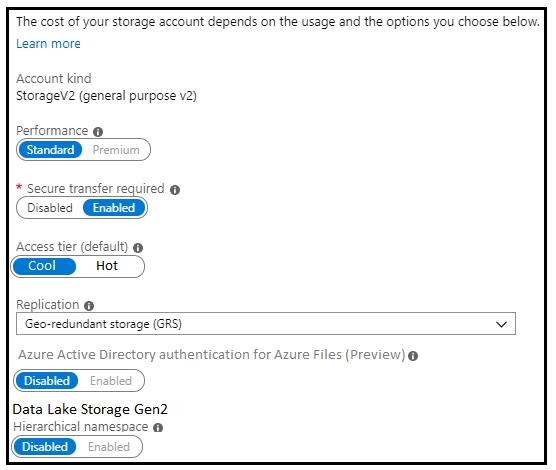
You have an Azure Storage account that is configured as shown in the following exhibit.
Use the drop-down menus to select the answer choice that completes each statement based on the information presented in the graphic.
NOTE: Each correct selection is worth one point.
Explanation
For the storage-medium dropdown, the account uses Standard performance, and standard general-purpose v2 accounts are backed by hard disk drives; only premium storage accounts use SSDs, and Standard SSD is a managed disk type, not a storage account performance tier. For the replication dropdown, the account uses geo-redundant storage (GRS), which keeps three copies in the primary region and copies the data asynchronously to a paired secondary region. Replication within one datacenter describes LRS, and replication across zones in one region describes ZRS.
You migrate SAP ERP Central Component (SAP ECC) production and non-production landscapes to Azure.
You are licensed for SAP Landscape Management (LaMa).
You need to refresh from the production landscape to the non-production landscape.
Which four actions should you perform in sequence? To answer, move the appropriate actions from the list of actions to the answer area and arrange them in the correct order.
Explanation
SAP LaMa runs on an SAP NetWeaver instance, so it is installed and configured first. The LaMa connector for Azure authenticates to Azure Resource Manager with a service principal, which you create in Microsoft Entra ID (App registrations) and then grant the Contributor role on the resource groups that hold the SAP systems, because a new service principal has no permissions. Finally, in the LaMa website you go to Infrastructure, open the Cloud Managers tab and add the Microsoft Azure Cloud Adapter with the service principal's ID and secret. The adapter is built into LaMa, so nothing is deployed from SAP Solution Manager.
For each of the following statements, select Yes if the statement is true. Otherwise, select No.
NOTE: Each correct selection is worth one point.
Explanation
Statement 1 (No): Oracle RAC is not supported on Azure because it requires multicast networking; high availability for SAP on Oracle on Azure uses Oracle Data Guard, with Fast-Start Failover for automatic failover.
Statement 2 (Yes): SAP on Oracle on Azure supports Windows guest operating systems as well as Oracle Linux. Current guidance recommends Windows Server 2019 or 2022 with Oracle 19c, and the supported version combinations are listed in SAP Note 2039619.
Statement 3 (No): For the Oracle database and application servers, SAP on Oracle on Azure is supported only on Oracle Linux, not on SUSE or Red Hat. Only ASCS/ERS VMs, which have no Oracle client, may run SLES or RHEL.
You have an SAP environment that is managed by using VMware vCenter.
You plan to migrate the SAP environment to Azure.
You need to gather information to identify which compute resources are required in Azure.
What should you use to gather the information?
A.Azure Migrate and SAP EarlyWatch Alert reportsCorrect
B.Azure Site Recovery and SAP Quick Sizer
C.SAP Quick Sizer and SAP HANA system replication
D.Azure Site Recovery Deployment Planner and SAP HANA Cockpit
Explanation
Azure Migrate discovers the VMware VMs through vCenter and assesses their actual CPU, memory and disk usage to recommend Azure VM sizes, while SAP EarlyWatch Alert reports give the SAP-specific view of hardware capacity, utilization and workload of the existing systems. Azure Site Recovery replicates machines rather than sizing them, SAP HANA system replication is a high-availability feature, and SAP Quick Sizer is meant for sizing new implementations rather than measuring an existing landscape.
You plan to migrate an SAP ERP Central Component (SAP ECC) production system to Azure.
You are reviewing the SAP EarlyWatch Alert report for the system.
You need to recommend sizes for the Azure virtual machines that will host the system.
Which two sections of the report should you review? Each correct answer presents a complete solution.
NOTE: Each correct selection is worth one point.
A.Hardware CapacityCorrect
B.Patch Levels under SAP Software Configuration
C.Hardware Configuration under LandscapeCorrect
D.Database and ABAP Load Optimization
E.Data Volume Management
Explanation
VM sizing needs the current servers' CPU, memory and their utilization. The Hardware Configuration section under Landscape lists each server's CPU type, cores and RAM, and the Hardware Capacity section shows how heavily that CPU and memory are used, which together let you map the system to Azure VM sizes. Patch levels, load optimization and data volume management describe software state, tuning and data growth, not the compute capacity a VM must provide.
You plan to migrate an SAP environment to Azure.
You need to recommend a solution to migrate the SAP application servers to Azure. The solution must minimize downtime and changes to the environments.
What should you include in the recommendation?
A.Azure Storage Explorer
B.Azure Import/Export service
C.AzCopy
D.Azure Site RecoveryCorrect
Explanation
Azure Site Recovery continuously replicates the application server VMs to Azure and then fails them over, so the servers move as they are with only a short cutover window and no reinstallation. Azure Storage Explorer, AzCopy and the Import/Export service copy files or disks, which would mean rebuilding the servers in Azure and a longer, more invasive migration.
You plan to migrate an on-premises SAP development system to Azure.
Before the migration, you need to check the usage of the source system hardware, such as CPU, memory, network, etc.
Which transaction should you run from SAP GUI?
A.SM51
B.DB01
C.DB12
D.OS07NCorrect
Explanation
Transaction OS07N (the operating system monitor) shows host-level hardware usage of the SAP server, including CPU, memory, paging, disk and network, which is what you need to baseline before sizing the Azure target. SM51 only lists the SAP application servers in the system, DB01 shows database lock waits, and DB12 shows database backup logs, so none of them report hardware utilization.
Your company has an SAP environment that contains the following components:
- SAP systems based on SAP HANA and SAP Adaptive Server Enterprise (SAP ASE) that run on SUSE Linux Enterprise Server 12 (SLES 12)
- Multiple SAP applications
The company plans to migrate all the applications to Azure.
You need to get a comprehensive list of all the applications that are part of the SAP environment.
What should you use?
A.the SAP license information
B.the SAP Solution ManagerCorrect
C.the data volume management report
D.the network inventory and locations
Explanation
SAP Solution Manager holds the landscape directory (LMDB) of every managed SAP system and the products and applications installed on it, so it gives a complete inventory of the SAP landscape to plan the migration. License information only shows what is licensed, not what is deployed, the data volume management report analyzes database growth, and a network inventory lists hosts and locations rather than SAP applications.
Note: This question is part of a series of questions that present the same scenario. Each question in the series contains a unique solution that might meet the stated goals. Some question sets might have more than one correct solution, while others might not have a correct solution.
You plan to migrate an SAP HANA instance to Azure.
You need to gather CPU metrics from the last 24 hours from the instance.
Solution: You query views from SAP HANA Studio.
Does this meet the goal?
A.YesCorrect
B.No
Explanation
Yes. SAP HANA keeps resource history in its monitoring and statistics views (for example M_LOAD_HISTORY_HOST and the _SYS_STATISTICS host resource history), and you can query these system views from SAP HANA Studio to get CPU usage for the last 24 hours. Microsoft's migration guidance specifically recommends using HANA system views with HANA Studio to understand system resource consumption when sizing the Azure target.
Note: This question is part of a series of questions that present the same scenario. Each question in the series contains a unique solution that might meet the stated goals. Some question sets might have more than one correct solution, while others might not have a correct solution.
You plan to migrate an SAP HANA instance to Azure.
You need to gather CPU metrics from the last 24 hours from the instance.
Solution: You run SAP HANA Quick Sizer.
Does this meet the goal?
A.Yes
B.NoCorrect
Explanation
No. SAP Quick Sizer is a web-based sizing tool that estimates hardware requirements from business inputs such as users and throughput; it does not read metrics from a running HANA instance. To get CPU usage from the last 24 hours you need the instance's own monitoring data, such as HANA system views or DBA Cockpit.
Note: This question is part of a series of questions that present the same scenario. Each question in the series contains a unique solution that might meet the stated goals. Some question sets might have more than one correct solution, while others might not have a correct solution.
You plan to migrate an SAP HANA instance to Azure.
You need to gather CPU metrics from the last 24 hours from the instance.
Solution: You use DBA Cockpit from SAP GUI.
Does this meet the goal?
A.YesCorrect
B.No
Explanation
Yes. DBA Cockpit (transaction DBACOCKPIT) connects to the SAP HANA database and exposes its performance and resource history, including host CPU usage over a chosen time range, so you can review the last 24 hours. It reads the same HANA monitoring data that the system views provide.
Note: This question is part of a series of questions that present the same scenario. Each question in the series contains a unique solution that might meet the stated goals. Some question sets might have more than one correct solution, while others might not have a correct solution.
You have a complex SAP environment that has both ABAP- and Java-based systems. The current on-premises landscapes are based on SAP NetWeaver 7.0 (Unicode and Non-Unicode) running on Windows Server and Microsoft SQL Server.
You need to migrate the SAP environment to a HANA-certified Azure environment.
Solution: You deploy a new environment to Azure that uses SAP NetWeaver 7.4. You export the databases from the on-premises environment, and then you import the databases into the Azure environment.
Does this meet the goal?
A.Yes
B.NoCorrect
Explanation
No. A database exported from SAP NetWeaver 7.0 cannot simply be imported into a system running NetWeaver 7.4, because the database content belongs to the older release; the release upgrade has to be performed on the SAP system itself (for example with Software Update Manager) rather than skipped by an export and import. The supported path is to upgrade the systems to a HANA-capable release first and then move them to Azure.
Note: This question is part of a series of questions that present the same scenario. Each question in the series contains a unique solution that might meet the stated goals. Some question sets might have more than one correct solution, while others might not have a correct solution.
You have a complex SAP environment that has both ABAP- and Java-based systems. The current on-premises landscapes are based on SAP NetWeaver 7.0 (Unicode and Non-Unicode) running on Windows Server and Microsoft SQL Server.
You need to migrate the SAP environment to a HANA-certified Azure environment.
Solution: You upgrade to SAP NetWeaver 7.4, and then you migrate SAP to Azure by using Azure Site Recovery.
Does this meet the goal?
A.YesCorrect
B.No
Explanation
Yes. Upgrading on-premises first brings the systems to SAP NetWeaver 7.4, a release that SAP supports on Azure and that can run on SAP HANA, so the landscape is ready for a HANA-certified environment. Azure Site Recovery can then replicate the upgraded Windows Server virtual machines to Azure, which Microsoft documents as a way to migrate an SAP deployment. Doing the upgrade before the move avoids running an unsupported old release on Azure.
Note: This question is part of a series of questions that present the same scenario. Each question in the series contains a unique solution that might meet the stated goals. Some question sets might have more than one correct solution, while others might not have a correct solution.
You have a complex SAP environment that has both ABAP- and Java-based systems. The current on-premises landscapes are based on SAP NetWeaver 7.0 (Unicode and Non-Unicode) running on Windows Server and Microsoft SQL Server.
You need to migrate the SAP environment to a HANA-certified Azure environment.
Solution: You migrate SAP to Azure by using Azure Site Recovery, and then you upgrade to SAP NetWeaver 7.4.
Does this meet the goal?
A.Yes
B.NoCorrect
Explanation
No. Migrating first would move SAP NetWeaver 7.0 systems to Azure as they are, and that old release does not meet the requirements of a HANA-certified Azure environment. The upgrade to NetWeaver 7.4 must happen on-premises before the move, so the migrated systems run a release supported on Azure and ready for SAP HANA.
A company named Contoso, Ltd. has users across the globe. Contoso is evaluating whether to migrate SAP to Azure.
The SAP environment runs on SUSE Linux Enterprise Server (SLES) servers and SAP HANA databases. The Suite on HANA database is 4 TB.
You need to recommend a migration solution to migrate SAP application servers and the SAP HANA databases. The solution must minimize downtime.
Which migration solutions should you recommend? To answer, select the appropriate options in the answer area.
NOTE: Each correct selection is worth one point.
Explanation
SAP application servers: Azure Site Recovery replicates the stateless application server VMs to Azure and fails them over with little downtime; it suits the application tier but is not meant for the database tier because it cannot guarantee database consistency at high change rates. SAP HANA databases: SAP HANA system replication keeps a secondary HANA instance in Azure continuously synchronized with the on-premises primary, so cutover is just a takeover and downtime is minimal. A System Copy (export/import or backup/restore) requires the source to be offline for the whole copy of 4 TB, and AzCopy only moves files.
You have an on-premises SAP environment hosted on VMware vSphere that uses Microsoft SQL Server as the database platform.
You plan to migrate the environment to Azure. The database platform will remain the same.
You need to gather information to size the target Azure environment for the migration.
What should you use?
A.the SAP EarlyWatch Alert reportCorrect
B.Azure Advisor
C.the SAP HANA sizing report
D.Azure Stack Edge
Explanation
For an existing SAP system, Microsoft recommends sizing from the current workload of the source system, using inputs such as DBMS workload reports and SAP EarlyWatch Alert reports, which show CPU, memory, database size and growth. The SAP HANA sizing report only applies when moving to SAP HANA, and the database here stays on SQL Server. Azure Advisor gives recommendations for resources already in Azure, and Azure Stack Edge is an edge appliance, not a sizing tool.
You have an existing SAP production landscape that uses SAP HANA databases.
You plan to migrate the landscape to Azure.
Which Azure virtual machine series is supported for the production SAP HANA database deployment?
A.F-Series
B.A-Series
C.M-SeriesCorrect
D.N-Series
Explanation
Production SAP HANA must run on Azure VM types listed in SAP's Certified IaaS Platforms directory, and the memory-optimized M-series is the family certified for SAP HANA production. F-series is compute-optimized with little memory, A-series is entry-level for test and development, and N-series is GPU-focused; none of them is certified for production HANA.
Note: This question is part of a series of questions that present the same scenario. Each question in the series contains a unique solution that might meet the stated goals. Some question sets might have more than one correct solution, while others might not have a correct solution.
After you answer a question in this section, you will NOT be able to return to it. As a result, these questions will not appear in the review screen.
You have a complex SAP environment that has both ABAP- and Java-based systems. The current on-premises landscapes are based on SAP NetWeaver 7.0 (Unicode and Non-Unicode) running on Windows Server and Microsoft SQL Server.
You need to migrate the SAP environment to an Azure environment.
Solution: You migrate the SAP environment as is to Azure by using Azure Site Recovery.
Does this meet the goal?
A.Yes
B.NoCorrect
Explanation
Moving the landscape as is with Azure Site Recovery does not meet the goal. Microsoft notes that Azure Site Recovery and Azure Migrate are not validated for large-scale SAP migrations and that database workloads are often not supported because consistency cannot be guaranteed; the proven approach is DBMS replication or SAP migration tools. The old NetWeaver 7.0 non-Unicode systems also need a Unicode conversion and upgrade to a release supported on Azure, which a lift-and-shift copy cannot do.
Verifying access...
Access Required
You need to purchase this exam to access practice mode
Unlock a few more questions every day for 300 points you earn free on
Godlike Academy. Everything you unlock with the Daily Climb stays open for 7 days after your last unlock.